
Plugin
Updated
Login Form Widget For Elementor
Login Form Widget For Elementor is a WordPress plugin that adds a login form widget to the Elementor page builder. It lets you place a working login form anywhere on a page and style it to match the rest of your site.
- Version
- 1.0.2
- Released
- May 2, 2023
- Type
- WordPress plugin
- Requires
- Elementor
- Licence
- GPL
- Included in
- Every plan, or $3.99 on its own
What’s new in Login Form Widget For Elementor 1.0.2
Version 1.0.2 · May 2, 2023
Latest
What it does
Many sites need a place where users can sign in, and the default WordPress login screen rarely matches the look of an Elementor design. This plugin gives you a login form you can drop into any Elementor layout, so visitors can log in from a page you built yourself. It requires Elementor, and it works as a widget you drag into position like any other element.
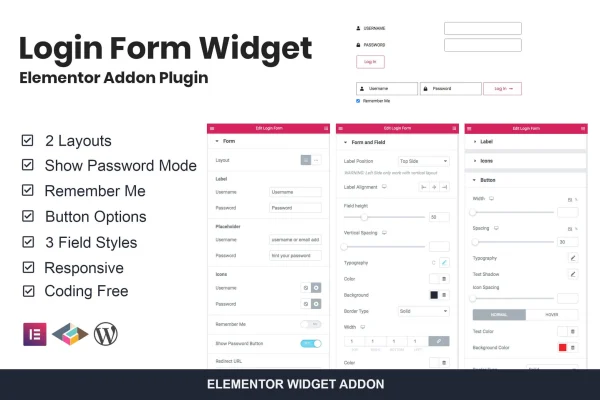
Once the widget is on the page, you pick one of two form layouts and one of three field styles, then adjust the typography to fit your fonts and sizes. You can add a Remember Me checkbox and a Show Password toggle, and set a custom redirect URL so users land on a chosen page after they sign in. The form is responsive, so it adapts to phones, tablets and desktops.
Best for
- Elementor sites that need a branded login page
- Sites with registered users who sign in regularly
- Freelancers building custom login areas for clients
Features
Two form layouts
Choose between two layout styles for the login form so it fits the structure and look of the page where you place it.
Three field styles
Pick from three input field styles to control how the username and password boxes appear and to match them to your site's branding.
Show password toggle
Users can switch password visibility on while typing, which helps them catch typos before they submit the login form.
Remember me checkbox
Add a Remember Me option so returning users can keep their login session and avoid signing in again on every visit.
Custom redirect after login
Set any URL as the destination after a successful login, sending users straight to a dashboard, account page or other chosen page.
Force displaying option
Use the force displaying setting to keep the login form visible where you place it, so it stays accessible on that page.
Typography controls
Adjust font styles and sizes inside the form so its text lines up with the typography used across the rest of your website.
Responsive form design
The login form is built to be mobile friendly, adjusting its layout so it remains usable on small and large screens alike.
Questions about Login Form Widget For Elementor
Do I need Elementor to use this plugin?
Yes. The plugin requires Elementor and works as a widget inside the Elementor editor. You add the login form to a page by placing the widget in your layout, then style it with the widget's settings.
Can I send users to a specific page after they log in?
Yes. The widget includes a customizable redirect URL setting. You can point it at any page, such as an account area or a welcome page, and users go there after a successful login.
How much control do I have over the form's appearance?
You can choose from two form layouts and three field styles, and you get typography controls for font styles and sizes. Together these let you match the login form to your site's colors, fonts and overall design.
Will the login form work on mobile devices?
Yes. The form uses a responsive design, so it adjusts to different screen sizes. Visitors on phones and tablets get a usable login form along with those on desktop computers.
Is Login Form Widget For Elementor free?
The code of Login Form Widget For Elementor is licensed under the GPL, so anyone may use, change and share it. GPL Feast is a paid service: a plan or a single purchase gives you the download and automatic updates. The developer's own support, licence key and online services are not included.
Which version of Login Form Widget For Elementor is this?
Version 1.0.2, released May 2, 2023. New versions appear here when the developer publishes them, and members get them as automatic updates.
How do I update Login Form Widget For Elementor?
Install the free GPL Feast Updater on your site and connect it with your API key. It installs new versions of Login Form Widget For Elementor automatically and keeps a backup, so you can roll back.
What does Login Form Widget For Elementor need?
Login Form Widget For Elementor needs Elementor installed and active.
You might also like






