
Plugin
Updated
Lono - Responsive HTML5 Audio Player With Playlist
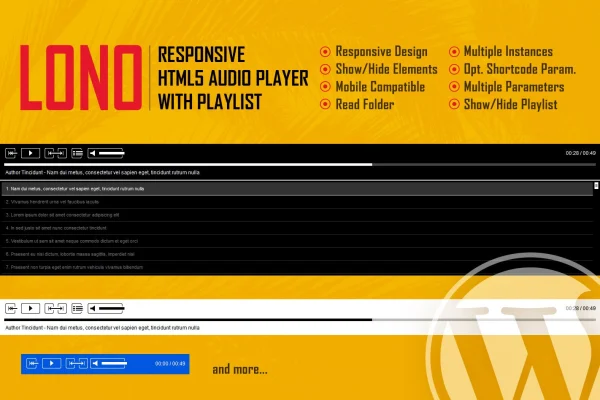
Lono - Responsive HTML5 Audio Player With Playlist is a WordPress plugin that adds an HTML5 audio player to your site. It can run as a full player with a playlist or as a minimal single player, and its colors can be adjusted to match your design.
- Version
- 1.3.2
- Released
- May 2, 2023
- Type
- WordPress plugin
- Licence
- GPL
- Included in
- Every plan, or $3.99 on its own
What’s new in Lono - Responsive HTML5 Audio Player With Playlist 1.3.2
Version 1.3.2 · May 2, 2023
Latest
What it does
Adding audio to a website often means settling for the browser's default player, which looks different everywhere and rarely fits a site's design. This plugin gives you a consistent player built with HTML5, CSS and JavaScript that adapts to desktops, tablets and phones. It suits music portfolios, podcast sites and any project where visitors need to play tracks directly on the page.
You choose between two display modes. The full mode shows a playlist so listeners can move between multiple tracks, while the minimal mode drops the playlist for a compact player. Color settings cover the background, sliders, timers, song titles, playlist fonts and item separators. Black and white control buttons are included, along with PSD files if you want to redesign them, and documentation explains setup and customization.
Best for
- Musicians and bands sharing tracks on their websites
- Podcasters who want an on-page episode player
- Portfolio sites that feature audio work
Features
Responsive player layout
The player adjusts to desktops, tablets and mobile screens, so visitors get a usable audio interface on whatever device they use to browse your site.
Two display modes
Run it as a full audio player with a playlist for multiple tracks, or switch to a minimal player without the playlist for a cleaner, smaller footprint.
Color customization
Change the colors of the player background, volume slider, timers, song titles, playlist fonts and playlist item separators to match your branding without writing code.
Prebuilt control buttons
Play, pause, next and previous buttons come in black and white versions, and PSD files are included so you can edit the control graphics yourself.
Playlist with styled items
Add multiple tracks to a playlist with distinct item separators and fonts, giving listeners an easy way to browse and pick songs or audio files.
Volume and seekbar sliders
Listeners can adjust the volume and jump to any point within a track using slider controls built into the player.
Timer and buffer indicators
A timer shows playback progress in real time, and a buffer indicator lets listeners see how much of the track has loaded.
Questions about Lono - Responsive HTML5 Audio Player With Playlist
Can I use the player without showing a playlist?
Yes. The plugin has two display modes. You can use the full player with a playlist for several tracks, or the minimal mode, which shows only the player without the playlist. This makes it workable for both single tracks and longer collections.
Will it match my site's colors?
You can set colors for the player background, volume slider, timers, song titles, playlist fonts and playlist item separators. These options let you fit the player to your brand without editing code.
Can I change the look of the play and skip buttons?
The plugin ships with black and white versions of the play, pause, next and previous buttons. PSD files are included too, so you can open them in a design tool and create your own versions of the controls.
Does it work on phones and tablets?
Yes. The player uses a responsive design that adapts to desktop, tablet and mobile screens, so listeners can use the controls, playlist and sliders on smaller devices.
Is Lono - Responsive HTML5 Audio Player With Playlist free?
The code of Lono - Responsive HTML5 Audio Player With Playlist is licensed under the GPL, so anyone may use, change and share it. GPL Feast is a paid service: a plan or a single purchase gives you the download and automatic updates. The developer's own support, licence key and online services are not included.
Which version of Lono - Responsive HTML5 Audio Player With Playlist is this?
Version 1.3.2, released May 2, 2023. New versions appear here when the developer publishes them, and members get them as automatic updates.
How do I update Lono - Responsive HTML5 Audio Player With Playlist?
Install the free GPL Feast Updater on your site and connect it with your API key. It installs new versions of Lono - Responsive HTML5 Audio Player With Playlist automatically and keeps a backup, so you can roll back.
You might also like






