
Plugin
Updated
Magic Christmas Card
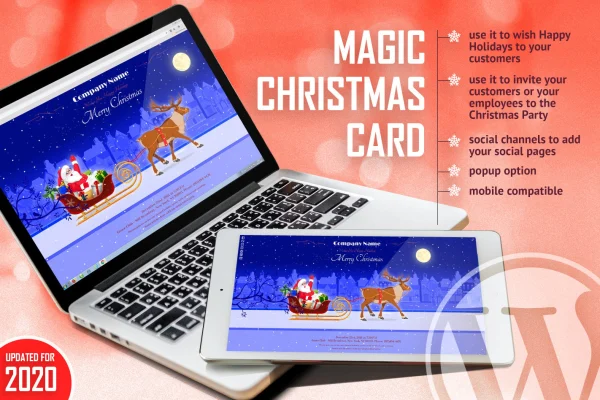
Magic Christmas Card is a WordPress plugin that delivers animated Christmas greetings and holiday party invitations. You can show the card as a popup on your site or paste its link into emails, so visitors, customers and employees all receive a festive message in the same format.
- Version
- 1.1
- Released
- May 2, 2023
- Type
- WordPress plugin
- Licence
- GPL
- Included in
- Every plan, or $3.99 on its own
What’s new in Magic Christmas Card 1.1
Version 1.1 · May 2, 2023
Latest
What it does
Sending a holiday greeting usually means a plain email or a static banner. This plugin replaces that with an animated Christmas card that people open in their browser. It works for warm wishes to readers and customers, and it also works as an invitation to a company Christmas party or a community holiday event. The card is responsive, so it adjusts to desktops, tablets and phones, and it runs on both iOS and Android devices.
There are two ways to share it. You can switch it on as a popup so visitors see the greeting when they arrive, or you can copy the card link into an email to customers or staff. Social media links can sit inside the card so recipients can find your pages. The card's content and look are edited through the included HTML, CSS and JS files, which makes it easy for anyone comfortable with basic web code to match the wording and styling to a brand.
Best for
- Businesses sending holiday greetings to customers
- Companies inviting employees to a Christmas party
- Personal blogs wanting a festive seasonal popup
Features
Animated Christmas card
Presents your holiday greeting as an animated card that visitors open and watch in the browser, adding seasonal character to a site or message.
Holiday party invitations
Use the card as an invitation to a Christmas party or holiday event for customers, employees or your wider community.
Shareable email link
Paste the card or invitation link directly into your emails so recipients can open the animated greeting with a single click.
Website popup option
Turn the card on as a popup so visitors see your festive message as soon as they land on your WordPress site.
Responsive on all screens
The card adapts to different screen sizes, from desktop monitors to smartphones, and works on both iOS and Android devices.
Social media links
Add links to your social media pages inside the card so people can follow and connect with you during the holidays.
Editable HTML, CSS and JS
Change the content and settings through the included HTML, CSS and JS files to fit the card to your own message and branding.
Questions about Magic Christmas Card
Can I send the card by email instead of showing it on my site?
Yes. Along with the popup option, the card or invitation has a link you can paste into any email. Recipients open the link and see the animated greeting, which makes it handy for messages to customers or staff who may not visit your website.
Will the card look right on phones?
The card is responsive and adjusts to different screen sizes, from desktops to smartphones. It is also described as compatible with both iOS and Android devices, so mobile recipients should see the same animated greeting as desktop users.
How do I change the text and design of the card?
Customization is done by editing the included HTML, CSS and JS files. That gives you direct control over the wording, styling and settings, though it does mean some comfort with basic web code helps when tailoring the card to your brand.
Can I use it for an event invitation rather than a greeting?
Yes. Besides holiday wishes, the card can serve as a Christmas party invitation for customers, employees or a community group. You can share it by email link or display it as a popup on your site.
Is Magic Christmas Card free?
The code of Magic Christmas Card is licensed under the GPL, so anyone may use, change and share it. GPL Feast is a paid service: a plan or a single purchase gives you the download and automatic updates. The developer's own support, licence key and online services are not included.
Which version of Magic Christmas Card is this?
Version 1.1, released May 2, 2023. New versions appear here when the developer publishes them, and members get them as automatic updates.
How do I update Magic Christmas Card?
Install the free GPL Feast Updater on your site and connect it with your API key. It installs new versions of Magic Christmas Card automatically and keeps a backup, so you can roll back.
You might also like






