
Plugin
Updated
Meet The Team
Meet The Team for Elementor is a WordPress plugin that adds team member widgets to the Elementor page builder. It gives you preset layouts, carousel styles and social media links so you can present each person's name, role and profiles in a clean, consistent section without writing code.
- Version
- 2.8
- Released
- Jan 25, 2025
- Type
- WordPress plugin
- Requires
- Elementor
- Licence
- GPL
- Included in
- Every plan, or $3.99 on its own
What’s new in Meet The Team 2.7
Version 2.7
Latest
- ImprovedUpdated code
What it does
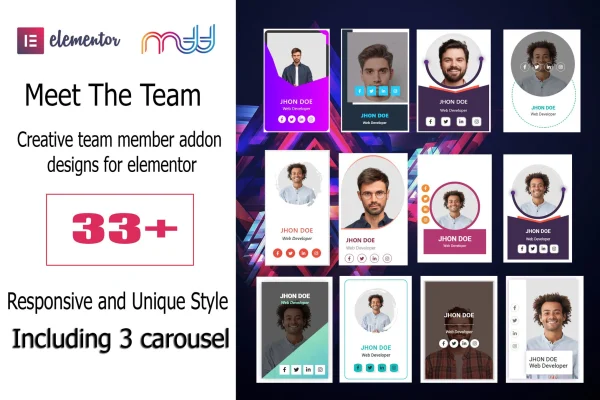
Most business and agency sites need a page that introduces the people behind the work, and building those cards by hand in Elementor takes time. This plugin gives you more than 33 ready-made team member designs to start from, plus 3 carousel styles for when you want members to slide past instead of sitting in a grid. You pick a preset, add each person's details and social links, and adjust the look to match your brand.
Styling controls cover colors, font sizes, font families, social icons and element alignment. Font Awesome is included for the social media icons, and the markup is built on Bootstrap 5 with W3C validated code. Team sections are responsive for different screen sizes, and RTL support helps sites written in right-to-left languages. It requires Elementor and comes with documentation to help with setup and customization.
Best for
- Company websites with an about or team page
- Agencies presenting staff on portfolio sites
- Elementor users building sites in RTL languages
Features
Over 33 preset designs
Start from more than 33 ready-made team member layouts suited to different styles and industries, then adjust them instead of building cards from scratch.
Three carousel styles
Display team members in one of 3 carousel layouts, which works well when you have a larger team and want to save vertical space.
Brand styling controls
Change colors, font sizes, font families, social icons and element alignment so each team section matches the rest of your site's design.
Social media links
Add social profile links to each member card, with Font Awesome included so the common social network icons are ready to use.
RTL language support
Team sections support right-to-left text direction, which suits sites published in languages such as Arabic or Hebrew.
Responsive layouts
Team member sections adapt to different screen sizes so cards stay readable on phones, tablets and desktop screens.
Bootstrap 5 based code
The plugin's markup is built on the Bootstrap 5 framework with W3C validated code and is tested across major browsers.
Meet The Team older versions
- 2.7Nov 22, 2024
Members and buyers of this product can download older versions.
Questions about Meet The Team
Do I need Elementor to use this plugin?
Yes. Meet The Team works as an addon for the Elementor page builder, so Elementor must be active on your site. The team member widgets are then added and edited inside the Elementor editor like any other element.
Can I show my team in a slider instead of a grid?
Yes. Along with the static preset layouts, the plugin includes 3 carousel styles that display team members in a sliding format. This is handy for larger teams or for pages where you want a compact section.
Will the team cards match my site's branding?
You can adjust colors, font sizes, font families, social icons and element alignment on each design. That lets you start from one of the more than 33 presets and tune it to fit your existing fonts and color scheme.
Does it work on sites in right-to-left languages?
Yes. The plugin includes RTL support, so team sections display correctly when your site uses a right-to-left text direction. The layouts are also responsive for different screen sizes.
Is Meet The Team free?
The code of Meet The Team is licensed under the GPL, so anyone may use, change and share it. GPL Feast is a paid service: a plan or a single purchase gives you the download and automatic updates. The developer's own support, licence key and online services are not included.
Which version of Meet The Team is this?
Version 2.8, released Jan 25, 2025. New versions appear here when the developer publishes them, and members get them as automatic updates.
How do I update Meet The Team?
Install the free GPL Feast Updater on your site and connect it with your API key. It installs new versions of Meet The Team automatically and keeps a backup, so you can roll back.
What does Meet The Team need?
Meet The Team needs Elementor installed and active.
You might also like






