
Plugin
Updated
Miresa
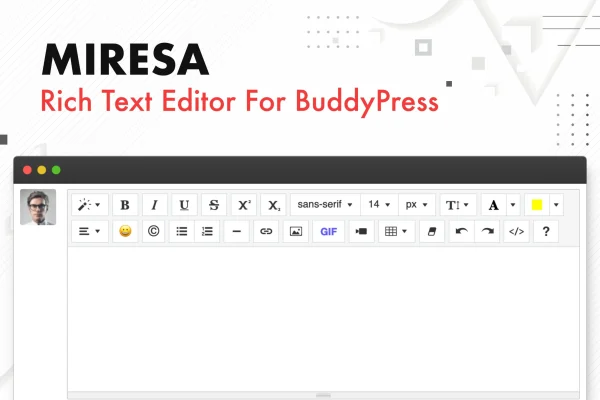
Miresa is a WordPress plugin that swaps the plain text activity box in BuddyPress for a visual rich text editor. Members can format their updates and add images, videos, links, tables, emojis and GIFs without writing any code.
- Version
- 1.1
- Released
- Apr 1, 2026
- Type
- WordPress plugin
- Licence
- GPL
- Included in
- Every plan, or $3.99 on its own
What’s new in Miresa 1.1
Version 1.1 · Apr 1, 2026
Latest
- FixedFixed a bug in the Giphy integration
- ImprovedUpdated Summernote plugin
What it does
Out of the box, BuddyPress activity updates accept only plain text. That keeps posts simple, but it also means members cannot bold a phrase, drop in a picture or share a video in a tidy way. Miresa adds a visual editor to the activity box so members can write formatted posts with rich HTML content, using familiar toolbar buttons instead of code. People who prefer working with markup can switch to a code view and edit the HTML directly.
The editor is built from modules, and each one can be turned on or off in a settings panel. If your community has no use for text colors or line height controls, you can switch them off, and the plugin loads only the scripts for the modules you keep. A built-in GIPHY integration lets members search for animated GIFs and stickers from inside the editor. Miresa suits BuddyPress sites where members post often and want more ways to express themselves in their updates.
Best for
- BuddyPress community sites with active member posting
- Social networks built on WordPress and BuddyPress
- Site managers who want richer member activity updates
Features
Rich text formatting
Members can apply bold, italic, underline, strikethrough, superscript and subscript styles to their BuddyPress activity updates using a visual toolbar.
Images, videos and tables
Add images, videos, links, tables and other HTML elements to activity posts without any coding, so updates can carry more than plain text.
Modular settings panel
Turn individual editor modules such as font styles, line height, text color, background and emojis on or off, so only the needed scripts load.
Built-in GIPHY search
Members can search the GIPHY library from inside the editor and insert animated GIFs and stickers straight into their posts.
Paragraph and font controls
Adjust font choices, text colors, background highlights and paragraph alignment, and add horizontal rules and lists to structure longer updates.
Undo, redo and code view
Undo and redo changes while writing, or toggle a code view to work with the underlying HTML directly.
Emojis and special characters
Insert emojis and special characters into activity updates from the editor, giving members more ways to add tone to their posts.
Responsive editor layout
The editor uses a responsive design, so members can write and format posts on modern devices of different screen sizes.
Questions about Miresa
Does this work with BuddyPress activity updates?
Yes. Miresa is made for BuddyPress and replaces the default plain text activity box with a visual editor, so members can post formatted text, images, videos, links, tables and GIFs in their updates.
Can I turn off editor tools my members do not need?
Yes. The editor is modular, and a settings panel lets you enable or disable modules such as font styles, line height, text color, background and emojis. Disabled modules do not load their scripts.
Do members need to know HTML to use it?
No. Formatting and media are added through a visual toolbar with no coding needed. Members who are comfortable with HTML can switch to the code view and edit the markup directly if they prefer.
How do GIFs get added to posts?
The editor includes a GIPHY integration. Members can search for animated GIFs and stickers from within the editor and insert them into their activity posts without leaving the page.
Is Miresa free?
The code of Miresa is licensed under the GPL, so anyone may use, change and share it. GPL Feast is a paid service: a plan or a single purchase gives you the download and automatic updates. The developer's own support, licence key and online services are not included.
Which version of Miresa is this?
Version 1.1, released Apr 1, 2026. New versions appear here when the developer publishes them, and members get them as automatic updates.
How do I update Miresa?
Install the free GPL Feast Updater on your site and connect it with your API key. It installs new versions of Miresa automatically and keeps a backup, so you can roll back.
You might also like






