
Plugin
Updated
Multimedia Carousel - Classic and Perspective - Visual Composer Addon
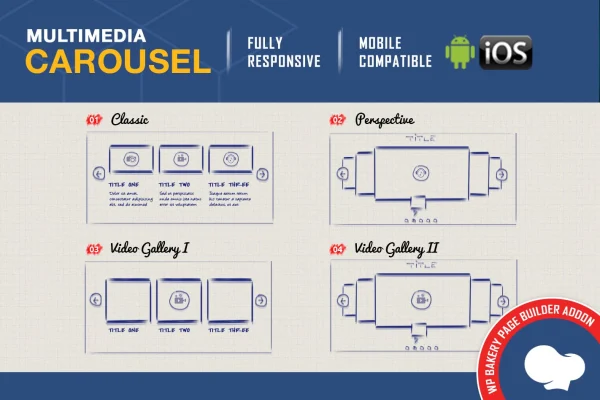
Multimedia Carousel - Classic and Perspective - Visual Composer Addon is a WordPress plugin that extends WPBakery Page Builder with a media carousel element. It lets you place images, YouTube and Vimeo videos, HTML5 video and HTML5 audio in one rotating display, styled in either a Classic or a Perspective look.
- Version
- 2.4
- Released
- Aug 25, 2026
- Type
- WordPress plugin
- Licence
- GPL
- Included in
- Every plan, or $3.99 on its own
What’s new in Multimedia Carousel - Classic and Perspective - Visual Composer Addon 2.4
Version 2.4 · Aug 25, 2026
Latest
What it does
Many sites need a tidy way to present a mix of media on one page. A portfolio might combine photos with a few video clips, and a music or podcast page might want audio tracks next to cover images. Building that by hand in WPBakery Page Builder usually means stacking separate galleries and players. This addon gives you a single carousel element that holds images, YouTube, Vimeo, HTML5 video and HTML5 audio together, so visitors can move through everything in one place.
You choose between two versions. Classic follows a traditional carousel style, while Perspective uses a more modern layered look and adds a circle timer for autoplay that you can adjust in color, size and transparency. Layouts can use fixed dimensions, full width or a fully responsive setup, and the carousel supports touch navigation on phones and tablets. Items can open in a lightbox or link to their own URLs, and you can place several carousels on the same page. Documentation and video tutorials cover setup and customization.
Best for
- WPBakery Page Builder sites that present images and video together
- Photographers, designers and creative portfolio sites
- Music or audio pages mixing tracks with cover images
Features
Classic and Perspective versions
Pick a traditional Classic carousel or the modern Perspective style, depending on which suits your site's design and the kind of content you present.
Mixed media in one carousel
Combine images, YouTube videos, Vimeo videos, HTML5 video and HTML5 audio inside a single carousel instead of using separate galleries and players.
Responsive with touch support
The carousel adapts to different screen sizes, and visitors on phones and tablets can move between items with touch gestures.
Lightbox viewing
Media can open in a pop-up overlay, so visitors view an image or video up close without leaving the page they are on.
Adjustable navigation controls
Show or hide the carousel controllers and the bottom navigation to match the interface you want visitors to see.
Fixed, full-width or responsive layouts
Set the carousel to fixed dimensions, stretch it full width, or use a fully responsive layout that fits the space available on the page.
Separate link for each item
Link every carousel item to its own URL and choose whether it opens in the same tab or a new one.
Circle timer styling
In the Perspective version, customize the autoplay circle timer's colors, size and transparency so it fits your site's style.
Questions about Multimedia Carousel - Classic and Perspective - Visual Composer Addon
Which page builder does this carousel work with?
It is an addon built for WPBakery Page Builder (formerly Visual Composer). It adds a carousel element you place on pages built with that builder, so it suits sites already using WPBakery for their layouts.
Can I put videos and audio in the same carousel as images?
Yes. A single carousel can hold images, YouTube videos, Vimeo videos, HTML5 video and HTML5 audio. This lets you present a mixed collection, such as photos alongside clips or audio tracks, in one rotating display.
What is the difference between the Classic and Perspective versions?
Classic offers a traditional carousel style, while Perspective has a more modern look. Perspective also includes a circle timer for autoplay, and you can change that timer's colors, size and transparency to match your design.
Can I use more than one carousel on a page?
Yes. You can add several carousels to a single page without them conflicting, which is handy if you want one for a video gallery and another for images or audio further down.
Is Multimedia Carousel - Classic and Perspective - Visual Composer Addon free?
The code of Multimedia Carousel - Classic and Perspective - Visual Composer Addon is licensed under the GPL, so anyone may use, change and share it. GPL Feast is a paid service: a plan or a single purchase gives you the download and automatic updates. The developer's own support, licence key and online services are not included.
Which version of Multimedia Carousel - Classic and Perspective - Visual Composer Addon is this?
Version 2.4, released Aug 25, 2026. New versions appear here when the developer publishes them, and members get them as automatic updates.
How do I update Multimedia Carousel - Classic and Perspective - Visual Composer Addon?
Install the free GPL Feast Updater on your site and connect it with your API key. It installs new versions of Multimedia Carousel - Classic and Perspective - Visual Composer Addon automatically and keeps a backup, so you can roll back.
You might also like







Multimedia Carousel - Classic and Perspective - Visual Composer Addonv2.4 · From $14/month or $3.99
See plans