
Plugin
Updated
Nutrition Facts Label Creator for Gutenberg
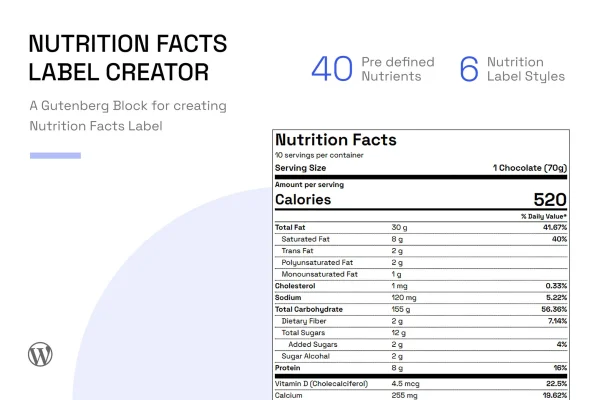
This WordPress plugin adds a block to the Gutenberg editor for building nutrition facts labels inside your posts and pages. It suits food bloggers, nutritionists, recipe websites and online food product stores that want to show clear nutritional information next to their recipes or products.
- Version
- 0.4.0
- Released
- Jun 15, 2025
- Type
- WordPress plugin
- Licence
- GPL
- Included in
- Every plan, or $3.99 on its own
What’s new in Nutrition Facts Label Creator for Gutenberg 0.4.0
Version 0.4.0
Latest
- ImprovedAdded option for rounding off % daily values
- FixedEditor CSS styles not working
- FixedColor picker values not updating in editor preview
- ImprovedUpdated node modules to the latest versions
- ImprovedUpdated Google fonts list to the latest one
- ImprovedTested and ensured compatibility with WordPress 6.8.1
- ImprovedSee block settings > Nutrition Table Styles > Round off % DV
What it does
Anyone who publishes recipes or sells food online eventually gets asked about calories, fats, sugars and vitamins. Building a proper nutrition label by hand in HTML is fiddly, and working out percent daily values for each nutrient is easy to get wrong. Nutrition Facts Label Creator for Gutenberg handles this as a block, so you add a label the same way you add a paragraph or an image, then fill in the values for your recipe or product.
The plugin draws on a predefined list of 40 nutrients, including proteins, vitamins, fats, sugars, zinc, magnesium and calcium, each with a standard daily value. Enter an amount and the percent daily value is calculated for you, with an option in the block settings to round those percentages off. You can add unlimited custom nutrients with drag and drop, pick from 6 label styles including the standard FDA style, and adjust colors and fonts to fit your site.
Best for
- Food bloggers publishing recipes with nutrition details
- Nutritionists sharing meal plans and dietary information
- Online stores selling packaged or homemade food products
Features
Native Gutenberg block
Labels are created as a block in the WordPress editor, so you build and place them directly inside posts and pages alongside your other content.
40 predefined nutrients
A built-in list covers proteins, vitamins, fats, sugars, zinc, magnesium, calcium and more, each paired with a standard daily value.
Automatic percent daily values
The plugin calculates percent daily values from the amounts you enter, following FDA guidelines, and a block setting lets you round those values off.
Unlimited custom nutrients
Add as many extra nutrients as a recipe or product needs, and arrange them in the label using a drag and drop interface.
Six label design styles
Choose from 6 nutrition label styles, including the standard FDA style, to match the look of your site or the format you need.
Color and font options
A color picker and a Google Fonts list let you adjust the label appearance, with changes shown in the editor preview.
Responsive, retina-ready output
Labels adapt to different screen sizes and use retina-ready CSS so they stay sharp on high-resolution displays.
Table-less semantic markup
Labels are built with semantic lists instead of HTML tables, a structure that supports better accessibility for your readers.
Nutrition Facts Label Creator for Gutenberg older versions
- 0.1.0May 30, 20231 new
Members and buyers of this product can download older versions.
Questions about Nutrition Facts Label Creator for Gutenberg
Can I make a label that looks like the standard FDA nutrition panel?
Yes. One of the 6 included label styles is the standard FDA style. Percent daily values are calculated according to FDA guidelines using the standard daily values attached to each predefined nutrient.
What if my recipe includes a nutrient that is not in the built-in list?
The plugin ships with 40 predefined nutrients, and you can add unlimited custom nutrients on top of those. Custom entries are placed with a drag and drop interface, so you can order the label to suit your recipe or product.
Do I have to work out percent daily values myself?
No. Once you enter nutrient amounts, the plugin calculates the percent daily values automatically. In the block settings, under Nutrition Table Styles, there is also a Round off % DV option if you prefer rounded figures.
Does it work with the block editor or a page builder?
It is built as a Gutenberg block, so you add and edit labels directly in the WordPress block editor. Styling options such as colors and fonts are available in the block settings, with changes visible in the editor preview.
Is Nutrition Facts Label Creator for Gutenberg free?
The code of Nutrition Facts Label Creator for Gutenberg is licensed under the GPL, so anyone may use, change and share it. GPL Feast is a paid service: a plan or a single purchase gives you the download and automatic updates. The developer's own support, licence key and online services are not included.
Which version of Nutrition Facts Label Creator for Gutenberg is this?
Version 0.4.0, released Jun 15, 2025. New versions appear here when the developer publishes them, and members get them as automatic updates.
How do I update Nutrition Facts Label Creator for Gutenberg?
Install the free GPL Feast Updater on your site and connect it with your API key. It installs new versions of Nutrition Facts Label Creator for Gutenberg automatically and keeps a backup, so you can roll back.
You might also like






