Plugin
Updated
Ocean Gutenberg Blocks
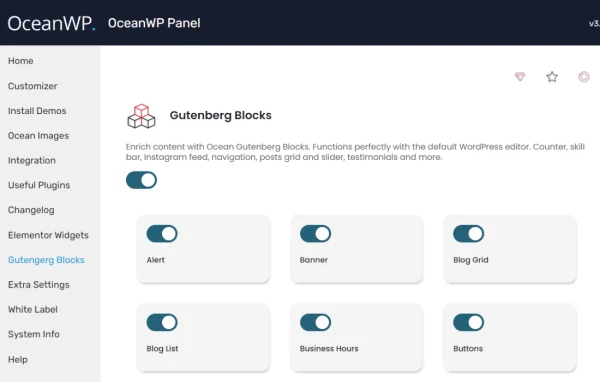
Ocean Gutenberg Blocks by OceanWP is a plugin that extends the default WordPress block editor for sites running the OceanWP theme. It adds a set of custom blocks, lets you place content inside modals using a shortcode, and lets you switch off blocks you never use.
Install this firstPlease install the Ocean EXtra Plugin from here to Activate OceanWP Products
Go to product- Version
- 1.2.3
- Released
- Sep 22, 2026
- Developer
- OceanWP
- Type
- WordPress plugin
- Requires
- OceanWP
- Licence
- GPL
- Included in
- Every plan, or $3.99 a year on its own
What’s new in Ocean Gutenberg Blocks 1.2.3
Version 1.2.3 · Sep 22, 2026
Latest
- ImprovedFrontend Assets: Block-specific scripts and styles now load only when required.
- ImprovedAdmin Assets: Restricted plugin assets to relevant admin and editor screens for better third-party compatibility.
- ImprovedGutenberg Editor: Updated block metadata, asset dependencies, and editor compatibility.
- ImprovedBlock Data: Improved post context handling for editor and REST API data.
- ImprovedPerformance: Optimized dynamic post queries, block parsing, and internal module discovery.
- ImprovedBlock Settings: Strengthened permission checks and request data handling.
- ImprovedBlocks: Newsletter: Improved request validation and secure remote request handling.
- FixedBlocks: Blog Grid: Corrected script dependencies in editor and widget contexts.
What it does
The default Gutenberg editor covers the basics, but OceanWP users often want extra layout options and a way to show content in a pop-up without adding another plugin. Ocean Gutenberg Blocks fills that gap with custom blocks built for the OceanWP theme, so new content follows the same styling as the rest of the site. Its block set includes options such as a blog grid and a newsletter block, which you place in the editor like any other block.
The modal feature works through a shortcode. You build the content you want to show, then drop the shortcode wherever a pop-up or lightbox should appear in your posts or pages. A separate setting lets you disable specific Gutenberg blocks, which trims the block inserter down to the tools you actually use. The plugin requires the OceanWP theme, so it fits best on sites already built with it.
Best for
- Websites already built on the OceanWP theme
- Bloggers who want extra blocks and pop-up content
- Developers building client sites with OceanWP and Gutenberg
Features
Custom Gutenberg blocks
Adds a collection of extra blocks to the editor, including a blog grid and a newsletter block, designed to give more layout options inside OceanWP.
Modal content via shortcode
Place rich content inside a modal window using a shortcode, so you can show pop-ups or lightboxes without installing a separate plugin.
Flexible modal placement
The modal shortcode can be embedded anywhere in your content, giving you freedom to choose exactly where each pop-up is triggered.
Disable unused blocks
Turn off specific Gutenberg blocks you do not need, keeping the block inserter shorter and the editing screen less cluttered.
OceanWP styling consistency
Built to work with the OceanWP theme, so blocks and modal content follow the theme's styling and fit the rest of your design.
Responsive output
Blocks and modal content are designed to respond to different screen sizes, so layouts adapt across desktop, tablet and phone views.
Assets loaded only when needed
Block-specific scripts and styles load only on pages that use them, and admin assets stay limited to the relevant editor screens.
Ocean Gutenberg Blocks older versions
- 1.2.1May 242 new, 2 improvements
- 1.2.0Nov 28, 20255 new, 2 fixes
- 1.1.9Jun 30, 20251 improvement
Members and buyers of this product can download older versions.
Questions about Ocean Gutenberg Blocks
Does this plugin work without the OceanWP theme?
It is built as an extension for OceanWP and requires that theme. The blocks and modal styling are designed around OceanWP, so it is meant for sites that already use it as their active theme.
How do I show content in a pop-up with it?
The plugin lets you insert rich content into a modal through a shortcode. You place the shortcode where you want the modal in your post or page, which lets you create pop-ups or lightboxes without another plugin.
Can I hide Gutenberg blocks I never use?
Yes. Ocean Gutenberg Blocks includes a setting for disabling specific blocks. Removing the ones you do not need keeps the inserter shorter and makes it quicker to find the blocks you work with.
What kind of blocks does it add?
It adds a set of custom blocks aimed at giving more layout flexibility in OceanWP. The block set includes a blog grid block and a newsletter block, alongside other blocks for building pages in the editor.
Is Ocean Gutenberg Blocks free?
The code of Ocean Gutenberg Blocks is licensed under the GPL, so anyone may use, change and share it. GPL Feast is a paid service: a plan or a single purchase gives you the download and automatic updates. The developer's own support, licence key and online services are not included.
Which version of Ocean Gutenberg Blocks is this?
Version 1.2.3, released Sep 22, 2026. New versions appear here when the developer publishes them, and members get them as automatic updates.
How do I update Ocean Gutenberg Blocks?
Install the free GPL Feast Updater on your site and connect it with your API key. It installs new versions of Ocean Gutenberg Blocks automatically and keeps a backup, so you can roll back.
What does Ocean Gutenberg Blocks need?
Ocean Gutenberg Blocks needs OceanWP installed and active.
More from OceanWP