
Plugin
Updated
Pmotion
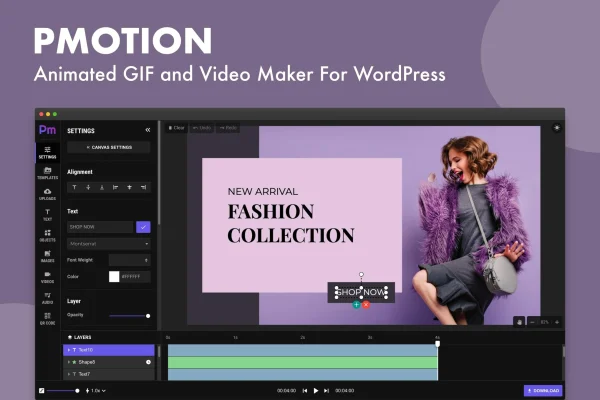
Pmotion is a WordPress plugin for making animated GIFs and videos without leaving your site dashboard. It takes the images and video clips you already have and turns them into animated content, using a drag-and-drop editor, templates and text or sticker overlays.
- Version
- 1.2
- Released
- May 2, 2024
- Type
- WordPress plugin
- Licence
- GPL
- Included in
- Every plan, or $3.99 on its own
What’s new in Pmotion 1.2
Version 1.2 · May 2, 2024
Latest
- FixedFixed Pixabay video issue
What it does
Making a simple animated GIF or short video clip usually means opening separate editing software, exporting a file and uploading it back to WordPress. This plugin moves that work into your dashboard. You can build and manage animations where you already manage your posts and pages, so there is no need for outside tools or advanced design skills. It suits bloggers, marketers and site owners who want moving visuals for promotions, posts or social sharing.
The workflow is built around a drag-and-drop interface. You start from one of the customizable animation templates or from your own images and video files, then add text and sticker overlays for messages, branding or a bit of personality. A real-time preview shows the animation as you work. When you are done, you can export the result as a GIF or as a video, and the output is responsive, so it adapts to desktops, tablets and phones.
Best for
- Bloggers adding animated visuals to posts
- Marketers creating promotional GIFs and short video snippets
- Site owners without access to separate editing software
Features
Drag-and-drop editor
Arrange images, clips and overlays by dragging them into place, so you can build animated GIFs and videos without technical knowledge.
Works inside the dashboard
Create and manage your animations directly within the WordPress admin area instead of switching to separate editing software.
Customizable animation templates
Start a project from a ready-made template, then adjust it to fit your content instead of building every animation from scratch.
Image and video inputs
Use media files you already have, including still images and video clips, as the source material for new animated content.
Text and sticker overlays
Add personalized messages, branding or expressive stickers on top of your visuals using the built-in overlay tools.
Real-time preview
Watch the animation play as you edit, so you can check timing, layout and overlays before you export the final file.
GIF and video export
Save each creation as an animated GIF or as a video file, depending on where you plan to use it on the web or social media.
Responsive output
Animated content is produced to display properly across desktop computers, tablets and mobile devices.
Questions about Pmotion
Can I use my existing photos and videos to make animations?
Yes. The plugin accepts both image and video inputs, so you can take media files you already have and turn them into animated GIFs or videos, then add text or sticker overlays on top.
What file formats can I export my animations in?
You can export your creations as animated GIFs or as videos. That gives you a choice depending on whether the content is going on a web page or being shared on social media.
Do I need design experience to use Pmotion?
No design background is required. The drag-and-drop interface, customizable templates and real-time preview are meant to let you build animations without technical knowledge, and you can see the result as you edit.
Will the animations display properly on phones?
The plugin produces responsive output, so your animated content is meant to look right on desktops, tablets and mobile devices without you creating separate versions for each screen size.
Is Pmotion free?
The code of Pmotion is licensed under the GPL, so anyone may use, change and share it. GPL Feast is a paid service: a plan or a single purchase gives you the download and automatic updates. The developer's own support, licence key and online services are not included.
Which version of Pmotion is this?
Version 1.2, released May 2, 2024. New versions appear here when the developer publishes them, and members get them as automatic updates.
How do I update Pmotion?
Install the free GPL Feast Updater on your site and connect it with your API key. It installs new versions of Pmotion automatically and keeps a backup, so you can roll back.
You might also like






