
Plugin
Updated
Pricing List Widget For Elementor
Pricing List Widget For Elementor is an addon plugin that adds a pricing list widget to the Elementor page builder. It lets you build clear price menus and lists for products, services or subscription tiers, with a choice of layouts and no coding needed.
- Version
- 1.0.1
- Released
- May 2, 2023
- Type
- WordPress plugin
- Requires
- Elementor
- Licence
- GPL
- Included in
- Every plan, or $3.99 on its own
What’s new in Pricing List Widget For Elementor 1.0.1
Version 1.0.1 · May 2, 2023
Latest
What it does
Many sites need a tidy way to list prices, from a salon's service menu to a studio's package options. Building that by hand with columns, text and spacing in Elementor can get fiddly, and keeping it consistent across pages takes effort. This plugin gives you a dedicated widget for the job, so each item sits in a structured list with its name, price and optional visuals lined up in a predictable format.
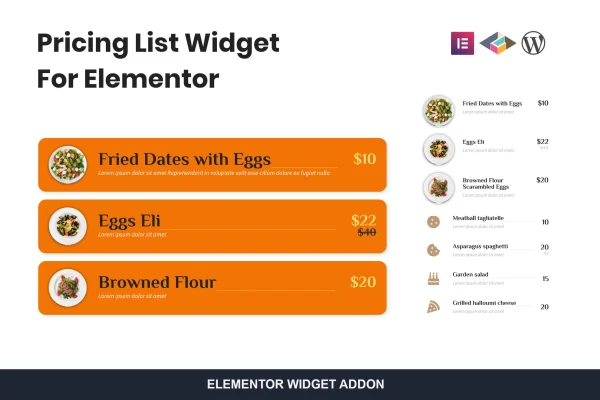
The widget works inside Elementor, so it requires that page builder to be active on your site. You drop it onto a page, pick one of four layouts and fill in your items. Each entry can show a regular price, a discount price, an image or an icon, and the list adapts to desktops, tablets and phones. It suits anyone who wants to edit pricing visually and update it later without touching code.
Best for
- Restaurants, cafes and salons listing menus or services
- Agencies and freelancers presenting service packages
- Elementor users who want structured price lists without code
Features
Four layout options
Choose between four distinct layouts to match the pricing list to the style of your site and the kind of items you are listing.
Regular and discount prices
Show a standard price alongside a discounted one so visitors can see the difference at a glance when you run a special offer.
Image support for items
Add an image to pricing items, which works well for menus, product lists or services that benefit from a visual reference.
Icon box support
Attach icons to list entries when you prefer a lighter visual cue than a full image for each service or product.
Responsive display
Pricing lists adjust to different screen sizes, so they remain readable on desktop monitors, tablets and mobile phones.
No coding required
Set up and customize pricing lists through the Elementor editor, making the widget approachable for users at any skill level.
Built for Elementor
The widget is designed specifically as an Elementor addon, so it fits into the same drag and drop editing workflow you already use.
Questions about Pricing List Widget For Elementor
Do I need Elementor to use this widget?
Yes. This is an addon built specifically for Elementor, so the Elementor page builder needs to be active on your WordPress site. The pricing list then appears as a widget you can place and edit inside the Elementor editor.
Can I show a sale price next to the original price?
Yes. Each item supports both a regular price and a discount price, so you can display the original amount alongside the reduced one. This is handy for highlighting special offers, seasonal deals or limited promotions on your list.
Can I add pictures or icons to each item?
You can. The widget supports images and icon boxes for pricing items, so you can pair each entry with a photo, such as a dish or product, or a simple icon that represents the service.
Will my pricing list look right on phones?
The widget is responsive, so your pricing lists adapt to desktops, tablets and mobile devices. You can choose from its four layouts to find the one that reads best for your content on smaller screens.
Is Pricing List Widget For Elementor free?
The code of Pricing List Widget For Elementor is licensed under the GPL, so anyone may use, change and share it. GPL Feast is a paid service: a plan or a single purchase gives you the download and automatic updates. The developer's own support, licence key and online services are not included.
Which version of Pricing List Widget For Elementor is this?
Version 1.0.1, released May 2, 2023. New versions appear here when the developer publishes them, and members get them as automatic updates.
How do I update Pricing List Widget For Elementor?
Install the free GPL Feast Updater on your site and connect it with your API key. It installs new versions of Pricing List Widget For Elementor automatically and keeps a backup, so you can roll back.
What does Pricing List Widget For Elementor need?
Pricing List Widget For Elementor needs Elementor installed and active.
You might also like






