
Plugin
Updated
Product Specification Table Widget For Elementor
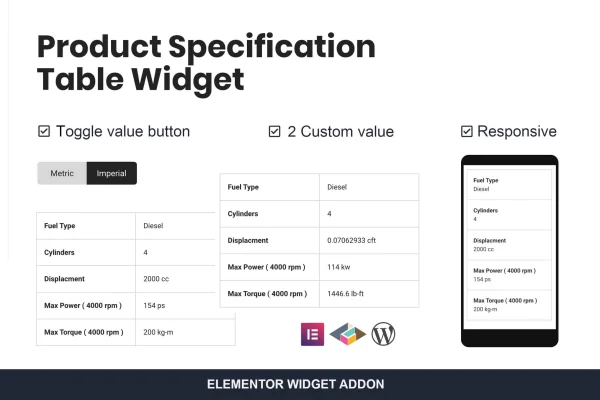
This Elementor addon plugin adds a widget for building two-column product specification tables. You can list product details, measurements or features in a clear format, show several values in one cell and let visitors switch between alternative specs with a toggle.
- Version
- 1.0.0
- Released
- May 2, 2023
- Type
- WordPress plugin
- Requires
- Elementor
- Licence
- GPL
- Included in
- Every plan, or $3.99 on its own
What’s new in Product Specification Table Widget For Elementor 1.0.0
Version 1.0.0 · May 2, 2023
Latest
What it does
Product pages often need to present dimensions, materials, capacities or technical details, and plain text paragraphs make that information hard to scan. This widget gives you a dedicated two-column table inside Elementor, with labels on one side and values on the other. It needs Elementor to run, and you build and customize each table in the editor without writing code, so it fits into the page building workflow you already use.
The second column can hold more than one value, which is handy for showing metric and imperial units together or listing product variations in one table. Toggle switches let visitors flip between alternative values or specifications. On screens narrower than 480px, the table converts into a single-column layout so it stays readable on phones. It suits ecommerce product pages, product catalogs, technical documentation and service comparisons.
Best for
- Ecommerce stores built with Elementor
- Product catalog and manufacturer websites
- Sites publishing technical documentation or service comparisons
Features
Two-column specification tables
Build clean tables with a label column and a value column to present product details, measurements or features in a format that is easy to read.
Mobile single-column layout
On screens narrower than 480px, the two-column table automatically switches to a single-column layout so specs stay legible on small devices.
Multiple values per row
The second column accepts several values, so you can show different measurement systems or product variations side by side in a single row.
Toggle switch for alternatives
Add toggle switches that let visitors switch between alternative values or specifications, such as changing which set of measurements the table displays.
No coding required
Create and style specification tables through the Elementor interface, with settings handled in the editor instead of custom HTML or CSS.
Flexible use cases
Use the tables on product pages, in technical documentation, for service comparisons or anywhere structured data needs a tidy presentation.
Questions about Product Specification Table Widget For Elementor
Do I need Elementor to use this widget?
Yes. The plugin is an addon for Elementor and adds its table widget to the Elementor editor, so Elementor must be active on your site. You then build and customize the tables directly inside the page builder.
Can I show metric and imperial measurements in the same table?
Yes. The second column supports multiple values, so you can place metric and imperial units side by side. You can also use the toggle switch so visitors can flip between alternative values or specifications.
How do the tables look on mobile phones?
The tables are responsive. When the screen is narrower than 480px, the two-column layout converts into a single-column layout, which keeps labels and values readable on phones without sideways scrolling.
Is this only useful for online stores?
No. It works well on ecommerce product pages, and it also fits product catalogs, technical documentation and service comparisons, or any page where structured details need a clear two-column presentation.
Is Product Specification Table Widget For Elementor free?
The code of Product Specification Table Widget For Elementor is licensed under the GPL, so anyone may use, change and share it. GPL Feast is a paid service: a plan or a single purchase gives you the download and automatic updates. The developer's own support, licence key and online services are not included.
Which version of Product Specification Table Widget For Elementor is this?
Version 1.0.0, released May 2, 2023. New versions appear here when the developer publishes them, and members get them as automatic updates.
How do I update Product Specification Table Widget For Elementor?
Install the free GPL Feast Updater on your site and connect it with your API key. It installs new versions of Product Specification Table Widget For Elementor automatically and keeps a backup, so you can roll back.
What does Product Specification Table Widget For Elementor need?
Product Specification Table Widget For Elementor needs Elementor installed and active.
You might also like






