
Plugin
Updated
Productify Pro
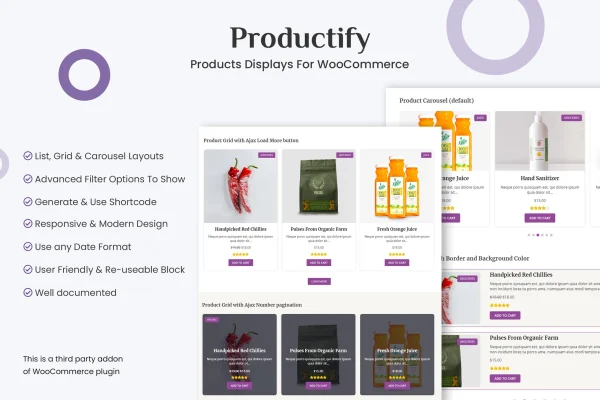
Productify Pro is a WordPress plugin for WooCommerce stores that gives you more ways to present your products. It adds grid, overlay grid, carousel and list layouts, including a continuous ticker carousel, and lets you adjust each display to match the look of your brand.
- Version
- 1.1.3
- Released
- Aug 24, 2026
- Type
- WordPress plugin
- Requires
- WooCommerce
- Licence
- GPL
- Included in
- Every plan, or $3.99 on its own
What’s new in Productify Pro 1.1.3
Version 1.1.3 · Aug 24, 2026
Latest
What it does
The default WooCommerce product listings work, but they give you only a narrow range of presentation choices. This plugin adds a set of display layouts you can place in your store to show products in different ways. You might use a standard grid for a category, an overlay grid for a featured collection, a carousel for new arrivals or a list view for shoppers who prefer to scan details quickly.
The plugin works with WooCommerce, so the displays pull from your existing product data without extra configuration. Layouts are responsive and retina ready, which means they adapt to desktops, tablets and phones and stay sharp on high resolution screens. It suits small boutique shops and larger catalogs alike, anywhere you want more control over how products appear on the page.
Best for
- WooCommerce store owners wanting more product layout choices
- Boutique shops highlighting featured collections or new arrivals
- Agencies building custom product pages for client stores
Features
Grid layout
Show products in a classic grid arrangement, a familiar format that lets shoppers compare several items at a glance on category or landing pages.
Overlay grid layout
Present products in a grid where details sit over the product image, giving featured collections or promotional sections a cleaner, image focused look.
Carousel displays
Place products in a sliding carousel so visitors can browse a set of items without the section taking up much vertical space on the page.
Ticker mode carousel
Run the carousel in ticker mode, which keeps a continuous stream of products moving across the screen for new arrivals or highlighted items.
List layout
Display products in a list view that suits shoppers who want to read product details in rows rather than scan a grid of images.
Customizable display styling
Adjust your product layouts so they fit your brand's visual style, keeping the displays consistent with the rest of your store's design.
Responsive and retina ready
Layouts adapt to desktops, tablets and smartphones, and they are built to look sharp on high resolution retina screens.
Works with WooCommerce data
Product information comes straight from WooCommerce, so displays reflect your existing catalog accurately without any additional configuration.
Productify Pro older versions
- 1.0.0Mar 12, 2024
Members and buyers of this product can download older versions.
Questions about Productify Pro
Does this plugin need WooCommerce?
Yes. Productify Pro is built for WooCommerce and requires it to be active on your site. It reads your existing WooCommerce product data and presents it in the layouts the plugin provides.
What layout types can I use to show products?
You can choose from grid, overlay grid, carousel and list layouts. The carousel also offers a ticker mode that keeps a continuous stream of products moving, which works well for new arrivals or promoted items.
Will the product displays work on phones and tablets?
The layouts are responsive, so they adjust to desktops, tablets and smartphones. They are also retina ready, which keeps product images and display elements looking sharp on high resolution screens.
Can I make the displays match my store's design?
Yes. The layouts are customizable, so you can tailor how product displays look to align with your brand and keep them consistent with the rest of your store's styling.
Is Productify Pro free?
The code of Productify Pro is licensed under the GPL, so anyone may use, change and share it. GPL Feast is a paid service: a plan or a single purchase gives you the download and automatic updates. The developer's own support, licence key and online services are not included.
Which version of Productify Pro is this?
Version 1.1.3, released Aug 24, 2026. New versions appear here when the developer publishes them, and members get them as automatic updates.
How do I update Productify Pro?
Install the free GPL Feast Updater on your site and connect it with your API key. It installs new versions of Productify Pro automatically and keeps a backup, so you can roll back.
What does Productify Pro need?
Productify Pro needs WooCommerce installed and active.
You might also like






