
Plugin
Updated
Progress Master Kit
Progress Master Kit is an addon plugin for Elementor that adds progress indicators to the page builder. It lets you build progress bars, skill meters, counters, countdown timers and animated pie charts, then style them to match your site without writing code.
- Version
- 1.6
- Released
- Aug 24, 2026
- Type
- WordPress plugin
- Requires
- Elementor
- Licence
- GPL
- Included in
- Every plan, or $3.99 on its own
What’s new in Progress Master Kit 1.6
Version 1.6 · Aug 24, 2026
Latest
What it does
Many sites need a clear way to show numbers: how far a project has come, how skilled a team member is in a given area, or how long until a deadline. Building those elements by hand takes custom code and styling work. This addon brings them into Elementor as ready elements you can drop onto a page, so displaying progress, deadlines and stats becomes part of your normal page building routine.
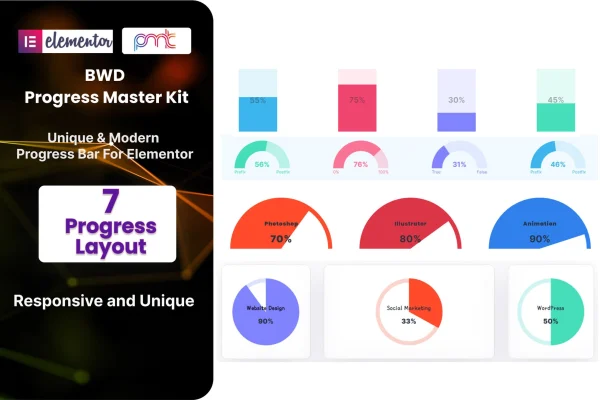
You pick from seven progress layouts, set a static or dynamic counter value, and adjust colors, sizes, styles and animation settings for entrance effects and progress motion. The elements are responsive across desktops, tablets and phones, and graphics are retina ready for high resolution screens. It works inside Elementor, and it ships with .pot files so you can translate the text for multilingual sites. Corporate sites, personal blogs and online stores can all use it.
Best for
- Portfolio and personal sites showing skill levels
- Agency or corporate sites reporting project progress and stats
- Designers building Elementor sites with countdowns or campaign goals
Features
Seven progress layouts
Choose from seven distinct progress layout options so the indicators fit the design style and purpose of each page you build.
Static and dynamic counters
Set counter values as static or dynamic, giving you control over the progress figure each element displays on the page.
Animation controls
Adjust entrance effects and the motion of the progress fill so bars, charts and counters animate the way you want.
Color, size and style options
Change colors, sizes and styles on each element to match the branding and look of your existing site.
Timers and pie charts
Add countdown timers and animated pie charts alongside progress bars and skill meters to present deadlines and statistics.
Responsive, retina ready display
Progress elements adapt to desktops, tablets and mobile devices, and the graphics stay sharp on high resolution screens.
Translation ready
Included .pot files let you translate the plugin text, which helps when you run a multilingual website.
No coding needed
Everything is set up through the Elementor interface, so beginners and experienced designers can build indicators without writing code.
Progress Master Kit older versions
- 1.0Mar 12, 2024
Members and buyers of this product can download older versions.
Questions about Progress Master Kit
Do I need Elementor to use this addon?
Yes. Progress Master Kit is built as an addon for the Elementor page builder, so Elementor must be active on your site. The progress bars, counters, timers and charts appear as elements you add and configure inside the Elementor editor.
What kinds of progress elements can I create?
You can build progress bars, skill meters, counters, countdown timers and animated pie charts. There are seven progress layout options to choose from, and each element can be customized with your own colors, sizes, styles and animation settings.
Can the counter values change, or are they fixed?
Both options are available. You can set a static value that stays as entered, or use the dynamic counter value option when you want the displayed figure to update, giving you control over how progress is shown.
Will the progress bars work on mobile and in other languages?
The elements are responsive and display on desktops, tablets and mobile devices, with retina ready graphics for sharp screens. The plugin includes .pot files, so you can translate its text for a multilingual site.
Is Progress Master Kit free?
The code of Progress Master Kit is licensed under the GPL, so anyone may use, change and share it. GPL Feast is a paid service: a plan or a single purchase gives you the download and automatic updates. The developer's own support, licence key and online services are not included.
Which version of Progress Master Kit is this?
Version 1.6, released Aug 24, 2026. New versions appear here when the developer publishes them, and members get them as automatic updates.
How do I update Progress Master Kit?
Install the free GPL Feast Updater on your site and connect it with your API key. It installs new versions of Progress Master Kit automatically and keeps a backup, so you can roll back.
What does Progress Master Kit need?
Progress Master Kit needs Elementor installed and active.
You might also like






