
Plugin
Updated
Progresser for Elementor
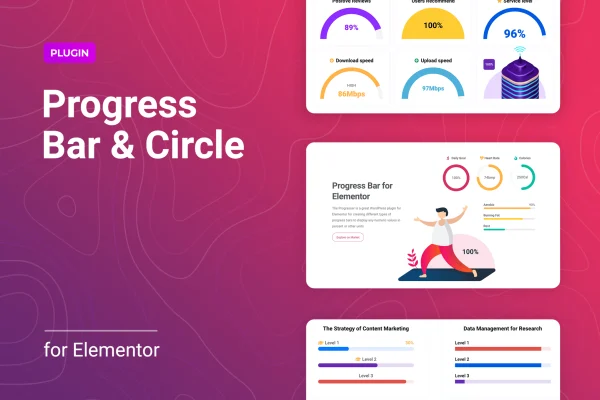
Progresser for Elementor is a WordPress plugin that adds progress bars and progress circles to the Elementor page builder. It gives you three widgets for showing numeric values as line, circular or semicircular indicators, with styling and animation settings you can adjust without writing code.
- Version
- 1.0.6
- Released
- Jan 13, 2026
- Type
- WordPress plugin
- Requires
- Elementor
- Licence
- GPL
- Included in
- Every plan, or $3.99 on its own
What’s new in Progresser for Elementor 1.0.6
Version 1.0.6 · Jan 13, 2026
Latest
- SecurityFixed plugin security issues
What it does
Many sites need a clear way to show a number visually: a skill level on a portfolio, a fundraising goal, a project milestone or the progress of a task. Building those indicators by hand takes custom CSS and JavaScript. This plugin requires Elementor and adds three dedicated widgets for line, circular and semicircular progress bars, so you can drop one into any layout and set its value in percent or in a custom unit of your choosing.
Each widget includes controls for height, width, color and typography, so the indicators can follow your branding. You can position the progress details, add an icon from the built-in library or upload your own SVG, and set how the bar animates through speed, easing and animation type options. The widgets are responsive across screen sizes, and you can place as many progress bars as you need on a page or across a site.
Best for
- Portfolio sites displaying skill levels
- Charity or crowdfunding pages tracking goals
- Agencies building Elementor sites for clients
Features
Three progress widget styles
Separate Elementor widgets for line, circular and semicircular progress bars let you pick the shape that fits each section of your design.
Percent or custom units
Display values as percentages or with a custom unit, which works well for things like hours, items, amounts raised or tasks completed.
Icons and custom SVGs
Add an icon from the built-in library or upload your own SVG file to give each progress indicator a more personal look.
Animation controls
Set the animation speed, easing and animation type to control how each progress bar fills when visitors see it on the page.
Styling settings
Adjust height, width, color and typography from the widget settings so the progress bars match your site's colors and fonts.
Flexible detail positioning
Choose where the progress details appear around the bar or circle, giving you control over how labels and values are laid out.
Responsive layouts
The progress widgets adapt to different devices and screen sizes, so your indicators stay readable on phones, tablets and desktops.
No limit on progress bars
Place as many progress bars as you like on a single page or across a whole site, which suits long pages with many sections.
Questions about Progresser for Elementor
Do I need Elementor to use this plugin?
Yes. The plugin is built for Elementor and adds its progress bars as Elementor widgets, so Elementor must be active on your WordPress site before you can place and edit the line, circular and semicircular indicators.
Can I show values other than percentages?
Yes. Each progress indicator can display its numeric value as a percentage or with a custom unit, so you can represent things like hours worked, items sold, funds raised or steps completed in the format that suits your content.
Can I add my own icons to the progress circles?
You can pick an icon from the built-in icon library or upload your own SVG file. This lets you match the indicators to your brand or add a visual hint about what each bar or circle represents.
Is there a limit to how many progress bars I can add?
No. You can add an unlimited number of progress bars to a page or across your site, which is useful for skill sections, multi-step project pages or dashboards that show many values at once.
Is Progresser for Elementor free?
The code of Progresser for Elementor is licensed under the GPL, so anyone may use, change and share it. GPL Feast is a paid service: a plan or a single purchase gives you the download and automatic updates. The developer's own support, licence key and online services are not included.
Which version of Progresser for Elementor is this?
Version 1.0.6, released Jan 13, 2026. New versions appear here when the developer publishes them, and members get them as automatic updates.
How do I update Progresser for Elementor?
Install the free GPL Feast Updater on your site and connect it with your API key. It installs new versions of Progresser for Elementor automatically and keeps a backup, so you can roll back.
What does Progresser for Elementor need?
Progresser for Elementor needs Elementor installed and active.
You might also like






