
Plugin
Updated
ProVision Image Editor for WordPress / WooCommerce with Folders File Manager
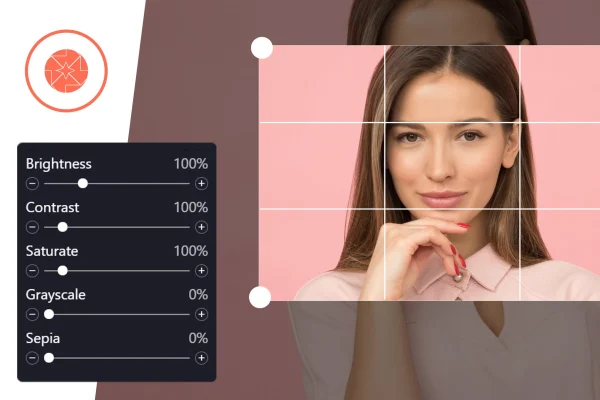
ProVision Image Editor for WordPress / WooCommerce is a plugin that puts an image editor inside your WordPress dashboard. You can crop, resize, adjust colors, add text and apply filters to images, including WooCommerce product photos, without switching to outside software.
- Version
- 1.0.0
- Released
- Mar 12, 2024
- Type
- WordPress plugin
- Requires
- WooCommerce
- Licence
- GPL
- Included in
- Every plan, or $3.99 on its own
What’s new in ProVision Image Editor for WordPress / WooCommerce with Folders File Manager 1.0.0
Version 1.0.0 · Mar 12, 2024
Latest
What it does
Most store owners and bloggers edit images in a separate app, export them, then upload the result to WordPress. Every small fix, like a tighter crop or a color tweak, means repeating that loop. This plugin moves the editing step into the dashboard, so you can open an image, make changes and save it where it already lives. The controls are meant to be approachable for people without design experience, while still covering the common edits a site needs day to day.
The plugin works with WooCommerce, which it requires, so product images can be adjusted right alongside your store setup. One useful touch is face detection for cropping: instead of cutting a thumbnail from the center, it looks for faces and keeps them in frame. Output is retina ready and suited to responsive layouts. Developers who want more control can extend the editor with HTML, CSS and JavaScript to fit a specific project.
Best for
- WooCommerce stores that edit product photos often
- Content sites needing quick crops and text overlays
- Freelancers managing images for client WordPress sites
Features
Editor inside the dashboard
Crop, resize and adjust images directly in WordPress, so routine edits no longer require exporting files to a separate desktop program.
Face detection cropping
When cropping thumbnails, the plugin detects faces and keeps them in frame instead of relying on a plain center crop that can cut people off.
Colors, text and filters
Adjust image colors, place text on images and apply filters to create product shots and graphics that match the look of your site.
WooCommerce product images
Edit WooCommerce product photos from the same dashboard where you manage your store, which keeps catalog image work in one place.
Retina and responsive output
Edited images are prepared with retina support and responsive design compatibility in mind, so they display clearly on different screens.
Beginner friendly controls
The interface uses straightforward controls, so team members without design skills can handle common image edits on their own.
HTML, CSS and JS customization
Advanced users can extend and adjust the editor with HTML, CSS and JavaScript to suit the requirements of a particular project.
Questions about ProVision Image Editor for WordPress / WooCommerce with Folders File Manager
Does this plugin need WooCommerce?
Yes. WooCommerce is listed as a requirement. The editor is built to work with WordPress and WooCommerce together, so you can edit product images and other media from the same dashboard.
What kinds of edits can I make?
You can crop and resize images, adjust colors, add text and apply filters. It also offers face detection when cropping, which keeps faces in the frame for cleaner thumbnails.
How does the face detection work?
When you crop an image, the plugin looks for faces and prioritizes them instead of cropping from the center. This helps avoid thumbnails where heads or faces are cut off awkwardly.
Can a developer customize the editor?
Yes. The editor supports HTML, CSS and JavaScript, so advanced users can extend its functionality or adjust how it behaves to fit a specific site or client project.
Is ProVision Image Editor for WordPress / WooCommerce with Folders File Manager free?
The code of ProVision Image Editor for WordPress / WooCommerce with Folders File Manager is licensed under the GPL, so anyone may use, change and share it. GPL Feast is a paid service: a plan or a single purchase gives you the download and automatic updates. The developer's own support, licence key and online services are not included.
Which version of ProVision Image Editor for WordPress / WooCommerce with Folders File Manager is this?
Version 1.0.0, released Mar 12, 2024. New versions appear here when the developer publishes them, and members get them as automatic updates.
How do I update ProVision Image Editor for WordPress / WooCommerce with Folders File Manager?
Install the free GPL Feast Updater on your site and connect it with your API key. It installs new versions of ProVision Image Editor for WordPress / WooCommerce with Folders File Manager automatically and keeps a backup, so you can roll back.
What does ProVision Image Editor for WordPress / WooCommerce with Folders File Manager need?
ProVision Image Editor for WordPress / WooCommerce with Folders File Manager needs WooCommerce installed and active.
You might also like







ProVision Image Editor for WordPress / WooCommerce with Folders File Managerv1.0.0 · From $14/month or $3.99
See plans