
Plugin
Updated
Pwork - Intranet For WordPress
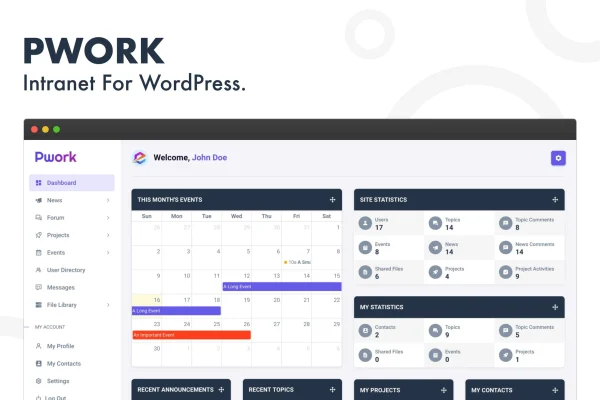
This WordPress plugin by Palleon Team turns your site into a private intranet for your team. It brings an employee dashboard, news feed, discussion forums, project management, file sharing and internal messaging together in one place, with role-based access controlling who sees what.
- Version
- 2.2
- Released
- Apr 16, 2026
- Developer
- Palleon Team
- Type
- WordPress plugin
- Licence
- GPL
- Included in
- Every plan, or $2.39 a year on its own
What’s new in Pwork - Intranet For WordPress 2.2
Version 2.2 · Apr 16, 2026
Latest
- NewSubfolder support added to the file library.
- NewDescription field added to the files.
- NewLock the Site option added (When this feature is enabled, all users & site visitors will be unable to access any pages outside the intranet on the front end. It is recommended to enable this setting only if you are using your WordPress site solely for intranet purposes).
- FixedSearch box issue fixed on folder view page.
- NewPwork dashboard widget added to the WordPress dashboard.
- ImprovedLanguage file (.pot) updated.
- ImprovedFreemius SDK updated.
What it does
Many teams spread their internal work across separate chat apps, file drives, project tools and email threads. This plugin pulls those jobs into a single private area on your WordPress site. Staff log in to a personal dashboard where they find tasks, announcements and updates, then move to the news feed, forums or messages as needed. A knowledge base holds company resources, FAQs and training materials, and a searchable user directory lists profiles and contact details for everyone on the team.
Permissions are handled with role-based access control, so you can limit sensitive content and tailor what each group of users sees. The file library supports subfolders and file descriptions, which helps keep documents organized. An event calendar covers meetings, deadlines and company events. If your WordPress site exists only for internal use, a lock option blocks users and visitors from reaching any front-end pages outside the intranet. The interface is mobile friendly, so people can check in from their phones.
Best for
- Small businesses wanting a private company intranet on WordPress
- Remote or distributed teams sharing files, news and messages
- Agencies building internal portals for client organizations
Features
Personal employee dashboard
Each team member gets a personal workspace showing their tasks, announcements and updates, so they can see what needs attention as soon as they log in.
Social-style news feed
Share company news, updates and announcements in a feed that looks and works like a social media timeline, keeping everyone on the team informed.
Projects and task tracking
Create projects, assign tasks to team members and track progress so deadlines and workloads stay visible to the people involved.
File library with subfolders
Upload, organize and share files within the team, arrange them into subfolders and add a description to each file for context.
Direct and group messaging
Team members can hold direct one-to-one conversations or group chats inside the intranet, which cuts down on internal email.
Role-based access control
Set user permissions by role to protect sensitive information and decide which content each group of team members can see.
Knowledge base and directory
Store company resources, FAQs and training materials in a knowledge base, alongside a searchable directory of employee profiles and contact information.
Site lock for intranet-only use
Turn on the lock option to stop users and visitors from reaching any front-end pages outside the intranet when the site is purely internal.
Pwork - Intranet For WordPress older versions
- 2.1Apr 104 new, 1 improvement, 1 removal
Members and buyers of this product can download older versions.
Questions about Pwork - Intranet For WordPress
Can I keep the rest of my WordPress site public while running the intranet?
Yes. The intranet is private by design, and the site lock option is a separate setting. You only enable the lock when the site is used solely for intranet purposes, since it blocks access to all front-end pages outside the intranet.
Can I control which employees see certain content?
Yes. Role-based access control lets you customize permissions by role, so sensitive information stays protected and each team member sees the content that matches their role.
How does file sharing work in the intranet?
Team members can upload, organize and share files in a file library. You can create subfolders to structure documents and add a description field to each file to explain what it contains.
Does it work on phones and tablets?
The plugin has a mobile friendly interface that is responsive on different devices, so team members can read the news feed, check messages and view files while away from their desks.
Is Pwork - Intranet For WordPress free?
The code of Pwork - Intranet For WordPress is licensed under the GPL, so anyone may use, change and share it. GPL Feast is a paid service: a plan or a single purchase gives you the download and automatic updates. The developer's own support, licence key and online services are not included.
Which version of Pwork - Intranet For WordPress is this?
Version 2.2, released Apr 16, 2026. New versions appear here when the developer publishes them, and members get them as automatic updates.
How do I update Pwork - Intranet For WordPress?
Install the free GPL Feast Updater on your site and connect it with your API key. It installs new versions of Pwork - Intranet For WordPress automatically and keeps a backup, so you can roll back.
You might also like






