
Plugin
Updated
Questionar for Elementor
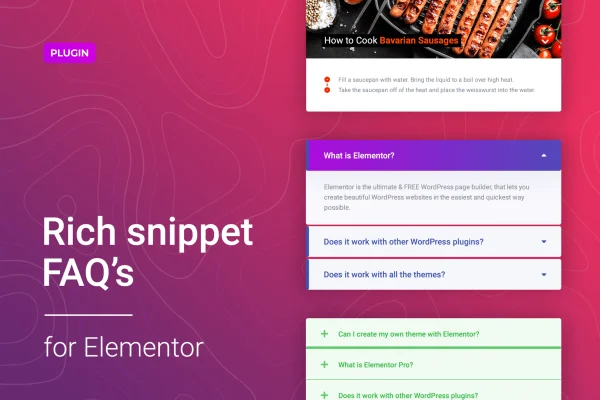
This WordPress plugin adds a dedicated FAQ accordion widget to Elementor. You can arrange common questions and answers into collapsible panels without writing code. It also generates FAQ schema markup automatically, and it ships with ready-made templates so you can build a tidy FAQ section quickly.
- Version
- 1.1.8
- Released
- Feb 24, 2026
- Type
- WordPress plugin
- Requires
- Elementor
- Licence
- GPL
- Included in
- Every plan, or $3.99 on its own
What’s new in Questionar for Elementor 1.1.8
Version 1.1.8 · Feb 24, 2026
Latest
- SecurityFixed plugin security issues.
What it does
Long FAQ pages tend to turn into walls of text that visitors scroll past. This plugin solves that by putting each question in a panel that expands to show its answer and collapses again when the reader is done. Visitors can open questions one at a time or in groups, which keeps support pages and product pages organized and easy to scan. Everything is built inside Elementor's drag and drop editor, so you add and manage your FAQs where you already design your pages.
Questionar for Elementor requires Elementor and works as a regular widget on any page you build with it. You can start from one of five pre-built FAQ templates, then adjust colors, fonts, icons and layouts to match your brand. The plugin adds schema markup to your FAQs automatically, so search engines can read them as structured question and answer content. For developers, CSS, SASS and JS files are included, which gives you room for deeper customization within your own workflow.
Best for
- Elementor sites that need a clean FAQ section
- Online shops adding questions to product pages
- Designers building customer support pages for clients
Features
Native Elementor widget
Add and edit FAQ accordions inside Elementor's drag and drop interface, so building a questions section needs no custom code.
Automatic FAQ schema markup
The plugin generates schema markup for your questions and answers, giving search engines structured data that can be used for rich results.
Five pre-built templates
Pick one of five ready-made FAQ designs as a starting point, then customize it to fit the look of your site.
Styling controls
Change colors, fonts, icons and layouts from the widget settings to match the accordion to your brand and page design.
Flexible expand and collapse
Visitors can open or close questions individually or in groups, which keeps longer FAQ lists organized and easy to move through.
Responsive and retina ready
The accordions adapt to desktops, tablets and smartphones, and display sharply on high resolution screens.
Developer source files
CSS, SASS and JS files are included for developers who want to customize the accordions further or fit them into a build process.
Questions about Questionar for Elementor
Do I need Elementor to use this plugin?
Yes. The plugin works as an Elementor widget, so Elementor must be active on your site. You place the FAQ accordion on a page using Elementor's editor and configure it there like any other widget.
Does it add FAQ schema to my pages?
It does. The plugin generates schema markup for your FAQ content automatically, so you do not need a separate tool or manual code to mark up your questions and answers as structured data for search engines.
Can I make the accordion match my site's design?
Yes. You can start from one of the five included templates and then adjust colors, fonts, icons and layouts. Developers can go further using the included CSS, SASS and JS files.
Can visitors open more than one question at a time?
The accordion lets users expand or collapse questions individually or in groups. That helps on longer FAQ lists where readers may want to compare a few answers side by side.
Is Questionar for Elementor free?
The code of Questionar for Elementor is licensed under the GPL, so anyone may use, change and share it. GPL Feast is a paid service: a plan or a single purchase gives you the download and automatic updates. The developer's own support, licence key and online services are not included.
Which version of Questionar for Elementor is this?
Version 1.1.8, released Feb 24, 2026. New versions appear here when the developer publishes them, and members get them as automatic updates.
How do I update Questionar for Elementor?
Install the free GPL Feast Updater on your site and connect it with your API key. It installs new versions of Questionar for Elementor automatically and keeps a backup, so you can roll back.
What does Questionar for Elementor need?
Questionar for Elementor needs Elementor installed and active.
You might also like






