
Plugin
Updated
QuoteMate
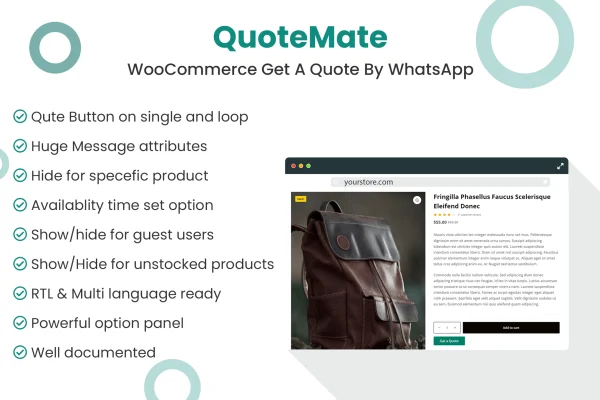
QuoteMate is a WordPress plugin for WooCommerce stores that lets customers request product quotes through WhatsApp. It adds a Get A Quote button to your product pages and catalog, opens a popup form, and sends the inquiry with product details straight to a WhatsApp chat.
- Version
- 1.0.4
- Released
- Mar 23, 2025
- Type
- WordPress plugin
- Requires
- WooCommerce
- Licence
- GPL
- Included in
- Every plan, or $3.99 on its own
What’s new in QuoteMate 1.0.4
Version 1.0.4 · Mar 23, 2025
Latest
- FixedThe issue where spaces and line breaks were not respected in WhatsApp messages.
- FixedThe issue where product buttons loaded after the "Load More" button did not trigger the popup form.
What it does
Some products don't fit a simple add to cart flow. Custom orders, bulk purchases and high-value items often need a conversation about price or specifications before anyone buys. This plugin gives shoppers a direct way to start that conversation on WhatsApp, a messaging app many of them already use every day, so you can answer questions and agree on a price in a personal chat.
Once it's set up, a Get A Quote button appears on single product pages and in product loops such as category and shop pages. Clicking it opens a popup form on the same page. The resulting WhatsApp message pulls in product attributes like size, color and SKU, and you can edit the default message template in the settings. It requires WooCommerce and needs no custom coding.
Best for
- WooCommerce stores selling customizable or made-to-order products
- Shops handling bulk or wholesale inquiries
- Sellers of high-value items that need price discussion
Features
Quote button in product loops
Display the Get A Quote button on catalog and category pages so shoppers can ask about a product without opening its page first.
Quote button on product pages
Add the button to single product pages, giving customers a clear option to ask about pricing while they review the product details.
Product details in messages
WhatsApp messages automatically include relevant product attributes such as size, color and SKU, so you know exactly which item the customer is asking about.
Editable message templates
Change the default WhatsApp message content from the plugin settings to match your store's tone and add any extra information you want included.
Visibility by user type
Choose whether the quote button appears for logged-in customers only, for guests only, or for both groups of visitors.
Popup quote form
Customer inquiries are collected in a popup window, so shoppers stay on the product page instead of being sent somewhere else.
Responsive, retina ready design
The quote button and popup are built to display clearly on different devices and screen sizes, including high-resolution displays.
QuoteMate older versions
- 1.0.0Mar 12, 2024
Members and buyers of this product can download older versions.
Questions about QuoteMate
Does this plugin work without WooCommerce?
No. QuoteMate is built for WooCommerce and requires it to run. The quote button and popup form attach to WooCommerce product pages and product loops, so you need an active WooCommerce store to use it.
What information is included in the WhatsApp message?
The message automatically includes relevant product attributes such as size, color and SKU, along with the customer's inquiry from the popup form. You can also edit the default message template in the settings to change the wording or add details.
Can I show the quote button only to registered customers?
Yes. The visibility settings let you show the Get A Quote button to logged-in customers only, to guests only, or to both, so you can control who is able to send quote requests.
Will the button work on shop pages that load more products?
The plugin places the quote button in product loops as well as on single product pages, and buttons on products added through a Load More button are set to open the popup form too.
Is QuoteMate free?
The code of QuoteMate is licensed under the GPL, so anyone may use, change and share it. GPL Feast is a paid service: a plan or a single purchase gives you the download and automatic updates. The developer's own support, licence key and online services are not included.
Which version of QuoteMate is this?
Version 1.0.4, released Mar 23, 2025. New versions appear here when the developer publishes them, and members get them as automatic updates.
How do I update QuoteMate?
Install the free GPL Feast Updater on your site and connect it with your API key. It installs new versions of QuoteMate automatically and keeps a backup, so you can roll back.
What does QuoteMate need?
QuoteMate needs WooCommerce installed and active.
You might also like






