
Plugin
Updated
Real Physical Media
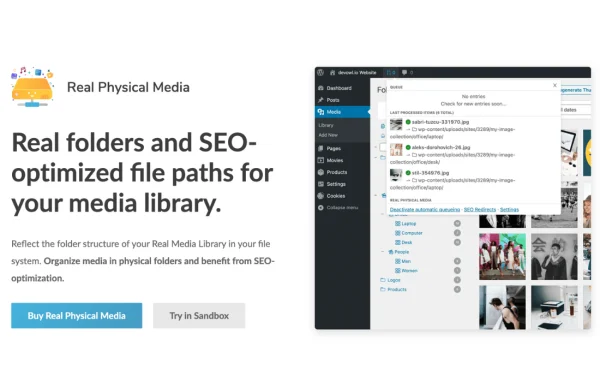
Real Physical Media by devowl is a WordPress plugin that organizes your media library into real, physical folders on your server. It replaces the default date-based upload structure with folders you choose, so images, videos, audio files and documents are easier to find, maintain and back up.
- Version
- 1.6.7
- Released
- Sep 29, 2026
- Developer
- devowl
- Type
- WordPress plugin
- Requires
- Media File Renamer
- Licence
- GPL
- Included in
- Every plan, or $3.19 on its own
What’s new in Real Physical Media 1.6.7
Version 1.6.7 · Sep 29, 2026
Latest
- SecurityNote: This package (@devowl-wp/real-physical-media) has been updated because a dependency, which is also shipped with this package, has changed.
- FixedDependency updates @devowl-wp/real-product-manager-wp-client 1.22.4
- FixedBug Fixes - allow Multisite license save when another site is already licensed (CU-869emd756)
- FixedBug Fixes - handle featureFlags as objects or arrays in License and LicenseActivation classes (CU-869envwq6)
- FixedDependency updates @devowl-wp/utils 1.20.37
- FixedBug Fixes - skip the language-pack and source-map offload when nothing was built (CU-869etm54z)
- ImprovedPerformance Improvements - optimize pagespeed by externalizing localized payload delivery (experimental opt-in, CU-869em5f1b)
What it does
By default, WordPress stores uploads in folders named after the year and month they were added. That works for a small site, but it gets messy as a library grows, and finding a specific file on the server or in a backup can take a while. This plugin moves your media into meaningful directories that exist on the server itself, so the folder structure you see reflects where files actually live.
Uploads can be sorted automatically into folders based on criteria you set, which keeps new files in order without manual work. The controls are simple enough that you can arrange and manage media without writing code. Because files sit in real folders, the resulting media URLs are cleaner and more descriptive, and backing up or migrating your media is more straightforward. It suits bloggers, photographers and site owners who handle a lot of files.
Best for
- Photographers managing large image libraries
- Bloggers with years of accumulated uploads
- Site owners who want orderly, backup-friendly media folders
Features
Real physical folders
Media files are arranged in actual folders on your server instead of the default date-based structure, which makes everyday management and backups easier to handle.
Automatic file sorting
New uploads are placed into specified folders based on criteria you choose, so your library stays organized without sorting each file by hand.
Clean media URLs
Files stored in named folders get clean, descriptive URLs that reflect your folder structure rather than upload dates.
No coding required
Simple controls in the WordPress admin let you organize, locate and edit media files without touching code or server settings.
Support for many media types
The plugin handles images, videos, audio files and documents, so all the content types in your library can follow the same folder system.
Backup-friendly structure
Since media lives in clear physical folders, backing up and migrating your files to another server is simpler to plan and carry out.
Real Physical Media older versions
- 1.6.0Aug 185 new, 8 improvements
- 1.5.142May 281 improvement, 2 fixes
- 1.5.139May 75 new, 8 improvements, 4 fixes
- 1.5.136Mar 26
- 1.5.125Dec 2, 2025
- 1.5.112Jul 10, 2025
- 1.5.109Jun 11, 2025
- 1.5.106May 6, 2025
- 1.5.103Apr 15, 2025
- 1.5.94Feb 6, 2025
Members and buyers of this product can download older versions.
55 older versions in all. If you need one that is not listed, ask support.
Questions about Real Physical Media
How is this different from the normal WordPress media folders?
WordPress normally saves uploads into year and month folders. This plugin stores your files in real folders on the server that you define, so the structure is based on meaning instead of upload date, and files are easier to find.
Can it sort my uploads automatically?
Yes. You can set criteria so that uploaded media is placed into specified folders automatically. This saves you from moving each file by hand and keeps a growing library organized over time.
Which file types does it work with?
It handles images, videos, audio and documents. Any of these media types can be organized into physical folders, so your whole library can follow one consistent structure.
Will it help with backups and site migrations?
Because files are kept in clearly named physical folders on your server, it is easier to see what you are backing up and to move media files when migrating a site.
Is Real Physical Media free?
The code of Real Physical Media is licensed under the GPL, so anyone may use, change and share it. GPL Feast is a paid service: a plan or a single purchase gives you the download and automatic updates. The developer's own support, licence key and online services are not included.
Which version of Real Physical Media is this?
Version 1.6.7, released Sep 29, 2026. New versions appear here when the developer publishes them, and members get them as automatic updates.
How do I update Real Physical Media?
Install the free GPL Feast Updater on your site and connect it with your API key. It installs new versions of Real Physical Media automatically and keeps a backup, so you can roll back.
What does Real Physical Media need?
Real Physical Media needs Media File Renamer installed and active.
You might also like






