
Plugin
Updated
Responsive Posts Carousel Pro
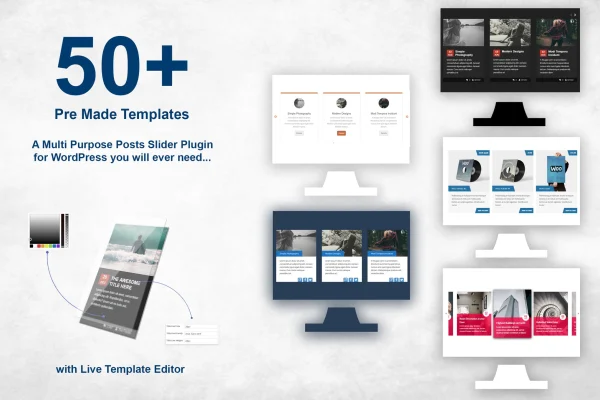
Responsive Posts Carousel Pro is a WordPress plugin that displays your content in touch-enabled, responsive carousels and sliders. It works with blog posts, gallery images, WooCommerce products and custom post types, and it includes more than 50 ready-made templates you can adjust in a live editor.
- Version
- 15.5
- Released
- Jun 26, 2026
- Type
- WordPress plugin
- Requires
- WooCommerce
- Licence
- GPL
- Included in
- Every plan, or $3.99 on its own
What’s new in Responsive Posts Carousel Pro 15.5
Version 15.5 · Jun 26, 2026
Latest
- NewModern Gutenberg block to embed carousels with a live preview.
- NewBlock options to override sorting (Order By), order direction and number of posts.
- NewVideo Carousel Support (YouTube, Vimeo and self-hosted MP4/WebM/Ogg).
- NewLightweight click-to-play (lazy loaded) video facade for better performance.
- NewWooCommerce Sale Badge with discount percentage on product templates.
- NewWooCommerce Star Ratings display on product carousel slides.
- NewWooCommerce Stock Status indicator (In Stock / Out of Stock / On Backorder).
- NewWooCommerce AJAX Add to Cart button with loading and success states.
What it does
Many sites have more good content than fits above the fold. A carousel lets you place featured articles, recent posts or products in a compact sliding area that visitors can swipe or scroll through. This plugin handles that job for posts, images, WooCommerce products and any custom post type. Layouts adapt to screen size, and you can set the number of columns separately for desktops, tablets and phones so the slider stays readable everywhere.
You start from one of more than 50 templates and adjust it in the Live Template Editor, which shows your changes as you make them. Slider types include multi-row, vertical and horizontal layouts, with equal height mode, custom image sizing, continuous scrolling and an AJAX lightbox. A Gutenberg block lets you embed carousels with a live preview and override sorting and post count. Store owners also get product details such as star ratings, stock status, sale badges and an AJAX add to cart button.
Best for
- Blogs highlighting featured, popular or recent posts
- WooCommerce stores displaying products in sliders
- Multilingual or RTL sites and WordPress Multisite networks
Features
More than 50 templates
Pick from over 50 ready-to-use carousel designs and customize them to match your site's style and layout without writing code.
Live template editor
See your carousel's appearance update as you edit it, so you can adjust the design with confidence instead of guessing.
Multiple slider layouts
Build multi-row, vertical or horizontal carousels, and turn on continuous scrolling for endless movement through your featured items.
Per-device column control
Set how many carousel columns appear on desktops, tablets and mobiles independently, so each screen size gets a layout that fits.
Video carousel support
Add YouTube, Vimeo or self-hosted MP4, WebM and Ogg videos to carousels, using a lazy loaded click-to-play facade.
WooCommerce product details
Product slides can show sale badges, star ratings, stock status and an AJAX add to cart button with loading and success states.
Gutenberg block
Embed carousels with a block that shows a live preview and lets you override order by, order direction and number of posts.
Sharing, lightbox and language support
Visitors can share items from the slider or open them in an AJAX lightbox. The plugin is translation ready, supports RTL and works on Multisite.
Responsive Posts Carousel Pro older versions
- 15.3Feb 241 fix
Members and buyers of this product can download older versions.
Questions about Responsive Posts Carousel Pro
Can I use it for WooCommerce products as well as blog posts?
Yes. The plugin works with blog posts, gallery images, custom post types and WooCommerce products. Product slides can display sale badges, star ratings, stock status (In Stock, Out of Stock or On Backorder) and an AJAX add to cart button.
Do I need coding skills to design a carousel?
No. You can start from one of more than 50 templates and adjust it in the Live Template Editor, which shows changes in real time. Options like equal height mode, image sizing and column counts are set through settings.
Will the carousel look right on phones and tablets?
The carousels are responsive and touch-enabled. You can also choose the number of columns separately for desktops, tablets and mobiles, so each device shows a layout suited to its screen.
Can I add carousels with the block editor?
Yes. A Gutenberg block lets you embed a carousel with a live preview. From the block you can override the sorting field, the order direction and the number of posts shown.
Is Responsive Posts Carousel Pro free?
The code of Responsive Posts Carousel Pro is licensed under the GPL, so anyone may use, change and share it. GPL Feast is a paid service: a plan or a single purchase gives you the download and automatic updates. The developer's own support, licence key and online services are not included.
Which version of Responsive Posts Carousel Pro is this?
Version 15.5, released Jun 26, 2026. New versions appear here when the developer publishes them, and members get them as automatic updates.
How do I update Responsive Posts Carousel Pro?
Install the free GPL Feast Updater on your site and connect it with your API key. It installs new versions of Responsive Posts Carousel Pro automatically and keeps a backup, so you can roll back.
What does Responsive Posts Carousel Pro need?
Responsive Posts Carousel Pro needs WooCommerce installed and active.
You might also like






