
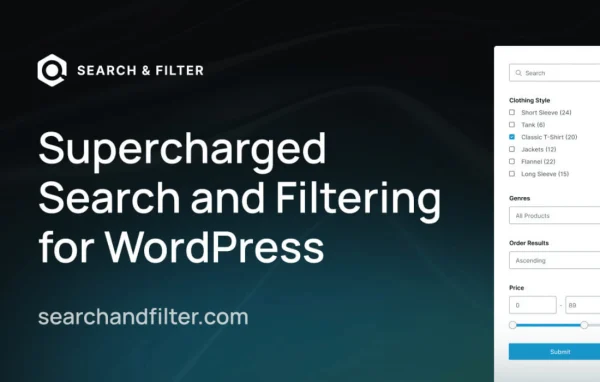
Plugin
Updated
Search & Filter Pro
Search & Filter Pro by Code Amp is a WordPress plugin for building custom search and filter forms. It works with the data you already have, including posts, categories, taxonomies, post meta and custom fields, so visitors can narrow down content or products without digging through pages.
- Version
- 3.2.3
- Released
- Mar 4, 2026
- Developer
- Code Amp
- Type
- WordPress plugin
- Licence
- GPL
- Included in
- Every plan, or $3.99 a year on its own
What’s new in Search & Filter Pro 3.2.3
Version 3.2.3
Latest
- NewDivi Integration added to the integrations screen.
- ImprovedDisable indexer syncing on frontend updates by default.
- ImprovedFaster indexing and more reliable error handling.
- FixedAn issue with tables not upgrading in some circumstances.
- FixedAdd polyfills for mb_.. functions to support the new search indexer.
- FixedA php error with range fields and number_format() in certain environments.
- FixedMissing css class & width options for fields.
- FixedAn issue where post meta conditions were not saving properly.
What it does
Default WordPress search gives visitors a single text box, which falls short once a site has many posts, products or custom fields. This plugin lets you create filter forms that match how your content is organized. You can filter by categories, taxonomies, post meta and custom fields, and results update in real time as visitors change their choices. Filter options that would return no results can be hidden automatically, so people avoid dead ends while they browse.
Forms are set up through a visual query builder, so you can shape what each search returns without writing code. An indexing system sits behind the searches to handle more complex queries. The plugin works with WooCommerce, WP eCommerce and Easy Digital Downloads for product filtering, and with Elementor, Divi, Beaver Builder, Advanced Custom Fields and WPML. It suits stores, blogs, portfolios and other sites where people need to sort through a lot of content.
Best for
- WooCommerce and Easy Digital Downloads stores with large catalogs
- Blogs and content sites with many categories and tags
- Sites built on custom fields using Advanced Custom Fields
Features
Filters from existing data
Build filters from your posts, categories, taxonomies, post meta and custom fields without setting up any extra data structures first.
Visual query builder
Adjust what each search returns using an interface instead of code, which makes detailed filtering rules practical for site owners without development experience.
Real-time results
Results refresh as visitors pick filter options, giving them immediate feedback and cutting down on extra clicks while they narrow their search.
Hides empty options
Filter choices that would return no results can be hidden automatically, so visitors only see options that lead somewhere useful.
Ecommerce product filtering
Works with WooCommerce, WP eCommerce and Easy Digital Downloads, so shoppers can filter products by the attributes and categories your store uses.
Page builder and plugin integrations
Connects with Elementor, Divi, Beaver Builder, Advanced Custom Fields and WPML, letting you place filters inside the tools and setups you already run.
Search indexing system
An indexer stores your searchable data ahead of time, which helps the plugin process complex queries across larger collections of content.
Field styling options
Design settings, including CSS classes and width options for fields, let you adjust how filters look so they fit your site's design.
Search & Filter Pro older versions
- 3.2.2Jan 261 fix
- 3.2.1Jan 232 fixes
- 3.2.0Jan 2315 new, 5 improvements, 20 fixes
- 3.1.8Aug 23, 2025
- 3.1.7Feb 19, 2025
- 3.1.4Feb 4, 2025
- 3.1.3Jan 18, 2025
- 3.1.0Dec 19, 2024
- 3.0.6Nov 22, 2024
- 3.0.5Nov 13, 2024
Members and buyers of this product can download older versions.
20 older versions in all. If you need one that is not listed, ask support.
Questions about Search & Filter Pro
Can I filter by custom fields and taxonomies?
Yes. Filters can be built from posts, categories, taxonomies, post meta and custom fields. It also integrates with Advanced Custom Fields, so fields you have created there can be used in your search and filter forms.
Will it work with my WooCommerce store?
It is compatible with WooCommerce, as well as WP eCommerce and Easy Digital Downloads. That lets shoppers filter products by categories, attributes and other product data instead of scrolling through the whole catalog.
Do I need to know how to code to set up filters?
No. Forms and queries are configured through a visual query builder, so you can decide what each search returns without writing code. Developers can still use CSS classes and field options for finer styling control.
Does it work with my page builder?
It integrates with Elementor, Divi and Beaver Builder, so you can add search and filter forms to layouts built with those tools. It also works with WPML for multilingual sites.
Is Search & Filter Pro free?
The code of Search & Filter Pro is licensed under the GPL, so anyone may use, change and share it. GPL Feast is a paid service: a plan or a single purchase gives you the download and automatic updates. The developer's own support, licence key and online services are not included.
Which version of Search & Filter Pro is this?
Version 3.2.3, released Mar 4, 2026. New versions appear here when the developer publishes them, and members get them as automatic updates.
How do I update Search & Filter Pro?
Install the free GPL Feast Updater on your site and connect it with your API key. It installs new versions of Search & Filter Pro automatically and keeps a backup, so you can roll back.
You might also like






