
Plugin
Updated
ShareBang
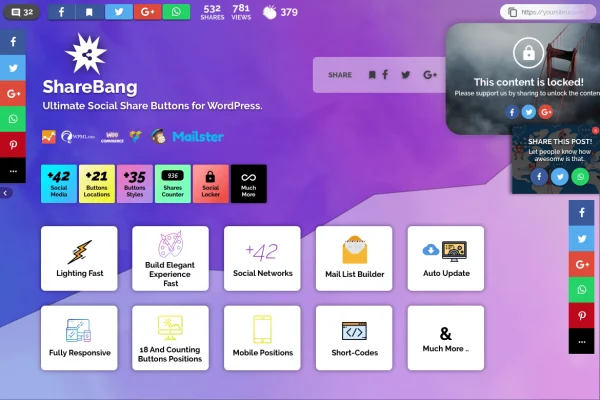
ShareBang is a WordPress plugin that adds social share buttons to your posts and pages. It supports more than 42 social networks and messaging apps, and it gives you control over where the buttons appear and how they look, with extras like a social locker and email list building.
- Version
- 1.4
- Released
- May 2, 2023
- Type
- WordPress plugin
- Licence
- GPL
- Included in
- Every plan, or $3.99 on its own
What’s new in ShareBang 1.4
Version 1.4 · May 2, 2023
Latest
What it does
Most sites need share buttons, and most site owners want them to match the design and sit in the right spot. This plugin covers the major social networks along with mobile messaging apps such as WhatsApp, Facebook Messenger, Telegram, Skype, Line and Viber. You choose from more than 21 placement options and more than 35 button themes, or build your own style with the Ultimate Button Themes Creator so the buttons fit your branding.
Beyond the buttons themselves, the plugin includes tools for people who track how sharing performs. A Social Locker can ask visitors to share or subscribe before they see certain content, and the Mail List Builder connects with Mailchimp and Mailster. Built-in analytics show share activity, and A/B testing lets you compare button styles, placements and messages. Click-to-Tweet quotes and a Facebook Save button round it out, all in a responsive, retina ready design.
Best for
- Bloggers and content creators who want readers to share posts
- Marketers building email lists through Mailchimp or Mailster
- Agencies adding share buttons to client sites
Features
Support for 42+ networks
Share buttons cover more than 42 social networks, including messaging apps like WhatsApp, Facebook Messenger, Telegram, Skype, Line and Viber.
Over 21 placement options
Pick exactly where buttons appear on your site from more than 21 placement options, so they sit where your readers will see them.
Button themes and creator
Choose from more than 35 button themes, or design custom buttons with the Ultimate Button Themes Creator to match your site's colors and style.
Social Locker
Hide selected content until a visitor shares it or subscribes, which gives readers a clear reason to spread your posts.
Mail list building
The Mail List Builder collects email subscribers on your site and works with Mailchimp and Mailster for managing your list.
Analytics and A/B testing
Track share activity and visitor behavior with built-in analytics, then test different button styles, placements and messages against each other.
Click-to-Tweet quotes
Highlight quotes or short messages from your content so visitors can post them to Twitter with a single click.
Facebook Save button
Let visitors save your content inside Facebook so they can come back to it later, with buttons that display well on retina and mobile screens.
Questions about ShareBang
Which social networks does ShareBang support?
It supports more than 42 social networks. That list includes mobile messaging platforms such as WhatsApp, Facebook Messenger, Telegram, Skype, Line and Viber, plus Twitter through the Click-to-Tweet feature and Facebook through a dedicated Save button.
Can I make the share buttons match my site design?
Yes. You can choose from more than 35 button themes, and the Ultimate Button Themes Creator lets you build custom button styles. Combined with more than 21 placement options, you have control over both how the buttons look and where they show up.
Does it connect with my email marketing service?
The built-in Mail List Builder works with Mailchimp and Mailster. You can also use the Social Locker to ask visitors to subscribe before viewing certain content, which helps collect sign-ups directly on your site.
Will the buttons work on phones and tablets?
The plugin uses a responsive, retina ready design, so the buttons are built to display and work properly on desktops, smartphones and tablets.
Is ShareBang free?
The code of ShareBang is licensed under the GPL, so anyone may use, change and share it. GPL Feast is a paid service: a plan or a single purchase gives you the download and automatic updates. The developer's own support, licence key and online services are not included.
Which version of ShareBang is this?
Version 1.4, released May 2, 2023. New versions appear here when the developer publishes them, and members get them as automatic updates.
How do I update ShareBang?
Install the free GPL Feast Updater on your site and connect it with your API key. It installs new versions of ShareBang automatically and keeps a backup, so you can roll back.
You might also like






