
Plugin
Updated
Slider Before After for Elementor
This plugin adds a before and after image slider to Elementor, so you can place two photos on top of each other and let visitors drag a handle to compare them. It works inside the Elementor editor and needs no coding.
- Version
- 1.0.1
- Released
- May 2, 2023
- Type
- WordPress plugin
- Requires
- Elementor
- Licence
- GPL
- Included in
- Every plan, or $3.99 on its own
What’s new in Slider Before After for Elementor 1.0.1
Version 1.0.1 · May 2, 2023
Latest
What it does
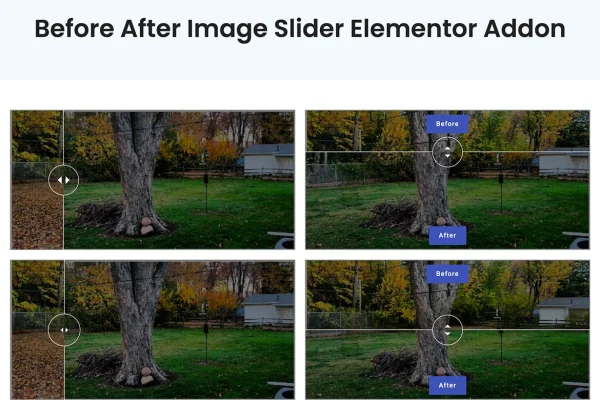
Showing change is hard with two separate photos sitting side by side. Visitors have to look back and forth, and small differences get lost. A comparison slider stacks both images in one frame and lets people reveal one over the other with a handle. That makes it a natural fit for beauty treatments, fitness progress, home renovation, architectural work and product upgrades, where the difference between two states is the whole story you want to tell.
The plugin requires Elementor and works through its drag and drop editor. You add the slider to a page, pick your two images from the WordPress Media Library or by URL, and choose a horizontal or vertical layout. From there you can rename the Before and After labels, set overlay colors and opacity, adjust the slider size and handle style, and turn on movement on hover. The slider is responsive and retina ready, so comparisons display properly on desktops, tablets and phones.
Best for
- Beauty salons, clinics and cosmetic service websites
- Fitness coaches sharing client progress photos
- Renovation, architecture and home improvement businesses
Features
Built for the Elementor editor
Add and adjust before and after sliders with Elementor's drag and drop interface, so you can build comparisons right on the page without writing any code.
Horizontal and vertical layouts
Choose a horizontal slider that reveals images side to side, or a vertical one that moves top to bottom, depending on what suits your photos.
Custom labels and overlay colors
Rename the Before and After labels and set the slider overlay colors so the comparison matches your brand and the rest of your page.
Move on hover
Turn on hover movement so the slider follows the visitor's cursor, letting people explore the change without clicking and dragging the handle.
Media Library or URL images
Load your images from the WordPress Media Library or point the slider to an image URL, which helps when your files live elsewhere.
Size, handle and opacity controls
Adjust the slider size, the handle style and the overlay opacity, along with other design settings, to control how the final comparison looks.
Responsive and retina ready
Sliders adapt to desktops, tablets and smartphones and are prepared for high resolution screens, so your comparison images stay sharp across devices.
Questions about Slider Before After for Elementor
Do I need Elementor to use this slider?
Yes. The plugin requires Elementor and works as an addon inside its editor. You build and style each before and after slider with Elementor's drag and drop interface on any page where you use Elementor.
Can the slider move up and down instead of side to side?
Yes. You can pick either a horizontal layout, where the handle moves left and right, or a vertical layout, where it moves top to bottom. Choose whichever shows the difference between your two images more clearly.
Can I change the Before and After text?
Yes. Both labels are customizable, so you can use your own wording. You can also set the overlay colors and opacity, the handle style and the slider size to fit your site's design.
Will the comparison work on phones and tablets?
The slider is responsive and retina ready, so it adjusts to desktops, tablets and smartphones and keeps images crisp on high resolution screens. You can also enable movement on hover for visitors using a mouse.
Is Slider Before After for Elementor free?
The code of Slider Before After for Elementor is licensed under the GPL, so anyone may use, change and share it. GPL Feast is a paid service: a plan or a single purchase gives you the download and automatic updates. The developer's own support, licence key and online services are not included.
Which version of Slider Before After for Elementor is this?
Version 1.0.1, released May 2, 2023. New versions appear here when the developer publishes them, and members get them as automatic updates.
How do I update Slider Before After for Elementor?
Install the free GPL Feast Updater on your site and connect it with your API key. It installs new versions of Slider Before After for Elementor automatically and keeps a backup, so you can roll back.
What does Slider Before After for Elementor need?
Slider Before After for Elementor needs Elementor installed and active.
You might also like






