
Plugin
Updated
SurvForm
SurvForm is a WordPress plugin for building custom survey forms with a drag-and-drop builder. It lets you create multi-page surveys, choose from 11 field types and review visitor submissions from your WordPress dashboard, all without writing code.
- Version
- 1.0.7.9
- Released
- May 2, 2023
- Type
- WordPress plugin
- Licence
- GPL
- Included in
- Every plan, or $3.99 on its own
What’s new in SurvForm 1.0.7.9
Version 1.0.7.9 · May 2, 2023
Latest
What it does
Collecting feedback, running market research or gathering details from visitors usually means stitching together a form tool that may clash with your theme. This plugin keeps surveys inside WordPress and uses the built-in page template system, so your forms display within your existing design. You build each survey with a drag-and-drop interface, pick from 11 field types and split longer questionnaires across multiple pages so respondents move through them in sections.
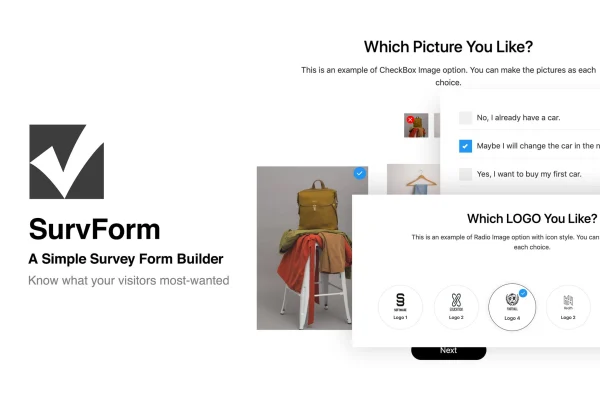
Visual options set it apart from plain text forms. Image checkboxes and radio buttons let people answer by picking pictures, icon styles can be applied to those options, and infinite scrolling keeps large image grids tidy. Forms are mobile-friendly and Retina ready, and customizable templates help you match your branding. Submissions are stored in the backend, and Ajax-powered registration and login forms let users sign in without page reloads.
Best for
- Businesses gathering customer feedback or running market research
- Educators creating questionnaires for students or course participants
- Bloggers who want to learn more about their readers
Features
Drag-and-drop survey builder
Arrange questions and fields by dragging them into place, so you can put together a survey without touching any code.
Eleven field types
Choose from 11 field types, including image checkboxes, image radio buttons, email and password fields, to suit different kinds of questions.
Multi-page surveys
Break long questionnaires into several pages so respondents work through one section at a time instead of facing a single long form.
Image grids with infinite scrolling
Image checkbox and radio options can load through infinite scrolling, which keeps forms compact even when you offer many picture choices.
Icon styles for image options
Apply icon styles to image checkboxes and radio buttons to make selections clearer and give your survey a more polished look.
Customizable form templates
Adjust the included form templates so your surveys follow your site's colors and branding rather than a generic default style.
Ajax registration and login
Registration and login forms work through Ajax, letting visitors sign up or sign in without the page reloading.
Dashboard submission storage
Visitor responses are saved in the WordPress backend, so you can review and analyze survey results from your dashboard.
Questions about SurvForm
Will SurvForm work with the theme I already use?
It is built to work with almost any WordPress theme. Survey forms use the native WordPress page template system, so they display within your existing site design rather than replacing or overriding it.
Can I create long surveys with several sections?
Yes. Multi-page support lets you split a questionnaire into separate pages, guiding respondents through sections one step at a time. This suits longer research surveys or forms that cover several topics.
Can people answer questions by choosing images?
Yes. Image checkbox and image radio button fields let respondents pick pictures as answers. You can add icon styles to these options, and infinite scrolling keeps grids with many images easy to browse.
Where do survey responses end up?
Submissions are stored in the backend of your WordPress site. You can view and analyze the collected responses from the dashboard without moving data to another tool first.
Is SurvForm free?
The code of SurvForm is licensed under the GPL, so anyone may use, change and share it. GPL Feast is a paid service: a plan or a single purchase gives you the download and automatic updates. The developer's own support, licence key and online services are not included.
Which version of SurvForm is this?
Version 1.0.7.9, released May 2, 2023. New versions appear here when the developer publishes them, and members get them as automatic updates.
How do I update SurvForm?
Install the free GPL Feast Updater on your site and connect it with your API key. It installs new versions of SurvForm automatically and keeps a backup, so you can roll back.
You might also like






