
Plugin
Updated
Testimonials (Slider + Grid) for WPBakery Page Builder
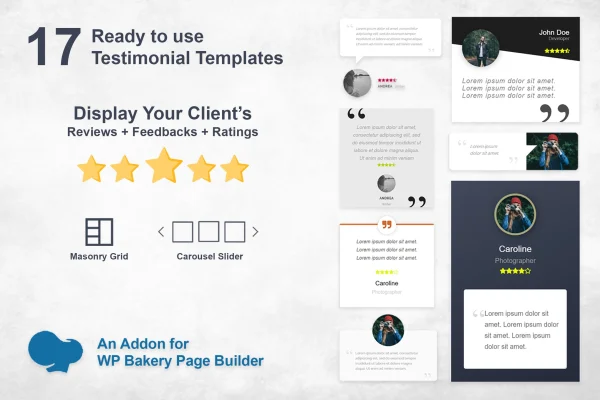
Testimonials (Slider + Grid) for WPBakery Page Builder is a WordPress plugin that adds testimonial displays to pages built with WPBakery Page Builder. It shows client testimonials, reviews, ratings and feedback as a touch-enabled slider or a masonry grid, with 17 ready-made styles to choose from.
- Version
- 2.1
- Released
- Aug 26, 2026
- Type
- WordPress plugin
- Licence
- GPL
- Included in
- Every plan, or $3.99 on its own
What’s new in Testimonials (Slider + Grid) for WPBakery Page Builder 2.1
Version 2.1 · Aug 26, 2026
Latest
What it does
Customer feedback is useful on almost any business site, but laying it out by hand in a page builder takes time and rarely looks consistent. This addon works inside WPBakery Page Builder, so you place testimonials on a page the same way you add any other element. You pick a layout, choose one of the 17 included styles and adjust colors and star ratings to match your design, with no coding needed.
There are two main display modes. The slider is touch-enabled, so visitors on phones and tablets can swipe through quotes, and it supports arrows, bottom dots and auto-play with adjustable speed. The masonry grid arranges testimonials in an isotope-style layout that suits pages with many reviews. A tagging system lets you group testimonials and filter which ones appear, so a services page and a product page can each show relevant feedback.
Best for
- Business sites built with WPBakery Page Builder
- Agencies adding client reviews to WPBakery projects
- Service providers who want star ratings on their pages
Features
17 ready-to-use styles
Choose from 17 prebuilt testimonial layouts so you can match the look of your site and brand without writing any code or CSS.
Touch-enabled slider
Testimonials can be shown in a slider that responds to swipe gestures, which makes browsing reviews comfortable on smartphones and tablets.
Masonry grid layout
Display testimonials in an isotope-style masonry grid, a good fit for pages that list many reviews and need visitors to scan them quickly.
Slider navigation and auto-play
Add slider arrows and bottom dots for navigation, and turn on auto-play with an adjustable speed to control how quickly testimonials rotate.
Color and star customization
Adjust star ratings, background colors, title colors and other design settings so the testimonial blocks fit your existing color scheme.
Tag-based organization
Assign tags to testimonials to keep them organized, then filter by tag to decide which feedback appears in each slider or grid.
Responsive display
Testimonial layouts adapt to different screen sizes, so the same block works on desktop monitors, tablets and phones.
Questions about Testimonials (Slider + Grid) for WPBakery Page Builder
Does this work without WPBakery Page Builder?
No. The addon is built for WPBakery Page Builder and adds its testimonial elements to that builder. You need WPBakery Page Builder active on your site to place and configure the slider and grid layouts.
Can I show different testimonials on different pages?
Yes. The plugin includes an item tagging system, so you can tag testimonials by topic, service or product and filter by those tags. That way each slider or grid shows only the feedback that fits the page it sits on.
Will the testimonial slider work on mobile devices?
The slider is touch-enabled, so visitors can swipe between testimonials on phones and tablets. The layouts are responsive as well, adjusting to different screen sizes for both the slider and the masonry grid.
How much can I change the design?
You start from one of 17 ready-made styles, then adjust details such as star ratings, background colors and title colors. For sliders you can also toggle arrows and dots and set the auto-play speed.
Is Testimonials (Slider + Grid) for WPBakery Page Builder free?
The code of Testimonials (Slider + Grid) for WPBakery Page Builder is licensed under the GPL, so anyone may use, change and share it. GPL Feast is a paid service: a plan or a single purchase gives you the download and automatic updates. The developer's own support, licence key and online services are not included.
Which version of Testimonials (Slider + Grid) for WPBakery Page Builder is this?
Version 2.1, released Aug 26, 2026. New versions appear here when the developer publishes them, and members get them as automatic updates.
How do I update Testimonials (Slider + Grid) for WPBakery Page Builder?
Install the free GPL Feast Updater on your site and connect it with your API key. It installs new versions of Testimonials (Slider + Grid) for WPBakery Page Builder automatically and keeps a backup, so you can roll back.
You might also like






