
Plugin
Updated
TF Woo Mini Cart Addon For Elementor
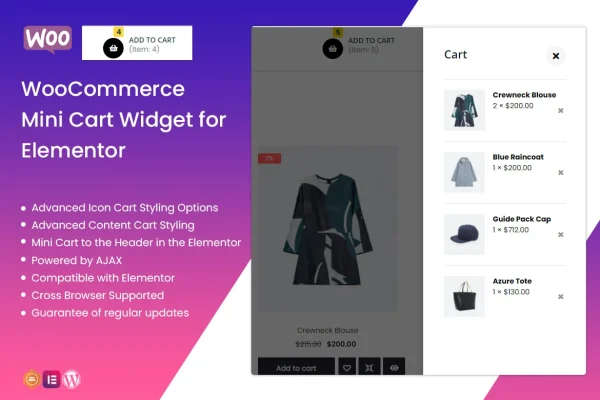
TF Woo Mini Cart Addon For Elementor is a WordPress plugin that adds a mini cart widget to the Elementor page builder. It lets shoppers in your WooCommerce store see what is in their cart on hover or click, without leaving the page they are browsing.
- Version
- 1.0.4
- Released
- Apr 2, 2022
- Type
- WordPress plugin
- Requires
- Elementor
- Licence
- GPL
- Included in
- Every plan, or $3.99 on its own
What’s new in TF Woo Mini Cart Addon For Elementor 1.0.4
Version 1.0.4 · Apr 2, 2022
Latest
- FixedFixed bug on Elementor 3.6.1
What it does
In many WooCommerce stores, checking the cart means opening a separate cart page. That interrupts browsing and sends shoppers away from the products they were looking at. This plugin places a compact, interactive mini cart in your header or anywhere else you build with Elementor. When a visitor hovers over or clicks the cart, a small panel opens with the cart contents, so they can review and manage their picks without a page reload.
Because it works as an Elementor widget, you drag it into your layout and style it in the same editor you use for the rest of the site. You can adjust the icon, the item counter, the text, colors, typography, spacing and the design of the cart contents so it matches your brand. The widget is retina ready and responsive across desktops, tablets and phones. It also comes with extra widgets, including Header Footer Slider, Image Box and Carousel box, for building other parts of your site.
Best for
- WooCommerce stores built with the Elementor page builder
- Designers who want a branded cart icon in the header
- Freelancers and agencies building online shops for clients
Features
Elementor widget
Add the mini cart through the Elementor page builder and place it in your header or any other section, then style it right in the editor.
Hover or click display
The cart contents open in a compact panel on hover or click, so shoppers can view and manage their items without a page reload.
Custom icon and counter
Change the cart icon, the item counter and the cart text so the widget fits the look of your store header.
Colors, typography and spacing
Set colors, fonts and spacing for the mini cart and its content area to match your brand style across the site.
Retina ready and responsive
The widget displays sharply on high resolution screens and adapts to desktops, tablets and smartphones.
Built for WooCommerce stores
The mini cart pulls from your WooCommerce cart, giving shoppers a quick summary of the products they have selected.
Extra Elementor widgets included
The plugin comes with additional widgets such as Header Footer Slider, Image Box and Carousel box for building other page sections.
Questions about TF Woo Mini Cart Addon For Elementor
Does this plugin need Elementor?
Yes. The mini cart is an Elementor widget, so you need Elementor active to add it to your pages. You place and style it inside the Elementor editor like any other widget, including in a header layout.
How do shoppers open the mini cart?
Shoppers open it by hovering over or clicking the cart. A compact panel then shows the items in their cart, letting them review and manage selections without reloading the page or leaving what they were browsing.
Can I make the mini cart match my store design?
Yes. You can customize the cart icon, counter, text, colors, typography, spacing and the design of the cart contents. This lets the widget blend in with your header and the rest of your brand styling.
Will the mini cart work on phones and tablets?
TF Woo Mini Cart Addon For Elementor is responsive and retina ready, so the widget adapts to desktops, tablets and smartphones and stays sharp on high resolution screens.
Is TF Woo Mini Cart Addon For Elementor free?
The code of TF Woo Mini Cart Addon For Elementor is licensed under the GPL, so anyone may use, change and share it. GPL Feast is a paid service: a plan or a single purchase gives you the download and automatic updates. The developer's own support, licence key and online services are not included.
Which version of TF Woo Mini Cart Addon For Elementor is this?
Version 1.0.4, released Apr 2, 2022. New versions appear here when the developer publishes them, and members get them as automatic updates.
How do I update TF Woo Mini Cart Addon For Elementor?
Install the free GPL Feast Updater on your site and connect it with your API key. It installs new versions of TF Woo Mini Cart Addon For Elementor automatically and keeps a backup, so you can roll back.
What does TF Woo Mini Cart Addon For Elementor need?
TF Woo Mini Cart Addon For Elementor needs Elementor installed and active.
You might also like






