
Plugin
Updated
TF Woo Product Mini Cart Addon For Elementor
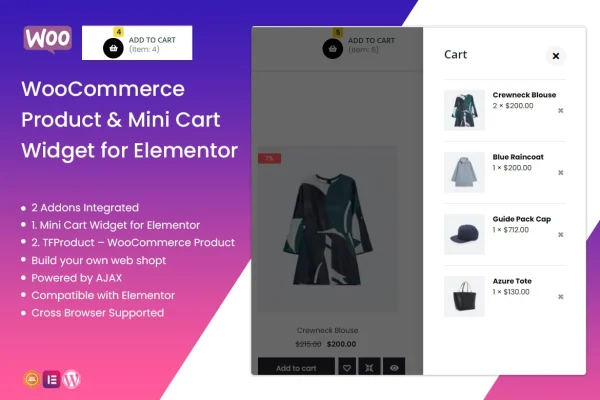
This plugin brings two WooCommerce addons into Elementor: a mini cart widget for your header and a product display tool for any page. Shoppers can check their cart items, quantities and totals without leaving the page they are on.
- Version
- 1.0.5
- Released
- Apr 2, 2022
- Type
- WordPress plugin
- Requires
- Elementor
- Licence
- GPL
- Included in
- Every plan, or $3.99 on its own
What’s new in TF Woo Product Mini Cart Addon For Elementor 1.0.5
Version 1.0.5 · Apr 2, 2022
Latest
- FixedFixed bug on Elementor 3.6.1
What it does
Many WooCommerce stores send shoppers to a separate cart page just to see what they have added. This plugin places a compact mini cart in your site header instead. It opens on hover or click and lists cart items, quantities and totals, so visitors can review their order and keep browsing. Everything is built inside Elementor, so you drag the widget into place and style it without writing code.
The second part of the plugin is the TFProduct addon, which displays WooCommerce products on any page with multiple layout options. Both widgets are responsive and retina ready, so they adapt to desktops, phones and high-resolution screens. You can change the cart icon, counter, text, colors, typography, spacing and layout to match your brand. It requires Elementor and suits store owners who already design their pages with it.
Best for
- WooCommerce stores designed with Elementor
- Freelancers building online shops for clients
- Store owners wanting a header cart without coding
Features
Header mini cart widget
Adds a compact mini cart to your site header that displays cart contents when a shopper hovers over it or clicks it.
Cart details at a glance
The mini cart lists cart items, quantities and totals, letting shoppers check their order without navigating away from the current page.
Styling controls in Elementor
Customize the cart icon, counter, text, colors, typography, spacing and layout directly in Elementor so the cart matches your store design.
Product display addon
The TFProduct addon displays WooCommerce products on any page, with multiple layout options to choose from for different sections of your store.
Drag and drop building
Both widgets work inside the Elementor page builder, so you can place and adjust them on your store pages without any coding.
Responsive and retina ready
The mini cart and product displays adapt to desktops and mobile phones and are prepared to look sharp on high-resolution screens.
Built with HTML, CSS, JavaScript
The widgets are built using HTML, CSS and JavaScript, the standard web technologies already used by WordPress themes and page builders.
Questions about TF Woo Product Mini Cart Addon For Elementor
Does this plugin need Elementor?
Yes. The widgets are designed to work exclusively inside the Elementor page builder. You add the mini cart and product displays to your pages using Elementor's drag and drop editor, and the plugin is meant for WooCommerce stores.
How does the mini cart open for shoppers?
The mini cart sits in your header and shows its contents on hover or click. It displays the items in the cart along with quantities and totals, so shoppers can review their order without leaving the page.
Can I make the cart match my brand?
You can customize the cart icon, counter, text, colors, typography, spacing and overall layout from within Elementor. No coding is needed to adjust these settings, so the cart can fit the look of your existing header.
What does the product display part do?
The TFProduct addon lets you display WooCommerce products on any page with multiple layout options. It is useful for building product sections on landing pages, home pages or category style pages in Elementor.
Is TF Woo Product Mini Cart Addon For Elementor free?
The code of TF Woo Product Mini Cart Addon For Elementor is licensed under the GPL, so anyone may use, change and share it. GPL Feast is a paid service: a plan or a single purchase gives you the download and automatic updates. The developer's own support, licence key and online services are not included.
Which version of TF Woo Product Mini Cart Addon For Elementor is this?
Version 1.0.5, released Apr 2, 2022. New versions appear here when the developer publishes them, and members get them as automatic updates.
How do I update TF Woo Product Mini Cart Addon For Elementor?
Install the free GPL Feast Updater on your site and connect it with your API key. It installs new versions of TF Woo Product Mini Cart Addon For Elementor automatically and keeps a backup, so you can roll back.
What does TF Woo Product Mini Cart Addon For Elementor need?
TF Woo Product Mini Cart Addon For Elementor needs Elementor installed and active.
You might also like






