
Plugin
Updated
TFClipping Mask Addon For Elementor
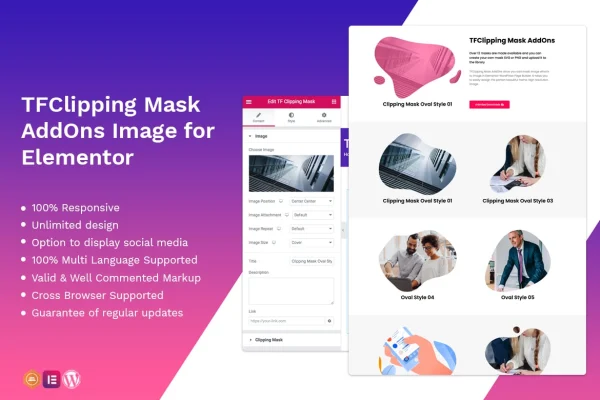
This is a WordPress plugin that adds a clipping mask widget to the Elementor page builder. It lets you place images inside shaped masks, using either the included preset shapes or your own SVG or PNG files, so you can frame visuals in custom outlines without writing code.
- Version
- 1.0.2
- Released
- Apr 2, 2022
- Type
- WordPress plugin
- Requires
- Elementor
- Licence
- GPL
- Included in
- Every plan, or $3.99 on its own
What’s new in TFClipping Mask Addon For Elementor 1.0.2
Version 1.0.2 · Apr 2, 2022
Latest
- FixedFixed bug on Elementor 3.6.1
What it does
Plain rectangular images can make a page feel flat, and cutting photos into custom shapes usually means extra work in an image editor or custom CSS. This addon handles that step inside Elementor. You drop the widget onto a page, pick an image, and choose a mask shape to clip it into. The result is a framed visual that fits the layout you are building, and you can swap the shape or the image at any time from the editor.
The widget comes with more than 12 high-resolution preset masks, and you can upload your own SVG or PNG mask files when you need a shape that matches your brand. Mixing preset and custom masks gives you plenty of room to experiment across different pages. Masked images are responsive and retina ready, so they stay sharp on phones, tablets and large screens. The plugin also supports multilingual sites, works across major browsers, and uses clean, commented markup that is easy to customize.
Best for
- Elementor users who want shaped image frames
- Designers building creative portfolio or brand sites
- Agencies needing custom mask shapes for client pages
Features
Preset high-resolution masks
Choose from more than 12 high-resolution mask shapes included with the widget to clip your images into a defined outline right away.
Custom SVG and PNG masks
Upload your own SVG or PNG mask files to create shapes that match your brand or a specific design idea for a page.
Responsive and retina ready
Masked images adapt to different screen sizes and display crisply on high-density screens, so the framing holds up on phones, tablets and desktops.
Built for Elementor
The mask works as an Elementor widget, so you add and adjust it within your normal page building workflow without any coding.
Multilingual site support
The widget is compatible with multilingual websites, so masked images can be used across pages in different languages.
Cross-browser compatibility
The addon is tested to work across major browsers, helping your masked images display consistently for visitors using different browsers.
Clean, commented markup
The code is clean, valid and well commented, which makes it easier for developers to customize the output when a project needs it.
Questions about TFClipping Mask Addon For Elementor
Do I need Elementor to use this plugin?
Yes. The plugin is an addon for the Elementor page builder and adds its clipping mask as an Elementor widget, so Elementor needs to be active on your WordPress site for it to work.
Can I use my own shapes instead of the included ones?
Yes. Along with more than 12 preset high-resolution masks, you can upload your own mask files in SVG or PNG format. This lets you create shapes tied to your brand, such as a logo outline or a custom graphic, and combine them with the presets.
Will masked images look good on mobile devices?
The widget is responsive and retina ready, so masked images resize for different screen sizes and stay sharp on high-density displays. That covers phones, tablets and desktop monitors.
Does it work on a multilingual website?
Yes. The addon supports multilingual websites, so you can use masked images on pages in different languages. It is also tested across major browsers for consistent display.
Is TFClipping Mask Addon For Elementor free?
The code of TFClipping Mask Addon For Elementor is licensed under the GPL, so anyone may use, change and share it. GPL Feast is a paid service: a plan or a single purchase gives you the download and automatic updates. The developer's own support, licence key and online services are not included.
Which version of TFClipping Mask Addon For Elementor is this?
Version 1.0.2, released Apr 2, 2022. New versions appear here when the developer publishes them, and members get them as automatic updates.
How do I update TFClipping Mask Addon For Elementor?
Install the free GPL Feast Updater on your site and connect it with your API key. It installs new versions of TFClipping Mask Addon For Elementor automatically and keeps a backup, so you can roll back.
What does TFClipping Mask Addon For Elementor need?
TFClipping Mask Addon For Elementor needs Elementor installed and active.
You might also like






