
Plugin
Updated
Tiny Portfolio Widgets For Elementor
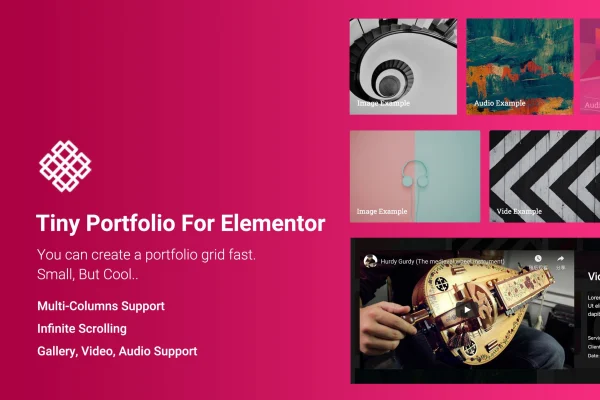
Tiny Portfolio Widgets For Elementor is a plugin that adds a portfolio grid widget to the Elementor page builder. It lets you display image, video and audio projects in a column grid, with a fullscreen popup that shows the details of each item.
- Version
- 1.0.7.4
- Released
- May 2, 2023
- Type
- WordPress plugin
- Requires
- Elementor
- Licence
- GPL
- Included in
- Every plan, or $3.99 on its own
What’s new in Tiny Portfolio Widgets For Elementor 1.0.7.4
Version 1.0.7.4
Latest
- ImprovedCompatible with Elementor 3.6.x
What it does
Many portfolio tools rely on a custom portfolio post type, which adds another layer of content to manage. This plugin skips that. You build the portfolio grid directly inside Elementor, add your projects as gallery images, videos or audio, and set how each item opens. When a visitor clicks a project, a fullscreen popup shows its detailed content, so people can look closely at your work without leaving the page.
The widget works with both the free and Pro versions of Elementor, so it fits most Elementor setups. You can choose between 2, 3, 4 or 5 columns, turn on infinite scrolling to load more items as visitors scroll, and adjust the grid and detail templates to match your brand. The layout is responsive and retina ready, it includes a language file for translation, and documentation covers setup and customization.
Best for
- Designers and photographers building portfolio pages in Elementor
- Freelancers who want a project grid without custom post types
- Agencies displaying image, video and audio work
Features
Flexible column layouts
Arrange your portfolio grid in 2, 3, 4 or 5 columns to suit the page design and the number of projects you want to display.
Infinite scrolling
Load more portfolio items as visitors scroll, without a page reload, so larger collections of work stay easy to browse.
Image, video and audio items
Add gallery images, videos or audio to portfolio entries, which suits creatives whose work spans more than one kind of media.
Fullscreen content popup
Each portfolio item can open in a fullscreen popup that shows its detailed content, giving visitors a closer look at a project.
Customizable grid and detail templates
Adjust both the grid template and the detail template so the look and feel of your portfolio lines up with your branding.
Works with Elementor Free and Pro
The widget runs on the free version of Elementor as well as Elementor Pro, so you can use it with either setup.
Responsive and retina ready
The portfolio grid adapts to different screen sizes and displays sharply on high resolution screens.
Translation ready
A language file is included, so you can translate the widget's text and adapt the portfolio for different languages and regions.
Questions about Tiny Portfolio Widgets For Elementor
Do I need Elementor Pro to use this widget?
No. The widget is compatible with both the free version of Elementor and Elementor Pro. Elementor itself is required, since the portfolio grid is added and edited inside the Elementor page builder.
Can I add videos and audio to my portfolio, or only images?
You can use more than images. Portfolio items support gallery images, videos and audio, so you can mix photography, video reels and sound projects in the same grid, each opening in a fullscreen detail popup.
Does it require a separate portfolio post type?
No. The plugin is built to display your work without a complex portfolio post type. You create the grid and its items through the Elementor widget, which keeps setup simpler for smaller portfolios.
Can I change how the portfolio looks?
Yes. You can pick 2, 3, 4 or 5 columns, enable infinite scrolling, and customize both the grid template and the detail template so the portfolio matches your site's style and branding.
Is Tiny Portfolio Widgets For Elementor free?
The code of Tiny Portfolio Widgets For Elementor is licensed under the GPL, so anyone may use, change and share it. GPL Feast is a paid service: a plan or a single purchase gives you the download and automatic updates. The developer's own support, licence key and online services are not included.
Which version of Tiny Portfolio Widgets For Elementor is this?
Version 1.0.7.4, released May 2, 2023. New versions appear here when the developer publishes them, and members get them as automatic updates.
How do I update Tiny Portfolio Widgets For Elementor?
Install the free GPL Feast Updater on your site and connect it with your API key. It installs new versions of Tiny Portfolio Widgets For Elementor automatically and keeps a backup, so you can roll back.
What does Tiny Portfolio Widgets For Elementor need?
Tiny Portfolio Widgets For Elementor needs Elementor installed and active.
You might also like






