
Plugin
Updated
TM Islamic Helper
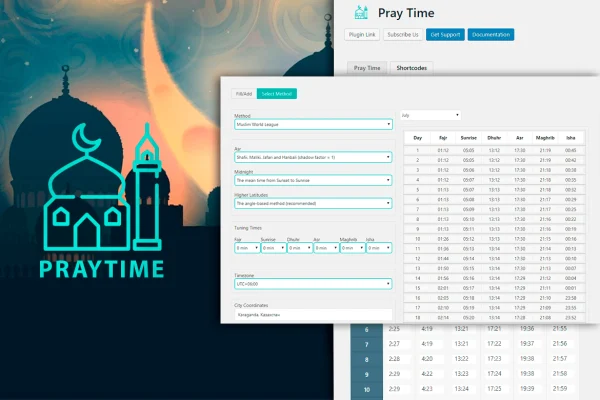
TM Islamic Helper is a WordPress plugin that displays daily Islamic prayer times on your website. You pick a calculation method, adjust or enter times yourself, and match the display to your site's design, so visitors can check the day's prayer schedule at a glance.
- Version
- 1.0.2
- Released
- May 2, 2023
- Type
- WordPress plugin
- Licence
- GPL
- Included in
- Every plan, or $3.99 on its own
What’s new in TM Islamic Helper 1.0.2
Version 1.0.2
Latest
- FixedFixed issues
- NewAdded Google Maps API key field in settings.
- ImprovedCompartibility with WordPress 6.0.
What it does
Mosques, Islamic centers and Muslim bloggers often need to share accurate daily prayer times, and updating a table by hand gets tedious. This plugin handles the schedule for you. You choose from several internationally recognized calculation methods so timings suit your location and denomination. If your community follows its own schedule, you can fine-tune the calculated times or type in custom times directly, which helps when a local mosque sets its own congregation times.
The plugin works within your existing WordPress theme and is configured without writing code. You can set the time format and adjust the design so the prayer table fits your site's look. It supports Arabic text and shows Hijri calendar dates alongside the schedule, and the layout is responsive across desktops, tablets and phones. Developers who want to go further can work with its HTML, CSS and JavaScript files to customize the output.
Best for
- Mosque and Islamic center websites
- Muslim community organizations sharing daily schedules
- Personal Muslim blogs and faith-focused sites
Features
Multiple calculation methods
Choose from various internationally recognized prayer time calculation methods so the timings match your location and the practice your community follows.
Manual time adjustments
Fine-tune calculated prayer times or enter your own custom times to reflect community preferences or the schedule of a local mosque.
Arabic text support
Display prayer schedules with Arabic text, which suits sites serving Arabic-speaking visitors or communities that prefer traditional prayer names.
Hijri calendar dates
Show Hijri calendar dates next to the prayer schedule so visitors can see the Islamic date along with the daily timings.
Custom formats and design
Adjust time formats and the visual design of the prayer times display so it fits in with the look of your existing site.
Responsive layout
The prayer times display adapts to desktops, tablets and smartphones, so visitors can check the schedule on whatever device they use.
No coding needed
Configure the plugin within any WordPress theme through its settings, making it approachable for site owners without development experience.
Editable front-end files
Clean HTML, CSS and JavaScript files give developers a clear starting point for deeper customization of how prayer times appear.
Questions about TM Islamic Helper
Can I use the prayer times my mosque already follows?
Yes. Besides choosing a calculation method, you can manually adjust the calculated times or enter your own custom times. This lets the displayed schedule match the timings your mosque or community has set.
Does it show the Islamic date as well as prayer times?
It does. The plugin can display Hijri calendar dates alongside the prayer schedule, and it supports Arabic text, so visitors see the Islamic date and the day's timings together.
Will it work with my current theme?
The plugin is built to run within any WordPress theme and is set up through its settings without code. You can also change time formats and design options so the display blends with your theme.
Can a developer customize how it looks?
Yes. The plugin includes clean HTML, CSS and JavaScript files, so a developer can modify the styling and output beyond the built-in design settings.
Is TM Islamic Helper free?
The code of TM Islamic Helper is licensed under the GPL, so anyone may use, change and share it. GPL Feast is a paid service: a plan or a single purchase gives you the download and automatic updates. The developer's own support, licence key and online services are not included.
Which version of TM Islamic Helper is this?
Version 1.0.2, released May 2, 2023. New versions appear here when the developer publishes them, and members get them as automatic updates.
How do I update TM Islamic Helper?
Install the free GPL Feast Updater on your site and connect it with your API key. It installs new versions of TM Islamic Helper automatically and keeps a backup, so you can roll back.
You might also like






