
Plugin
Updated
TMNET
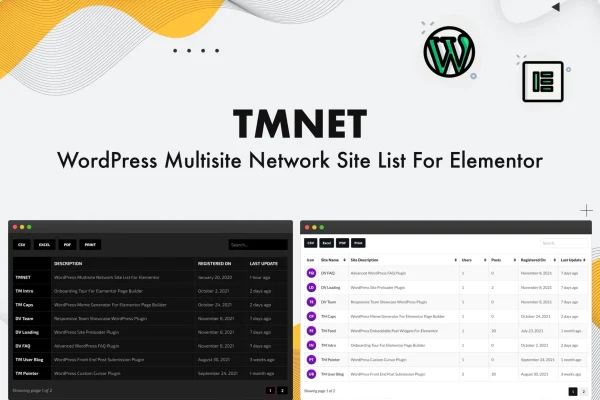
TMNET WordPress Multisite Site List For Elementor is a plugin for WordPress Multisite networks. It lets you place a list of sites from your network on any Elementor page, then choose which sites appear, what details they show and how the list looks.
- Version
- 1.1
- Released
- May 2, 2023
- Type
- WordPress plugin
- Requires
- Elementor
- Licence
- GPL
- Included in
- Every plan, or $3.99 on its own
What’s new in TMNET 1.1
Version 1.1 · May 2, 2023
Latest
What it does
Running a multisite network often means you want a public or internal page that lists the sites in it, with names, icons and short descriptions. Building that by hand gets out of date quickly. This plugin pulls site information straight from your network and displays it inside an Elementor page, so the list reflects the sites you actually run. It requires Elementor, and you work with it through the familiar drag and drop editor.
You decide what goes into each entry. Available fields include site name, favicon, description, registration date and latest update, plus blog option fields such as admin email, theme name and WooCommerce options. You can include or exclude specific sites, set the display order and add a search box for visitors. Styling covers colors, fonts, borders and shadows, so the list can match the rest of your design, and the layout is responsive across screen sizes.
Best for
- WordPress Multisite network administrators
- Agencies presenting a portfolio of client sites
- Developers building network directory pages in Elementor
Features
Custom list skins
Design your own look by adjusting colors, fonts, borders, shadows and other style settings so the site list matches your branding.
Selectable site data fields
Show details such as site name, description, favicon, registration date and latest update for each site in your network.
Blog option fields
Add blog related information to each entry, including admin email, theme name and WooCommerce options, for a more detailed view of every site.
Search box for visitors
Place a search box above the list so visitors can find a particular site in your network without scrolling through every entry.
Custom site ordering
Control the order in which network sites are displayed, so the most relevant sites can appear where you want them.
Include or exclude sites
Pick exactly which sites from the network appear in the list and hide the ones you do not want shown.
Works inside Elementor pages
Add the multisite list to any Elementor page using the drag and drop editor you already use for the rest of your layout.
Responsive layout
The site list adapts to different screen sizes, so it displays properly on desktops, tablets and mobile phones.
Questions about TMNET
Does this plugin work on a regular single WordPress site?
It is built specifically for WordPress Multisite networks. Its purpose is to pull information about the sites in a network and display them as a list, so it is intended for multisite installations.
Do I need Elementor to use it?
Yes. The plugin requires Elementor, and the site list is added and configured inside Elementor pages using the drag and drop editor.
Can I hide some of the sites in my network from the list?
Yes. You can choose which network sites to include or exclude, so only the sites you want visitors to see appear on the page. You can also set the order they are shown in.
What information can each site entry show?
You can display fields such as site name, favicon, description, registration date and latest update. Blog option fields like admin email, theme name and WooCommerce options are also available if you want more detail.
Is TMNET free?
The code of TMNET is licensed under the GPL, so anyone may use, change and share it. GPL Feast is a paid service: a plan or a single purchase gives you the download and automatic updates. The developer's own support, licence key and online services are not included.
Which version of TMNET is this?
Version 1.1, released May 2, 2023. New versions appear here when the developer publishes them, and members get them as automatic updates.
How do I update TMNET?
Install the free GPL Feast Updater on your site and connect it with your API key. It installs new versions of TMNET automatically and keeps a backup, so you can roll back.
What does TMNET need?
TMNET needs Elementor installed and active.
You might also like






