
Plugin
Updated
Trustify
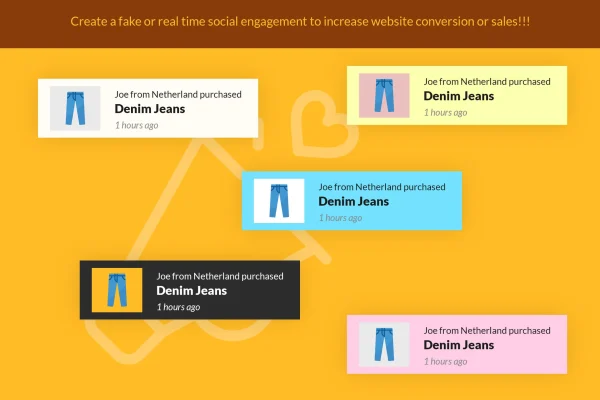
Trustify is a WordPress plugin that displays social proof notifications on your site. It shows small popups about things like recent purchases, customer actions or newsletter signups. As its full name (Fake Social Evidence) makes clear, these messages are simulated, so the content is whatever you configure.
- Version
- 2.4
- Released
- Apr 18, 2024
- Type
- WordPress plugin
- Licence
- GPL
- Included in
- Every plan, or $3.99 on its own
What’s new in Trustify 2.4
Version 2.4 · Apr 18, 2024
Latest
- ImprovedCompatibility check with WordPress
- ImprovedCompatibility check with WooCommerce
- ImprovedCompatibility check with Easy Digital Downloads
What it does
A quiet site can feel empty to a first-time visitor. Trustify adds small notification popups that mention activity such as a recent purchase, a customer action or a newsletter signup. The idea is to give the page a sense of activity while people browse. Because the notifications are simulated, it is worth thinking about how they fit your audience, your local advertising rules and the expectations of the people who visit your site before you turn them on.
Setup happens in an admin interface that comes with pre-built front-end views, so you can configure notifications without writing code. You pick a layout: text only, text with an image on the left, or text with an image on the right. The design is responsive and retina ready, and it is built to work across major browsers. It suits blogs, online shops and small business sites that want notifications about sales or email subscriptions.
Best for
- Small online shops wanting purchase activity popups
- Bloggers promoting newsletter signups
- Small business sites adding notification popups
Features
Activity notification popups
Displays popups about recent purchases, customer actions or newsletter signups to give visitors a sense of activity on the site.
Three layout options
Choose between text-only notifications, text with an image on the left, or text with an image on the right to match your site design.
Newsletter signup prompts
Notifications can highlight email subscriptions, which gives you a way to draw visitor attention toward your newsletter opt-in.
Admin interface without coding
An admin interface with pre-built front-end views lets you configure and place notifications without writing any code.
Responsive and retina ready
Notifications are designed to display properly on phones, tablets and desktops, including high-resolution screens.
Cross-browser compatibility
Built to look and work consistently across the major web browsers your visitors are likely to use.
Questions about Trustify
Are the notifications based on real customer activity?
No. The plugin is described as showing fake social evidence, meaning it simulates purchases, customer actions and signups. You control the messages it displays, so consider transparency with your visitors and any advertising rules that apply to your business.
Can I show images in the notifications?
Yes. You can use text-only notifications or pair the text with an image placed on either the left or the right side of the popup, depending on what fits your design.
Do I need coding skills to set it up?
No coding is needed. The plugin includes an admin interface and pre-built front-end views, so you configure notifications through settings rather than by editing code.
Will the popups look right on mobile devices?
The notifications use a responsive, retina-ready design meant to display well on different screen sizes and high-resolution displays, and they are built to work across major browsers.
Is Trustify free?
The code of Trustify is licensed under the GPL, so anyone may use, change and share it. GPL Feast is a paid service: a plan or a single purchase gives you the download and automatic updates. The developer's own support, licence key and online services are not included.
Which version of Trustify is this?
Version 2.4, released Apr 18, 2024. New versions appear here when the developer publishes them, and members get them as automatic updates.
How do I update Trustify?
Install the free GPL Feast Updater on your site and connect it with your API key. It installs new versions of Trustify automatically and keeps a backup, so you can roll back.
You might also like






