
Plugin
Updated
TW Wishlist for WooCommerce
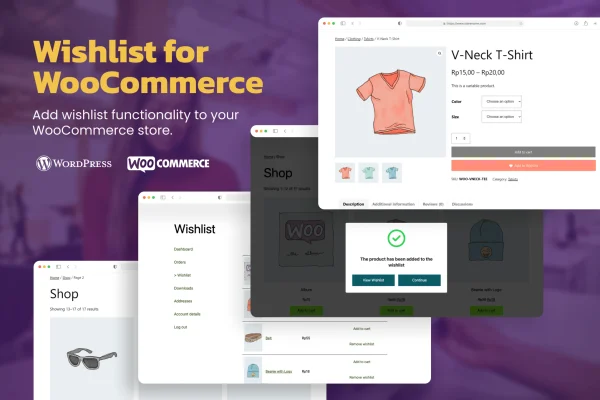
This WordPress plugin adds a wishlist to your WooCommerce store. Shoppers can save products they like, keep them in a personal list, and move them into the cart with one click when they are ready to buy.
- Version
- 1.1.0
- Released
- Dec 9, 2024
- Type
- WordPress plugin
- Requires
- WooCommerce
- Licence
- GPL
- Included in
- Every plan, or $3.99 on its own
What’s new in TW Wishlist for WooCommerce 1.1.0
Version 1.1.0 · Dec 9, 2024
Latest
- NewWishlist collection (folder)
- FixedFix several CSS issues
What it does
Many shoppers find a product they like but are not ready to buy it yet. Without a way to save it, they have to search for it again later or simply forget about it. A wishlist gives them a place to keep those items. TW Wishlist for WooCommerce lets customers add, view and remove products from their own list, so they can come back to their saved picks whenever they choose.
The plugin is made specifically for WooCommerce, so it requires WooCommerce to run, and setup needs no coding. It works with both simple and variable products, which covers most store catalogs. Saved items can be grouped into wishlist collections, which work like folders. The layout is responsive for phones and tablets, and you can adjust the wishlist's appearance so it matches your store's branding.
Best for
- WooCommerce stores with large or varied product catalogs
- Shops selling variable products like apparel in many sizes
- Store owners who want a wishlist without custom code
Features
Personal wishlist management
Customers can add products to their own wishlist, view everything they have saved, and remove items they no longer want.
One-click add to cart
Shoppers can move an item from their wishlist straight into the shopping cart with a single click when they decide to buy.
Wishlist collections
Saved products can be organized into collections that act like folders, so shoppers can group items in a way that makes sense to them.
Simple and variable products
The wishlist works with both simple and variable WooCommerce products, so stores with sizes, colors or other options are covered.
Mobile friendly layout
The wishlist is responsive, giving shoppers on smartphones and tablets a consistent experience with those browsing on a desktop.
Customizable appearance
You can adjust how the wishlist looks so it fits your store's branding and blends in with the rest of your shop design.
No coding needed
The plugin is designed for WooCommerce and can be set up without writing any code, which suits store owners without technical experience.
TW Wishlist for WooCommerce older versions
- 1.0.1Dec 20, 20231 fix
Members and buyers of this product can download older versions.
Questions about TW Wishlist for WooCommerce
Does this plugin work without WooCommerce?
No. TW Wishlist for WooCommerce is built specifically for WooCommerce and requires it to be active on your site. It adds wishlist features to your existing WooCommerce products and cart.
Can customers save products with variations?
Yes. The plugin supports both simple and variable WooCommerce products, so items with options such as sizes or colors can be saved to a wishlist alongside standard products.
Can shoppers organize their saved items into groups?
Yes. The plugin includes wishlist collections, which work like folders. Shoppers can sort their saved products into separate groups instead of keeping everything in one long list.
Can I change how the wishlist looks on my store?
Yes. The wishlist appearance can be customized to match your store's branding. The layout is also responsive, so it adapts to phones and tablets as well as desktop screens.
Is TW Wishlist for WooCommerce free?
The code of TW Wishlist for WooCommerce is licensed under the GPL, so anyone may use, change and share it. GPL Feast is a paid service: a plan or a single purchase gives you the download and automatic updates. The developer's own support, licence key and online services are not included.
Which version of TW Wishlist for WooCommerce is this?
Version 1.1.0, released Dec 9, 2024. New versions appear here when the developer publishes them, and members get them as automatic updates.
How do I update TW Wishlist for WooCommerce?
Install the free GPL Feast Updater on your site and connect it with your API key. It installs new versions of TW Wishlist for WooCommerce automatically and keeps a backup, so you can roll back.
What does TW Wishlist for WooCommerce need?
TW Wishlist for WooCommerce needs WooCommerce installed and active.
You might also like






