
Plugin
Updated
Ultimate Post Recipe
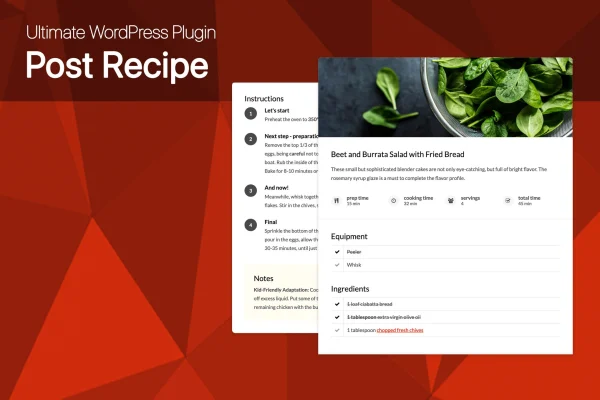
Ultimate Post Recipe is a WordPress plugin that turns regular blog posts into structured recipe pages. It lets you add ingredients, cooking steps, equipment lists and photos in a recipe block, and it adds schema.org markup for Google Rich Snippets.
- Version
- 1.0.0
- Released
- May 2, 2023
- Type
- WordPress plugin
- Licence
- GPL
- Included in
- Every plan, or $3.99 on its own
What’s new in Ultimate Post Recipe 1.0.0
Version 1.0.0 · May 2, 2023
Latest
What it does
Writing recipes as plain post text makes them hard to scan and hard for search engines to read. This plugin gives each recipe a dedicated block with separate lists for ingredients, equipment and cooking steps. There is no limit on how many items or steps you add, and the lists accept HTML formatting and affiliate links, so you can link to the exact pan or spice you recommend. No coding is needed to build a recipe.
The recipe block can be placed automatically or positioned manually anywhere in the post. It is designed to work with any WordPress theme, and the layout is responsive and retina ready for phones, tablets and desktops. Readers can click list items to mark them done or undone while they cook. You can choose rounded or squared element styles, adjust the styling to match your site and upload a custom image for each recipe block.
Best for
- Food bloggers publishing recipes in regular posts
- Cooking websites that want structured recipe markup
- Recipe writers who include affiliate links to ingredients or tools
Features
Unlimited steps and ingredients
Add as many cooking steps, ingredients and equipment items as a recipe needs, with no fixed cap on list length.
HTML and affiliate links
Ingredient and equipment lists support HTML formatting and affiliate links, so you can point readers to specific products or tools.
Schema.org recipe markup
Recipes include markup for Google Rich Snippets using schema.org, giving search engines structured details about each recipe.
Automatic or manual placement
Let the plugin insert the recipe block automatically, or place it manually at any spot on the post page.
Clickable done and undone items
Readers can mark list items as done or undone with a mouse click, which helps them keep their place while cooking.
Rounded or squared styles
Choose rounded or squared element styles and adjust the styling options so recipe blocks match the look of your site.
Custom recipe images
Upload your own image for each recipe block to show the finished dish alongside the ingredients and instructions.
Responsive and retina ready
The recipe layout adapts to different screen sizes and displays sharply on high resolution screens, from desktops to smartphones.
Questions about Ultimate Post Recipe
Will it work with the theme I already use?
The plugin is designed to work with any WordPress theme, so the recipe block should display within your existing design without extra adjustments. You can also tweak its styling, including rounded or squared elements, to better match your site.
Does it add structured data for search engines?
Yes. Recipes include schema.org markup for Google Rich Snippets. This gives search engines structured information about your recipe, such as ingredients and steps. How search engines choose to display that data is up to them.
Can I put affiliate links in my ingredient list?
Yes. Both the ingredient and equipment lists accept HTML and affiliate links. That lets you link a specific knife, mixer or pantry item directly from the recipe block where readers are already looking.
Do I need to know how to code?
No coding is required. You fill in the recipe details, and the plugin builds the block for you. You can let it place the block automatically or choose a manual position within the post.
Is Ultimate Post Recipe free?
The code of Ultimate Post Recipe is licensed under the GPL, so anyone may use, change and share it. GPL Feast is a paid service: a plan or a single purchase gives you the download and automatic updates. The developer's own support, licence key and online services are not included.
Which version of Ultimate Post Recipe is this?
Version 1.0.0, released May 2, 2023. New versions appear here when the developer publishes them, and members get them as automatic updates.
How do I update Ultimate Post Recipe?
Install the free GPL Feast Updater on your site and connect it with your API key. It installs new versions of Ultimate Post Recipe automatically and keeps a backup, so you can roll back.
You might also like






