
Plugin
Updated
Wicked Folders Pro
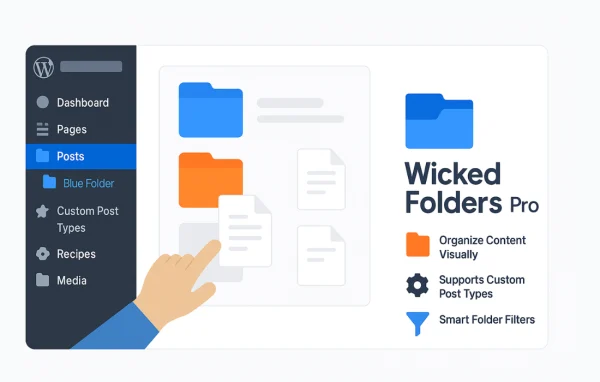
Wicked Folders Pro by Wicked is a WordPress plugin that adds virtual folders to your admin area. You can sort pages, posts, media files and custom post types into folders, and your URLs and permalinks stay exactly as they are.
- Version
- 4.2.0
- Released
- Oct 2, 2026
- Developer
- Wicked
- Type
- WordPress plugin
- Licence
- GPL
- Included in
- Every plan, or $7.19 a year on its own
What’s new in Wicked Folders Pro 4.2.0
Version 4.2.0 · Oct 2, 2026
Latest
- NewRedesigned settings screen
- NewDownload media folders (Wicked Folders Pro)
- FixedSecurity issue allowing users with contributor role and above to assign items they can't edit to folders using the REST API
- FixedSecurity issue allowing users with contributor role and above to overwrite another user's folder pane state using the REST API
- FixedFolder permissions not being applied when unassigning items from folders
- FixedSecurity issue allowing SQL injection via the folder filter on the Users screen (Wicked Folders Pro)
What it does
As a site grows, the WordPress dashboard fills up with long lists of pages, posts and media files. Finding one item means scrolling or searching through everything. This plugin lets you group that content into folders you name yourself, so a busy blog, a large media library or a site with several custom post types becomes easier to work through day to day.
The folders are virtual, which means they only exist in the admin. Moving a page into a folder does not change its URL or permalink, so the public site is unaffected. You build and arrange folders with drag and drop, assign many items at once, and use search and filter options to find content inside folders. Folder permissions also help teams of editors and contributors keep a consistent structure.
Best for
- Bloggers with large archives of posts and pages
- Sites with big media libraries
- Content teams sharing one WordPress dashboard
Features
Virtual folders
Organize pages, posts, media and custom post types into folders that live only in the admin, leaving URLs and permalinks unchanged.
Drag and drop sorting
Create folders and move content into them by dragging, which makes sorting a long list of items quick and hands-on.
Works with any content type
Folders are available for pages, posts, media files and custom post types, so one system covers the whole site.
Bulk folder assignment
Select multiple items and assign or move them to a folder in one step, which helps when organizing a large backlog of content.
Folder search and filter
Search and filter options let you locate content within your folders without scrolling through every item in a list.
Custom folder names
Name folders however you like so the structure matches the way you or your team already think about the site's content.
Folder permissions
Permissions control what users can do with folders, giving teams of editors and contributors a shared and consistent way to organize content.
Wicked Folders Pro older versions
- 4.1.4Jun 30
- 4.1.2Apr 72 fixes
- 4.1.1Nov 18, 20252 fixes
- 4.0.0Nov 12, 20252 new, 3 improvements, 1 fix
- 3.2.3Jun 3, 2025
- 3.2.2May 22, 2025
- 3.2.1Mar 28, 2025
- 3.2.0Mar 27, 2025
- 3.1.3Nov 16, 2024
- 3.1.2Oct 24, 2024
Members and buyers of this product can download older versions.
23 older versions in all. If you need one that is not listed, ask support.
Questions about Wicked Folders Pro
Will putting pages into folders change my URLs?
No. The folders are virtual and only exist in the WordPress admin. Assigning a page, post or media file to a folder does not alter its URL or permalink, so links to your public pages keep working as before.
Can I use folders for custom post types as well as media?
Yes. Folders work with pages, posts, media files and custom post types. That means you can apply the same folder approach across all the content you manage in the dashboard.
Is there a way to move a lot of items at once?
Yes. Bulk folder assignment lets you select multiple items and assign or move them to a folder together. You can also drag and drop items, which is handy for smaller adjustments.
Does it help when several people edit the same site?
It can. Shared folders give editors and contributors a standard way to organize content, and folder permissions help control what each user can do with folders and the items in them.
Is Wicked Folders Pro free?
The code of Wicked Folders Pro is licensed under the GPL, so anyone may use, change and share it. GPL Feast is a paid service: a plan or a single purchase gives you the download and automatic updates. The developer's own support, licence key and online services are not included.
Which version of Wicked Folders Pro is this?
Version 4.2.0, released Oct 2, 2026. New versions appear here when the developer publishes them, and members get them as automatic updates.
How do I update Wicked Folders Pro?
Install the free GPL Feast Updater on your site and connect it with your API key. It installs new versions of Wicked Folders Pro automatically and keeps a backup, so you can roll back.
You might also like






