
Plugin
Updated
Wiloke Call To Action
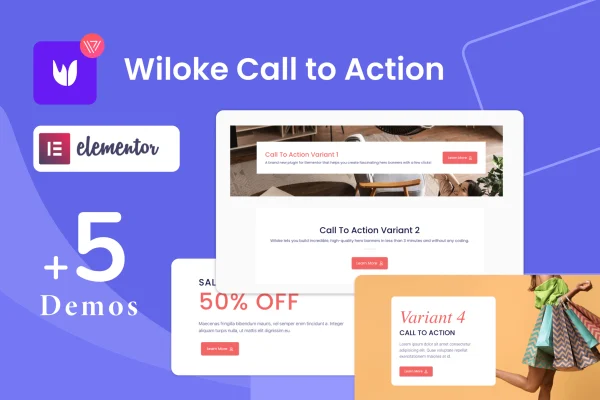
Wiloke Call To Action is an Elementor addon plugin by Wiloke for building call to action hero banners. You pick a template, upload an image, add your text and set up a button, all inside Elementor and without writing code.
- Version
- 1.0.23
- Released
- May 2, 2023
- Type
- WordPress plugin
- Requires
- Elementor
- Licence
- GPL
- Included in
- Every plan, or $3.99 on its own
What’s new in Wiloke Call To Action 1.0.23
Version 1.0.23 · May 2, 2023
Latest
What it does
Many sites need a strong banner at the top of a page that tells visitors what to do next, and building one by hand in Elementor can take a lot of fiddling with sections, backgrounds and buttons. This plugin gives you ready banner layouts so the structure is already in place. It requires Elementor and works inside the editor you already use, so there is no separate tool to learn.
The workflow is short: choose one of five hero banner templates, upload your image, write your heading and text, then customize the call to action button. You can adjust backgrounds and add animation effects, including parallax, to match your brand. Banners are responsive and retina ready, so they display cleanly on phones, tablets and large screens. It suits landing pages, home pages and promotional sections where a clear prompt matters.
Best for
- Elementor users building landing pages and home pages
- Freelancers and agencies creating client hero sections quickly
- Small business sites promoting a product or offer
Features
Five hero banner templates
Start from five distinct hero banner layouts built around a call to action, then adjust them to fit your page instead of designing from scratch.
No coding needed
Build a banner by uploading an image, inserting your text and customizing the button, with no code required at any step.
Customizable backgrounds
Change the banner background to suit your brand and content, so each hero section fits the look of the page it sits on.
Parallax and animation effects
Add parallax and other animated effects to banners to give hero sections movement and draw attention to your message.
Flexible CTA buttons
Customize the call to action button so its look and wording match the action you want visitors to take on that page.
Responsive and retina ready
Banners adapt to different screen sizes and are retina ready, so images and text stay sharp on high resolution displays.
Built for Elementor
The addon is made specifically for Elementor, so you create and edit banners within your normal Elementor page building process.
Questions about Wiloke Call To Action
Do I need Elementor to use this plugin?
Yes. Wiloke Call To Action is built specifically as an addon for Elementor and requires it. You create and edit your banners inside the Elementor editor alongside the rest of your page content.
How many banner templates are included?
The plugin includes five distinct hero banner templates. Each one can be customized with your own image, text, background, animation effects and call to action button, so you can get different looks from the same starting layouts.
Will the banners look right on mobile devices?
The banners are fully responsive and retina ready. They adapt to different screen sizes, from phones to desktop monitors, and keep images crisp on high resolution screens.
Can I add motion effects to my banners?
Yes. You can apply animation effects to your banners, including parallax backgrounds. These options sit alongside the background and button settings, so you can decide how much movement each banner has.
Is Wiloke Call To Action free?
The code of Wiloke Call To Action is licensed under the GPL, so anyone may use, change and share it. GPL Feast is a paid service: a plan or a single purchase gives you the download and automatic updates. The developer's own support, licence key and online services are not included.
Which version of Wiloke Call To Action is this?
Version 1.0.23, released May 2, 2023. New versions appear here when the developer publishes them, and members get them as automatic updates.
How do I update Wiloke Call To Action?
Install the free GPL Feast Updater on your site and connect it with your API key. It installs new versions of Wiloke Call To Action automatically and keeps a backup, so you can roll back.
What does Wiloke Call To Action need?
Wiloke Call To Action needs Elementor installed and active.
You might also like






