
Plugin
Updated
Wiloke Countdown
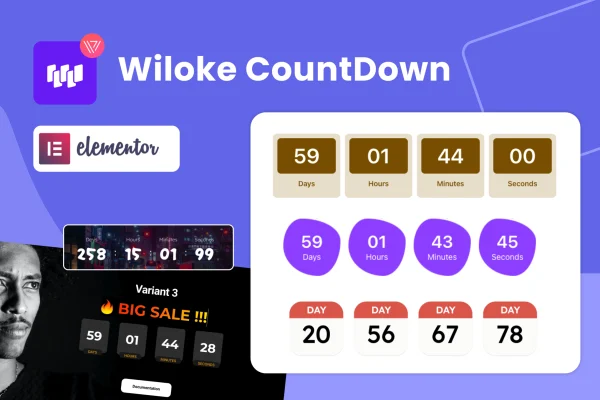
Wiloke Countdown Timer for Elementor is a WordPress plugin by Wiloke that adds countdown timers to pages you build with Elementor. It gives you several timer designs and simple controls, so you can mark the end of a sale or the start of an event right on the page.
- Version
- 1.0.21
- Released
- May 2, 2023
- Type
- WordPress plugin
- Requires
- Elementor
- Licence
- GPL
- Included in
- Every plan, or $3.99 on its own
What’s new in Wiloke Countdown 1.0.21
Version 1.0.21 · May 2, 2023
Latest
What it does
Time-limited offers work better when visitors can see exactly how long they have. This plugin puts a live countdown on your Elementor pages so the deadline for a sale, launch or event is clear at a glance. It requires Elementor and works inside the builder, which means you place and style the timer the same way you handle the rest of your layout, keeping the design consistent with your site.
You start by picking one of the included timer layouts, then adjust colors, fonts and the timer format using the plugin's controls, with no coding needed. The timers are responsive and retina ready, so they display cleanly on desktops and phones, and they animate live as the clock runs down. Typical uses include limited-time sales, product launches, webinars, tutorials, events and holiday promotions.
Best for
- Online stores running limited-time sales
- Marketers promoting launches, webinars or events
- Designers building Elementor sites for clients
Features
Built for Elementor
Add countdown timers directly inside the Elementor page builder, so they sit alongside your other content and follow the same design workflow.
Multiple timer designs
Choose from a range of countdown layouts and customize them to match the look of your site or a specific campaign.
Color and font controls
Adjust colors, fonts and timer formats through user-friendly settings, with no code required to get the look you want.
Responsive and retina ready
Timers adapt to different screen sizes and stay sharp on high-resolution displays, from desktop monitors down to smartphones.
Live animated countdowns
The timers count down live on the page with animation, giving visitors a clear, moving view of how much time is left.
Fits many campaign types
Use the same tool for limited-time sales, product launches, events, webinars, tutorials and holiday offers across your site.
Questions about Wiloke Countdown
Do I need Elementor to use this countdown plugin?
Yes. The plugin requires Elementor and is designed to work inside it. You add and style the countdown timers within the Elementor page builder, alongside the other elements on your page.
Can I change how the timer looks?
Yes. You can pick from several countdown layouts and then adjust colors, fonts and the timer format through the plugin's controls. No coding skills are needed to make these changes.
Will the countdown display properly on mobile phones?
The timers are responsive and retina ready, so they adjust to different screen sizes and stay crisp on high-resolution displays. That covers desktops, tablets and smartphones.
What kinds of promotions can I use it for?
It suits any campaign with a deadline or start time, such as limited-time sales, product launches, events, webinars, tutorials and holiday offers.
Is Wiloke Countdown free?
The code of Wiloke Countdown is licensed under the GPL, so anyone may use, change and share it. GPL Feast is a paid service: a plan or a single purchase gives you the download and automatic updates. The developer's own support, licence key and online services are not included.
Which version of Wiloke Countdown is this?
Version 1.0.21, released May 2, 2023. New versions appear here when the developer publishes them, and members get them as automatic updates.
How do I update Wiloke Countdown?
Install the free GPL Feast Updater on your site and connect it with your API key. It installs new versions of Wiloke Countdown automatically and keeps a backup, so you can roll back.
What does Wiloke Countdown need?
Wiloke Countdown needs Elementor installed and active.
You might also like






