
Plugin
Updated
Wiloke Expanding Flex Cards
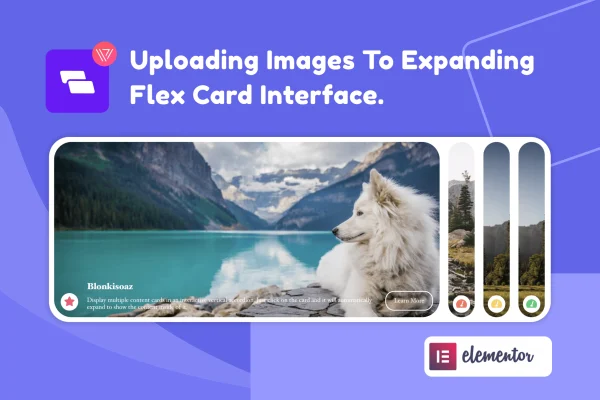
Wiloke Expanding Flex Cards is an Elementor addon plugin by Wiloke that displays images and post content inside animated cards that expand on click or hover. You build and style the cards in Elementor's drag and drop editor, with no coding needed.
- Version
- 1.0.0
- Released
- May 7, 2023
- Type
- WordPress plugin
- Requires
- Elementor
- Licence
- GPL
- Included in
- Every plan, or $3.99 on its own
What’s new in Wiloke Expanding Flex Cards 1.0.0
Version 1.0.0 · May 7, 2023
Latest
What it does
Standard image grids and post lists can feel flat, especially on portfolio, service or team sections where you want visitors to explore. This plugin adds an expanding card layout to Elementor. Each card opens up when a visitor clicks or hovers, which gives more room to the item in focus while the rest stay visible. You can fill the cards with images or pull in posts, choosing specific post types or handpicking individual post IDs so only the content you want appears.
Because it works as an Elementor widget, you place it on a page like any other element and adjust it from the editor panel. Colors, animations, card sizes and layout settings are all editable, so the cards can match the rest of your design. The layout is responsive and retina ready, and there is no limit on how many cards you display. It needs Elementor to run, and it fits portfolios, landing pages, product sections and blog highlights.
Best for
- Portfolio sites presenting projects as interactive cards
- Agencies building service or team sections in Elementor
- Blogs highlighting selected posts on landing pages
Features
Expanding card layout
Images and posts appear in an interactive card layout where each card expands on click or hover, giving the selected item more space on the page.
Elementor widget
Add the flex cards to any page inside Elementor's drag and drop editor and adjust them from the widget settings without writing code.
Post type selection
Choose which post types feed the cards, including custom post types, so the layout can display portfolio items, products or regular blog posts.
Handpicked post IDs
Pick individual posts by ID when you want exact control over which entries appear in the card layout and leave everything else out.
Style and animation controls
Change colors, animations, card sizes and layout settings so the cards fit your brand and the look of the surrounding page.
Responsive and retina ready
The cards adapt to desktops, tablets and phones, and images stay sharp on high resolution screens.
No card limit
Display as many flex cards as your section needs, whether that is a handful of services or a long run of portfolio pieces.
Questions about Wiloke Expanding Flex Cards
Do I need Elementor to use this plugin?
Yes. Wiloke Expanding Flex Cards works as an Elementor widget, so Elementor must be active on your site. You add the cards to a page through the Elementor editor and configure them from the widget's settings panel.
Can the cards show my own posts instead of just images?
Yes. The cards can display images or post content. You can select specific post types, including custom post types, or enter individual post IDs to control exactly which entries appear in the layout.
How do the cards behave when visitors interact with them?
Each card expands when a visitor clicks or hovers on it, giving that item more room while the others stay in view. You can adjust the animations along with colors, card sizes and layout settings.
Will the cards work on mobile devices?
The layout is responsive, so the cards adapt to desktops, tablets and smartphones. They are also retina ready, which keeps images crisp on high resolution screens.
Is Wiloke Expanding Flex Cards free?
The code of Wiloke Expanding Flex Cards is licensed under the GPL, so anyone may use, change and share it. GPL Feast is a paid service: a plan or a single purchase gives you the download and automatic updates. The developer's own support, licence key and online services are not included.
Which version of Wiloke Expanding Flex Cards is this?
Version 1.0.0, released May 7, 2023. New versions appear here when the developer publishes them, and members get them as automatic updates.
How do I update Wiloke Expanding Flex Cards?
Install the free GPL Feast Updater on your site and connect it with your API key. It installs new versions of Wiloke Expanding Flex Cards automatically and keeps a backup, so you can roll back.
What does Wiloke Expanding Flex Cards need?
Wiloke Expanding Flex Cards needs Elementor installed and active.
You might also like






