
Plugin
Updated
Wiloke Posts Elegant
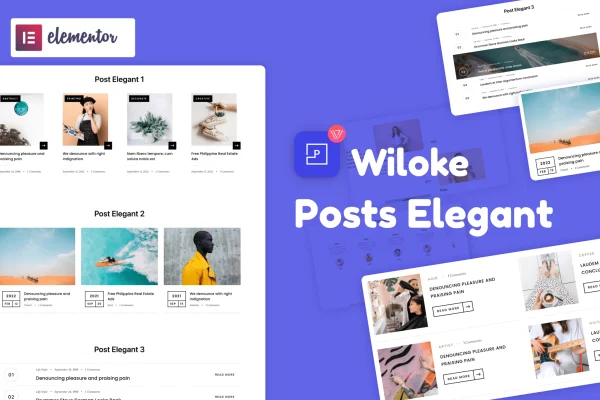
Wiloke Posts Elegant is a WordPress plugin by Wiloke that lets you place blog post listings on any page built with Elementor. It gives you five layout styles, filtering by category or tag, and settings for how many posts appear and how they look.
- Version
- 1.0.20
- Released
- May 2, 2023
- Type
- WordPress plugin
- Requires
- Elementor
- Licence
- GPL
- Included in
- Every plan, or $3.99 on its own
What’s new in Wiloke Posts Elegant 1.0.20
Version 1.0.20 · May 2, 2023
Latest
What it does
Many Elementor sites need a blog feed on pages other than the main blog, such as a homepage news section or a category spotlight on a landing page. This plugin handles that job. You add it to a page in Elementor, pick one of five layout styles, and choose which posts to pull in by category, tag or time order. Each preview can show the headline, author, category and featured image, so visitors get a clear sense of the post before clicking.
Once the posts are in place, you can adjust the details in Elementor's drag-and-drop interface. Settings cover the number of posts per page, post size, padding and background color, which helps the listing match the rest of your design. The layouts are responsive and retina ready, so they adapt to different screen sizes. Developers who want more control can add custom HTML and CSS to fine-tune the appearance. Elementor is required.
Best for
- Bloggers building their sites with Elementor
- News and magazine style sites showing recent articles
- Freelancers adding blog sections to client pages
Features
Five layout styles
Choose from five distinct designs for your blog post previews and pick the one that fits the look of your site.
Category and tag filtering
Show posts by category, by tag or by time order, so each page displays only the content you want there.
Place posts on any page
Add blog post listings to any page of an Elementor site, such as a homepage, landing page or section page.
Detailed post previews
Each preview can display the headline, author, category and featured image, giving readers context before they open a post.
Adjustable display settings
Control the number of posts per page, post size, padding and background color to keep listings consistent with your branding.
Responsive and retina ready
Post layouts adapt to different devices and screen sizes and are prepared for high resolution displays.
Custom HTML and CSS
Developers can add their own HTML and CSS to adjust the appearance of post listings beyond the built-in settings.
Questions about Wiloke Posts Elegant
Do I need Elementor to use this plugin?
Yes. The plugin works with the Elementor page builder, and you add and customize the blog post listings through Elementor's drag-and-drop interface on the pages you build.
Can I show only posts from one category?
Yes. You can filter posts by category or by tag, and you can also sort them by time order. This lets you show, for example, only news posts on one page and tutorials on another.
What information appears in each post preview?
Each preview can show the post headline, the author, the category and the featured image. You can also adjust post size, padding and background color so the previews suit your page design.
Will the post layouts work on phones?
The layouts are responsive and retina ready, so they adjust to different devices and screen sizes. If you need further changes, you can add custom CSS to fine-tune how they look.
Is Wiloke Posts Elegant free?
The code of Wiloke Posts Elegant is licensed under the GPL, so anyone may use, change and share it. GPL Feast is a paid service: a plan or a single purchase gives you the download and automatic updates. The developer's own support, licence key and online services are not included.
Which version of Wiloke Posts Elegant is this?
Version 1.0.20, released May 2, 2023. New versions appear here when the developer publishes them, and members get them as automatic updates.
How do I update Wiloke Posts Elegant?
Install the free GPL Feast Updater on your site and connect it with your API key. It installs new versions of Wiloke Posts Elegant automatically and keeps a backup, so you can roll back.
What does Wiloke Posts Elegant need?
Wiloke Posts Elegant needs Elementor installed and active.
You might also like






