
Plugin
Updated
Wiloke Posts Slider
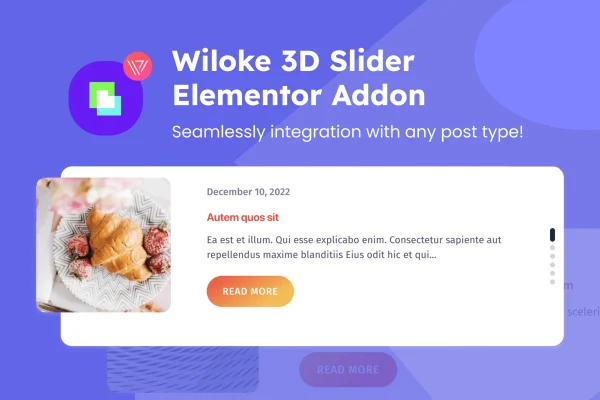
Wiloke Posts Slider is a WordPress plugin for Elementor that turns your posts into responsive sliders. It works with any post type, so blog articles, portfolio items or custom content can all rotate through a slider you place and style inside the page builder.
- Version
- 1.0.0
- Released
- Sep 20, 2023
- Type
- WordPress plugin
- Requires
- Elementor
- Licence
- GPL
- Included in
- Every plan, or $3.99 on its own
What’s new in Wiloke Posts Slider 1.0.0
Version 1.0.0 · Sep 20, 2023
Latest
What it does
Static lists of posts can make good content easy to miss, especially on a busy home page or landing page. This plugin gives you a slider that pulls in posts and presents them as slides visitors can move through. Because it supports all post types, you can feature regular blog posts, portfolio entries, products or any custom post type your site uses, and you decide how many items appear in the slider.
The plugin requires Elementor and works inside its editor, so you add the slider to a page and adjust it while you see the result. You can set colors for titles and descriptions and apply gradient effects to buttons to match your site's look. The sliders are responsive and adapt to desktops, tablets and phones. It suits blogs, news sites, portfolios and online stores that want a visual way to surface content.
Best for
- Bloggers who want to feature recent or selected posts
- News and magazine sites built with Elementor
- Portfolio and store sites using custom post types
Features
Works with any post type
Display regular blog posts, pages or custom post types in the slider, so you can feature whatever content matters most on your site.
Built for Elementor
Add the slider from within Elementor and customize it in the editor while you see your changes on the page in real time.
Responsive slider layout
Sliders adjust to different screen sizes, so they display properly for visitors on desktops, tablets and smartphones.
Title and description colors
Choose custom colors for post titles and descriptions so the slider text fits your site's branding and the surrounding design.
Gradient button effects
Apply gradient effects to the slider's buttons to give calls to read more a styled look that matches your color scheme.
Control the number of posts
Set how many posts the slider shows, keeping it to a short featured selection or a longer rotating set of content.
Questions about Wiloke Posts Slider
Do I need Elementor to use this slider?
Yes. The plugin is built for Elementor and requires it. You place and customize the slider inside the Elementor editor, where you can see your changes as you make them.
Can it show custom post types or only blog posts?
It supports all post types. Along with standard blog posts, you can display custom post types such as portfolio items or other content your site registers, which makes it useful beyond a typical blog.
How much can I change the slider's appearance?
You can set custom colors for titles and descriptions, add gradient effects to buttons and choose how many posts the slider features. These options help the slider match your site's branding.
Will the slider look right on phones?
The sliders are responsive, so they adapt to the screen they appear on. Visitors on desktops, tablets and smartphones get a layout sized for their device.
Is Wiloke Posts Slider free?
The code of Wiloke Posts Slider is licensed under the GPL, so anyone may use, change and share it. GPL Feast is a paid service: a plan or a single purchase gives you the download and automatic updates. The developer's own support, licence key and online services are not included.
Which version of Wiloke Posts Slider is this?
Version 1.0.0, released Sep 20, 2023. New versions appear here when the developer publishes them, and members get them as automatic updates.
How do I update Wiloke Posts Slider?
Install the free GPL Feast Updater on your site and connect it with your API key. It installs new versions of Wiloke Posts Slider automatically and keeps a backup, so you can roll back.
What does Wiloke Posts Slider need?
Wiloke Posts Slider needs Elementor installed and active.
You might also like






