
Plugin
Updated
Wiloke Pricing
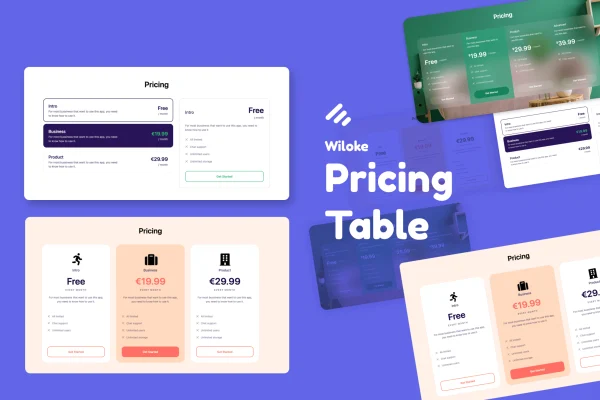
Wiloke Pricing Table Addon for Elementor is a WordPress plugin for building pricing tables inside the Elementor page builder. You pick a template, then adjust colors, fonts, icons, images and animations so your plans or service packages match the rest of your site.
- Version
- 2.0.2
- Released
- May 2, 2023
- Type
- WordPress plugin
- Requires
- Elementor
- Licence
- GPL
- Included in
- Every plan, or $3.99 on its own
What’s new in Wiloke Pricing 2.0.2
Version 2.0.2 · May 2, 2023
Latest
What it does
Laying out pricing plans by hand in a page builder takes time, and getting columns, features and buttons to line up across devices can be fiddly. This addon gives you ready-made pricing table templates designed for various industries, so you start from a finished layout and change only what you need. It works inside Elementor with drag-and-drop editing, and no coding is required to customize the tables.
Once a template is in place, you can change typography, colors, icons and images, and add animation effects that draw attention to pricing options and buttons. Tables are responsive and adjust to different screen sizes, and the graphics are retina ready for high-resolution displays. The addon is built to work with any WordPress theme, which makes it practical for agencies and freelancers reusing it across client projects. It requires Elementor.
Best for
- SaaS sites presenting subscription plans
- Digital agencies listing service packages
- Freelancers building Elementor sites for clients
Features
Ready-made pricing templates
Choose from a range of pricing table templates designed for different industries, giving you a finished layout to start from instead of building columns from scratch.
Styling without code
Adjust colors, typography, icons, images and animations through the editing interface, so your tables match your brand without touching any code.
Drag-and-drop Elementor editing
The addon works inside the Elementor page builder, letting you place and edit pricing tables with the same drag-and-drop workflow you already use.
Responsive layouts
Pricing tables adjust automatically to different screen sizes, so plans stay readable for visitors on desktops, tablets and phones.
Retina ready graphics
Visuals are prepared for high-resolution screens, keeping icons and images in your pricing tables sharp on retina displays.
Animation effects
Add subtle animations that highlight specific pricing options and call-to-action buttons, helping visitors notice the plan you want to feature.
Custom icons and images
Place your own icons and images in tables to make features easier to scan and to give each plan a clear visual identity.
Works with any theme
The addon is designed to run with any WordPress theme, so you can use it across different sites and projects.
Questions about Wiloke Pricing
Do I need Elementor to use this pricing table addon?
Yes. The plugin is built as an addon for the Elementor page builder and requires Elementor. You create and edit pricing tables inside Elementor using its drag-and-drop editor.
Can I change the look of the templates to match my brand?
Yes. After choosing a template, you can customize colors, typography, icons, images and animation effects. All of this is done through the editing interface, so no coding knowledge is needed to make the tables fit your site's style.
Will my pricing tables look right on phones?
The tables are responsive and automatically adjust to different screen sizes, so they display properly on desktop and mobile. Graphics are also retina ready, which keeps them crisp on high-resolution screens.
Does it work with my current WordPress theme?
Wiloke Pricing is designed to be compatible with all WordPress themes, so you can add pricing tables to an existing site without switching themes, as long as Elementor is active.
Is Wiloke Pricing free?
The code of Wiloke Pricing is licensed under the GPL, so anyone may use, change and share it. GPL Feast is a paid service: a plan or a single purchase gives you the download and automatic updates. The developer's own support, licence key and online services are not included.
Which version of Wiloke Pricing is this?
Version 2.0.2, released May 2, 2023. New versions appear here when the developer publishes them, and members get them as automatic updates.
How do I update Wiloke Pricing?
Install the free GPL Feast Updater on your site and connect it with your API key. It installs new versions of Wiloke Pricing automatically and keeps a backup, so you can roll back.
What does Wiloke Pricing need?
Wiloke Pricing needs Elementor installed and active.
You might also like






