
Plugin
Updated
Wiloke Product Furniture
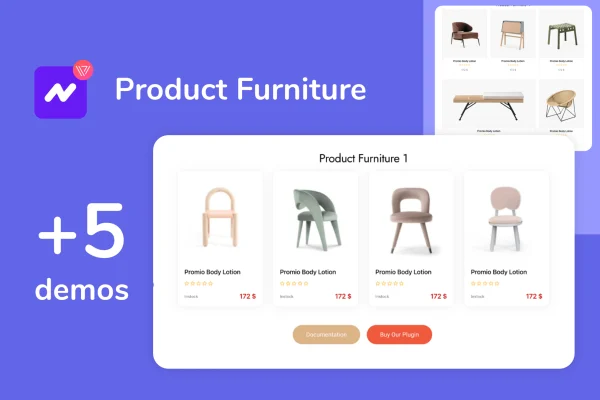
Elementor WooCommerce Product Furniture by Wiloke is a WordPress plugin for furniture stores built with WooCommerce and Elementor. It lets you place your furniture catalog on any page of your site, so visitors can browse products and add them to the cart without leaving the page they are on.
- Version
- 1.0.15
- Released
- May 2, 2023
- Type
- WordPress plugin
- Licence
- GPL
- Included in
- Every plan, or $3.99 on its own
What’s new in Wiloke Product Furniture 1.0.15
Version 1.0.15 · May 2, 2023
Latest
What it does
Furniture shops often want products to appear beyond the standard shop page, such as on the homepage, a landing page or a dedicated product section. This plugin handles that by placing your WooCommerce furniture catalog wherever you build pages in Elementor. Shoppers can look through items, check prices and reviews, and add products to their cart right from that page. That keeps browsing and buying in one place instead of sending people back and forth between pages.
You pick from five display styles, including carousel layouts, then adjust colors, fonts, text and images to match your store's branding. Shoppers can filter items by status (On Sale, In Stock or Out of Stock) as well as by categories and brands. Each product can show customer reviews, regular and sale prices, and an Add to Cart button. The layouts are responsive and retina ready, and the plugin is built with HTML, CSS and JS.
Best for
- Online furniture stores running WooCommerce
- Elementor users building furniture shop homepages or landing pages
- Agencies creating home decor stores for clients
Features
Catalog on any page
Place your furniture products on the homepage, landing pages or product sections, so visitors can browse and add items to the cart without leaving the page.
Five display styles
Choose between five layouts for your product display, including carousel options, to fit the look of your store and the page you are building.
Design customization
Change colors, fonts, text and images in the product display so it matches the branding and visual style of the rest of your storefront.
Status filters
Let shoppers narrow products by status, showing only items that are On Sale, In Stock or Out of Stock while they browse your furniture catalog.
Category and brand filters
Visitors can filter the displayed furniture by product categories and by brands, which helps them find relevant pieces in a larger inventory.
Reviews and pricing
Show customer reviews alongside both regular and sale prices for each product, giving shoppers the details they need right in the display.
Add to Cart buttons
Each product can include an Add to Cart button, so shoppers can put furniture in their cart directly from the page they are viewing.
Responsive and retina ready
Product layouts adapt to desktops, tablets and smartphones, and are retina ready so images stay sharp on high resolution screens.
Questions about Wiloke Product Furniture
Which plugins does this need to work?
It is built for sites that use both WooCommerce and Elementor. WooCommerce supplies the furniture products, prices and cart, and Elementor is where you place and style the product displays on your pages.
Can customers add items to the cart without leaving the page?
Yes. The product display can include Add to Cart buttons, so visitors can browse your furniture and add pieces to their cart from the homepage, a landing page or any other page where you place the catalog.
What filtering options do shoppers get?
Shoppers can filter products by status, choosing On Sale, In Stock or Out of Stock. They can also filter by product categories and by brands, which is useful when your catalog covers many types of furniture.
How much control do I have over the look?
You can choose from five display styles, including carousel layouts, and then adjust colors, fonts, text and images. That lets the product display match your store's branding, and the layouts are responsive across devices.
Is Wiloke Product Furniture free?
The code of Wiloke Product Furniture is licensed under the GPL, so anyone may use, change and share it. GPL Feast is a paid service: a plan or a single purchase gives you the download and automatic updates. The developer's own support, licence key and online services are not included.
Which version of Wiloke Product Furniture is this?
Version 1.0.15, released May 2, 2023. New versions appear here when the developer publishes them, and members get them as automatic updates.
How do I update Wiloke Product Furniture?
Install the free GPL Feast Updater on your site and connect it with your API key. It installs new versions of Wiloke Product Furniture automatically and keeps a backup, so you can roll back.
You might also like






