
Plugin
Updated
Wiloke Team Member
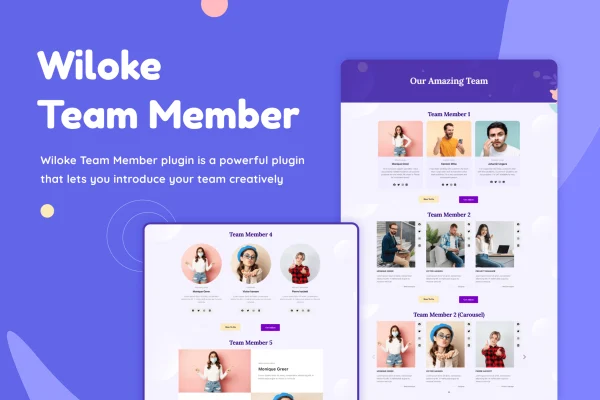
Wiloke Team Member, built by Wiloke, is an Elementor add-on plugin for presenting the people behind a business. It gives you a set of text and image templates made for team sections, so you can show each member's photo, job title and bio inside the Elementor editor.
- Version
- 2.0.1
- Released
- May 2, 2023
- Type
- WordPress plugin
- Requires
- Elementor
- Licence
- GPL
- Included in
- Every plan, or $3.99 on its own
What’s new in Wiloke Team Member 2.0.1
Version 2.0.1 · May 2, 2023
Latest
What it does
Most company and agency sites need an about or team page, and building attractive member profiles from scratch in a page builder can take a lot of trial and error. This plugin gives you ready layouts designed for team presentations, including image blocks, image carousels, interleaved layouts and text overlays. You pick a layout that suits the page, add your people, and adjust the styling to match your brand without writing code.
The plugin requires Elementor and works through its drag and drop editor, so the templates behave like the rest of your Elementor content. Profiles can use hover color animations to add some movement when visitors move over a card. The layouts are responsive and retina ready, which keeps photos and text looking sharp on phones, tablets and high resolution screens. It fits corporate sites, agency portfolios and any business that wants to put faces to its name.
Best for
- Corporate websites with an about or team page
- Agency portfolios presenting their staff
- Freelancers building Elementor sites for small businesses
Features
Team profile templates
Choose from a range of text and image templates built for team sections, covering image blocks, text overlays and other layouts for member profiles.
Image carousels
Display team members in a carousel layout, a handy option when you have many people to present without making the page very long.
Interleaved layouts
Use interleaved layouts that alternate images and text, giving a team page a more editorial feel than a plain grid of cards.
Hover color animations
Add hover color animations to profiles so cards react when visitors move their cursor over them, giving the section a more interactive feel.
Photo, title and bio fields
Present each member with a photo, job title and short bio, so visitors can see who does what at your business.
Responsive and retina ready
Profiles adapt to different screen sizes and display cleanly on high resolution screens, so team sections hold up on phones, tablets and desktops.
Editing inside Elementor
Customize the templates with the Elementor drag and drop editor, adjusting styles to match your brand without needing any coding knowledge.
Questions about Wiloke Team Member
Do I need Elementor to use this plugin?
Yes. The plugin is an Elementor add-on and requires Elementor to be active. Its team templates are placed and customized through the Elementor drag and drop editor, alongside the rest of your page content.
What kinds of team layouts are included?
The templates cover image blocks, image carousels, interleaved layouts and text overlays. Each layout is meant for presenting team members with their photo, job title and bio, and you can adjust the styling to suit your site.
Will the team profiles look good on mobile devices?
The layouts are responsive and retina ready. They adapt to different screen sizes and keep images sharp on high resolution displays, so your team section should read well on phones, tablets and desktop screens.
Can I customize the templates without coding?
Yes. Customization happens in the Elementor editor using drag and drop controls, so you can change the look of team sections to match your brand without writing any code.
Is Wiloke Team Member free?
The code of Wiloke Team Member is licensed under the GPL, so anyone may use, change and share it. GPL Feast is a paid service: a plan or a single purchase gives you the download and automatic updates. The developer's own support, licence key and online services are not included.
Which version of Wiloke Team Member is this?
Version 2.0.1, released May 2, 2023. New versions appear here when the developer publishes them, and members get them as automatic updates.
How do I update Wiloke Team Member?
Install the free GPL Feast Updater on your site and connect it with your API key. It installs new versions of Wiloke Team Member automatically and keeps a backup, so you can roll back.
What does Wiloke Team Member need?
Wiloke Team Member needs Elementor installed and active.
You might also like






