
Plugin
Updated
Wiloke Timeline
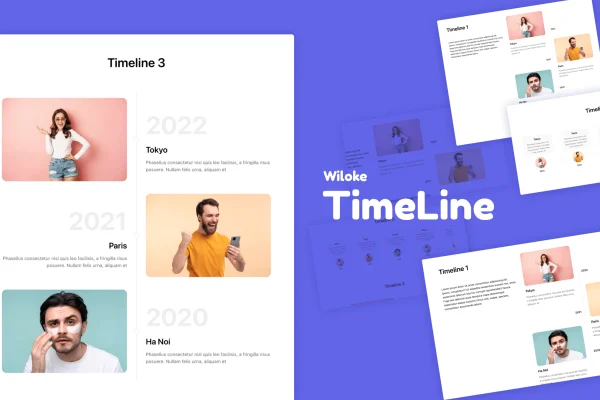
Wiloke Timeline by Wiloke is a WordPress plugin that adds timeline layouts to the Elementor page builder. It helps you present chronological content, such as company history, project roadmaps, schedules or process steps, in a clear visual sequence that you can style to match your brand.
- Version
- 2.0.2
- Released
- May 2, 2023
- Type
- WordPress plugin
- Requires
- Elementor
- Licence
- GPL
- Included in
- Every plan, or $3.99 on its own
What’s new in Wiloke Timeline 2.0.2
Version 2.0.2 · May 2, 2023
Latest
What it does
Chronological information is hard to read as a block of text. A list of dates and events gets lost on a page, and building a custom timeline by hand takes time. This plugin gives Elementor users ready-made timeline layouts so that milestones, roadmap stages or process steps appear in an ordered, visual flow. It requires Elementor, and it works inside the builder with drag and drop editing and live previews, so you build the timeline on the page you are already designing.
You start by picking one of three timeline templates and then fill in each entry with its date, image, icon and text. Fonts and other details can be adjusted to fit your branding while the layout structure stays intact. The timelines are responsive and retina ready, so they display cleanly on phones, tablets and desktops. It fits well on about pages, project or product roadmap pages, event and program schedules, appointment overviews and step-by-step process explanations.
Best for
- Business sites presenting company history and milestones
- Agencies and freelancers building Elementor sites for clients
- Product teams publishing roadmaps or process steps
Features
Three timeline layouts
Choose from three distinct timeline templates and pick the one that best suits your history, roadmap, events or process content.
Editable entry content
Set the dates, images, icons and text for every timeline entry so each milestone carries the details your visitors need.
Branding adjustments
Change fonts, icons and other visual details to match your brand while keeping the timeline layout structure in place.
Built for Elementor
Works inside the Elementor page builder with drag and drop creation and live previews as you edit your timeline.
Responsive display
Timelines adapt to different screen sizes, so entries stay readable on mobile phones, tablets and desktop screens.
Retina ready graphics
Timelines are retina ready, keeping images and icons sharp on high resolution displays.
Flexible use cases
Use timelines for business milestones, program schedules, process steps, appointments or project progress shown in chronological order.
Questions about Wiloke Timeline
Do I need Elementor to use this timeline plugin?
Yes. The plugin requires Elementor and is built to work inside it. You create and edit timelines in the Elementor page builder using drag and drop, with live previews of your changes as you work.
How many timeline designs are included?
There are three timeline templates. You pick the layout that suits your content, then customize the dates, images, icons, fonts and text of each entry to fit your brand without changing the underlying structure.
Will the timelines look good on mobile devices?
The timelines are responsive, so they adjust to different screen sizes including phones and tablets. They are also retina ready, which keeps images and icons crisp on high resolution screens.
What kinds of content can I show with Wiloke Timeline?
It suits any content that follows a chronological order. Common uses include company history, business milestones, project roadmaps, program timelines, appointment schedules, process steps and project progress updates.
Is Wiloke Timeline free?
The code of Wiloke Timeline is licensed under the GPL, so anyone may use, change and share it. GPL Feast is a paid service: a plan or a single purchase gives you the download and automatic updates. The developer's own support, licence key and online services are not included.
Which version of Wiloke Timeline is this?
Version 2.0.2, released May 2, 2023. New versions appear here when the developer publishes them, and members get them as automatic updates.
How do I update Wiloke Timeline?
Install the free GPL Feast Updater on your site and connect it with your API key. It installs new versions of Wiloke Timeline automatically and keeps a backup, so you can roll back.
What does Wiloke Timeline need?
Wiloke Timeline needs Elementor installed and active.
You might also like






