
Plugin
Updated
WooCommerce Category Gallery
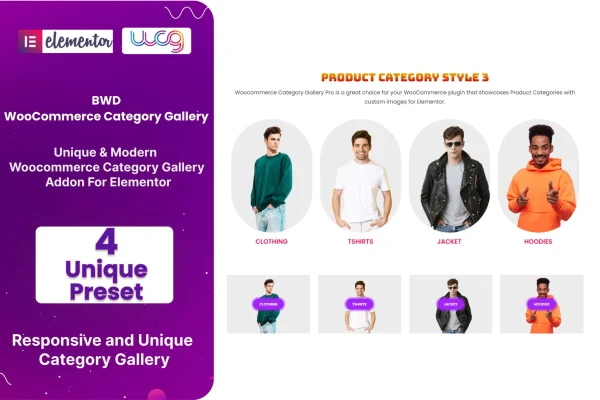
WooCommerce Category Gallery is a WordPress plugin that adds a category gallery element to Elementor. It lets WooCommerce store owners display product categories as image galleries with custom text, links and buttons, all arranged visually without writing code.
- Version
- 1.6
- Released
- Aug 24, 2026
- Type
- WordPress plugin
- Requires
- Elementor
- Licence
- GPL
- Included in
- Every plan, or $3.99 on its own
What’s new in WooCommerce Category Gallery 1.6
Version 1.6 · Aug 24, 2026
Latest
What it does
Many WooCommerce stores leave category browsing to a plain list or a default grid, which makes it harder to point shoppers toward featured, seasonal or best selling sections. This addon gives you a dedicated gallery for product categories inside Elementor, so you can place category images on a homepage, a landing page or any other layout you build. Each category can carry its own description, link and button, which helps visitors understand where each section leads.
You start from one of four preset designs, then adjust the appearance and behavior through advanced options in the Elementor editor. The galleries are responsive and adapt to desktops, tablets and phones. The plugin requires Elementor and works with WordPress themes built on it. It also ships with a .pot file, so you can translate its text for a store that serves visitors in more than one language.
Best for
- WooCommerce stores designed with Elementor
- Shops promoting seasonal or featured product categories
- Freelancers building Elementor storefronts for clients
Features
Four preset designs
Choose from four preset gallery layouts as a starting point, then adjust them to match the look and branding of your store.
Custom category text
Add your own description or promotional text to each category tile so shoppers know what they will find before they click.
Custom category links
Point each category in the gallery to the link you choose, giving you control over where visitors go next.
Call to action buttons
Place custom buttons on category tiles with labels such as shop now or view details to guide visitors toward a section.
Advanced display options
Fine tune how the gallery looks and behaves through advanced settings, all handled in the Elementor editor without code.
Responsive layouts
Galleries adjust to desktops, tablets and mobile devices, so category images stay readable and tidy on smaller screens.
Translation ready
A .pot file is included, so you can translate the plugin's text and use it on a multilingual store.
WooCommerce Category Gallery older versions
- 1.0Sep 22, 2023
Members and buyers of this product can download older versions.
Questions about WooCommerce Category Gallery
Do I need Elementor to use this plugin?
Yes. The plugin is an addon for Elementor and requires it. The category gallery is added and configured inside the Elementor editor, and it works with WordPress themes built on Elementor.
Can I write my own text and buttons for each category?
Yes. Each category in the gallery can have custom text, such as a short description or promotional message, plus its own link and a custom button with a label like shop now or view details.
How much can I change the gallery design?
You begin with one of four preset designs, then use the advanced options to adjust the gallery's appearance and behavior. No coding is needed, since everything is set through Elementor's visual controls.
Will the gallery work on a store in another language?
The plugin includes a .pot file, which lets you translate its text strings. That makes it suitable for stores that run in a language other than English or serve several languages.
Is WooCommerce Category Gallery free?
The code of WooCommerce Category Gallery is licensed under the GPL, so anyone may use, change and share it. GPL Feast is a paid service: a plan or a single purchase gives you the download and automatic updates. The developer's own support, licence key and online services are not included.
Which version of WooCommerce Category Gallery is this?
Version 1.6, released Aug 24, 2026. New versions appear here when the developer publishes them, and members get them as automatic updates.
How do I update WooCommerce Category Gallery?
Install the free GPL Feast Updater on your site and connect it with your API key. It installs new versions of WooCommerce Category Gallery automatically and keeps a backup, so you can roll back.
What does WooCommerce Category Gallery need?
WooCommerce Category Gallery needs Elementor installed and active.
You might also like






