Plugin
Updated
WooCommerce Checkout Fields & Fees
WooCommerce Checkout Fields & Fees is a WordPress plugin for WooCommerce stores. It lets you add, edit or remove fields on the checkout form and attach extra fees to the options customers pick, so you collect the details you need and charge for add-ons in one place.
- Version
- 11.2
- Released
- Jun 4, 2025
- Developer
- Vanquish
- Type
- WordPress plugin
- Requires
- WooCommerce
- Licence
- GPL
- Included in
- Every plan, or $3.99 on its own
What’s new in WooCommerce Checkout Fields & Fees 11.2
Version 11.2
Latest
- FixedFixed an issue related to multiple select fields
What it does
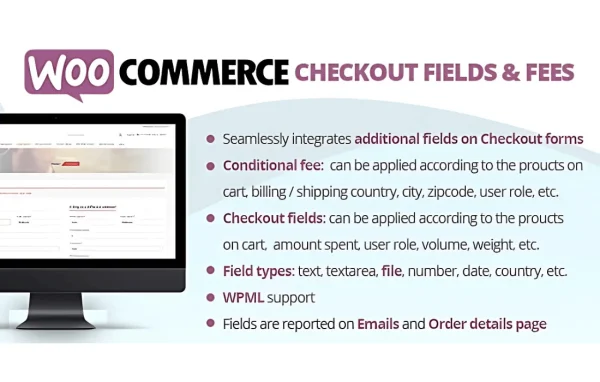
The default WooCommerce checkout asks for a fixed set of details, and many stores need something different. You might want a delivery date, a gift message or a yes or no question, or you might want to drop fields you never use. This plugin gives you a no-code interface for shaping that form. You can add text fields, number fields, date pickers, radio buttons, checkboxes and dropdowns, mark fields as required, set input format rules and drag fields into the order you want.
The fee side covers charges that depend on what a buyer selects. Gift wrapping, expedited shipping or special handling can be offered as checkout options, and the plugin adds the matching fee automatically when a customer chooses one. It runs on top of WooCommerce, which it requires, and works with multilingual and right-to-left setups. Developers get hooks and filters for custom extensions, while store owners without coding experience can handle everyday changes from the settings.
Best for
- WooCommerce stores needing extra customer details at checkout
- Shops selling paid add-ons like gift wrapping or rush shipping
- Multilingual or right-to-left language online stores
Features
Add, edit or remove fields
Change the checkout form to match your business by adding new fields, editing existing ones or removing the fields you do not need.
Fees tied to customer choices
Attach extra charges to checkout selections, such as gift wrapping or expedited shipping, and have the fee applied automatically when a customer picks that option.
Drag and drop ordering
Reorder checkout fields by dragging them into place, so you can arrange the form in a sequence that makes sense for your customers.
Several field types
Choose from text, number, date picker, radio button, checkbox and select dropdown fields to collect the kind of information each question needs.
Custom validation rules
Make fields required or enforce specific input formats so customers submit accurate details and you deal with fewer order mistakes.
Translation and RTL support
Works with multilingual setups and right-to-left languages, which suits stores that sell to customers in more than one language.
Hooks and filters
Developers can use the included hooks and filters to extend the plugin and build custom checkout behavior beyond the standard settings.
WooCommerce Checkout Fields & Fees older versions
- 10.8Oct 14, 20241 fix
- 10.6Apr 19, 20241 improvement
- 10.3Oct 17, 20231 improvement
- 10.1Jun 22, 2023
- 10.0Jun 7, 2023
Members and buyers of this product can download older versions.
Questions about WooCommerce Checkout Fields & Fees
Can I charge extra for options like gift wrapping?
Yes. You can link a fee to a checkout selection, such as gift wrapping, expedited shipping or special handling. When the customer chooses that option, the fee is added to the order automatically.
Do I need to know how to code to use it?
No. Fields are added, edited, removed and reordered through a visual interface with drag and drop sorting. Coding is only needed if a developer wants to extend the plugin using its hooks and filters.
What kinds of fields can I add to checkout?
You can add text, number, date picker, radio button, checkbox and select dropdown fields. Each field can be made required or given input format rules to keep the information customers enter accurate.
Does it work with stores in other languages?
It supports translation and multilingual setups, and it works with right-to-left languages. That makes it a reasonable fit for stores selling to customers in different regions. It requires WooCommerce to run.
Is WooCommerce Checkout Fields & Fees free?
The code of WooCommerce Checkout Fields & Fees is licensed under the GPL, so anyone may use, change and share it. GPL Feast is a paid service: a plan or a single purchase gives you the download and automatic updates. The developer's own support, licence key and online services are not included.
Which version of WooCommerce Checkout Fields & Fees is this?
Version 11.2, released Jun 4, 2025. New versions appear here when the developer publishes them, and members get them as automatic updates.
How do I update WooCommerce Checkout Fields & Fees?
Install the free GPL Feast Updater on your site and connect it with your API key. It installs new versions of WooCommerce Checkout Fields & Fees automatically and keeps a backup, so you can roll back.
What does WooCommerce Checkout Fields & Fees need?
WooCommerce Checkout Fields & Fees needs WooCommerce installed and active.
More from Vanquish