
Plugin
Updated
WooFoo - Restaurant Food Menu for Elementor
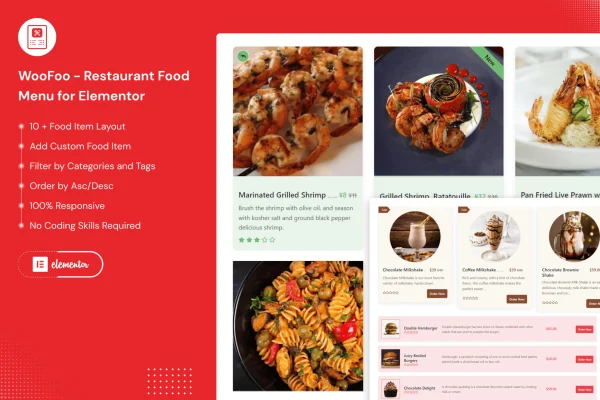
WooFoo - Restaurant Food Menu for Elementor is a WordPress plugin for building food menus inside the Elementor page builder. It gives restaurants, cafes, bars and other food businesses a set of menu designs and lets them list dishes with names, descriptions, images and prices, without writing code.
- Version
- 1.0.9
- Released
- Jun 9, 2026
- Type
- WordPress plugin
- Requires
- Elementor
- Licence
- GPL
- Included in
- Every plan, or $3.99 on its own
What’s new in WooFoo - Restaurant Food Menu for Elementor 1.0.9
Version 1.0.9 · Jun 9, 2026
Latest
- ImprovedUpdated WordPress 7.0 compatibility Check
- SecurityImproved overall plugin security
What it does
Putting a menu on a restaurant website often means fighting with tables, image galleries or a PDF that is hard to read on a phone. This plugin gives you menu layouts made for food items, so each dish gets a name, a description, a photo and a price in a tidy format. It requires Elementor, and you build and adjust your menus through Elementor's drag and drop editor, the same way you work on the rest of your pages.
You can add menu items by hand or pull in WooCommerce products, which suits shops that already sell food or takeaway items through WooCommerce. More than 10 menu designs are included, and you can change colors, fonts and layouts in Elementor to match your branding. Items can be grouped by category or meal type with filtering and sorting, and the layouts are responsive, so the menu adapts to desktop and mobile screens.
Best for
- Restaurants and cafes building their sites with Elementor
- Bars and food businesses that want an online menu
- Freelancers and agencies making hospitality websites
Features
More than 10 menu designs
Pick from over 10 menu layouts suited to different restaurant styles, then adjust the one you choose to fit your brand.
Built for Elementor
Create and edit food menus with Elementor's drag and drop interface, so you can place a menu on any page without touching code.
Custom or WooCommerce items
Add dishes manually as custom menu items, or display WooCommerce products as your menu if you already manage food items in your store.
Dish details and photos
Each menu item can include a name, a description, an image and a price, giving visitors a clear look at what you serve.
Category filtering and sorting
Organize dishes by category or meal type, such as starters or desserts, so visitors can filter the menu and find what they want.
Responsive layouts
Menu layouts adapt to different screen sizes, from desktop monitors to smartphones, so diners can read the menu on the device they have.
Styling controls
Change colors, fonts and layout settings within Elementor to keep the menu consistent with the rest of your restaurant's website.
WooFoo - Restaurant Food Menu for Elementor older versions
- 1.0.7Feb 7, 20251 improvement
- 1.0.3Dec 8, 20231 improvement
- 1.0.2Sep 16, 20231 new, 1 improvement
- 1.0May 14, 2023
Members and buyers of this product can download older versions.
Questions about WooFoo - Restaurant Food Menu for Elementor
Do I need Elementor to use this menu plugin?
Yes. The plugin requires Elementor, and menus are built and styled through Elementor's drag and drop editor. If your site uses a different page builder, you would need to add Elementor to work with these menus.
Can I use my existing WooCommerce products as menu items?
Yes. Along with custom menu items that you enter by hand, the plugin can display WooCommerce products as a food menu. This is handy if you already keep your dishes and categories in a WooCommerce store.
Will the menu look right on phones?
The menu layouts are responsive, so they adjust to different screen sizes, from large desktop monitors down to smartphones. That way diners checking your menu on the go still get a readable layout.
Can I match the menu to my restaurant's branding?
Yes. You start from one of more than 10 menu designs and then change colors, fonts and layout settings within Elementor so the menu fits the look of your site.
Is WooFoo - Restaurant Food Menu for Elementor free?
The code of WooFoo - Restaurant Food Menu for Elementor is licensed under the GPL, so anyone may use, change and share it. GPL Feast is a paid service: a plan or a single purchase gives you the download and automatic updates. The developer's own support, licence key and online services are not included.
Which version of WooFoo - Restaurant Food Menu for Elementor is this?
Version 1.0.9, released Jun 9, 2026. New versions appear here when the developer publishes them, and members get them as automatic updates.
How do I update WooFoo - Restaurant Food Menu for Elementor?
Install the free GPL Feast Updater on your site and connect it with your API key. It installs new versions of WooFoo - Restaurant Food Menu for Elementor automatically and keeps a backup, so you can roll back.
What does WooFoo - Restaurant Food Menu for Elementor need?
WooFoo - Restaurant Food Menu for Elementor needs Elementor installed and active.
You might also like






