
Plugin
Updated
WordPress Demo Content Manager
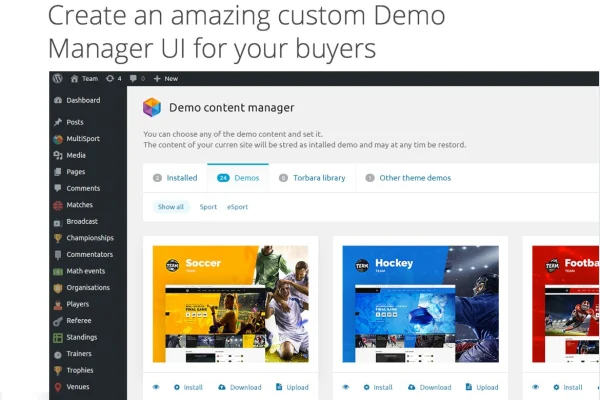
WordPress Demo Content Manager by torbara is a plugin for theme developers and designers who work with demo content. It lets you import, export and reset demo data from the WordPress dashboard, and it can manage several demos inside a single WordPress installation.
- Version
- 2.0.5
- Released
- May 2, 2023
- Type
- WordPress plugin
- Licence
- GPL
- Included in
- Every plan, or $3.99 on its own
What’s new in WordPress Demo Content Manager 2.0.5
Version 2.0.5
Latest
- ImprovedUpgrade to \WPObjects version 1.1.2
What it does
Themes that ship with many demos can be hard to build, support and present. Each demo needs its own content, and keeping that content consistent across projects takes time. This plugin gives you one place to create, import and control demo data, so you can set up a demo, export it and bring it back into another site without rebuilding it by hand. It was written with the everyday problems of theme development in mind, such as troubleshooting demos and keeping setups the same from one project to the next.
The plugin works inside your existing WordPress install. You can switch between multiple demo contents on a single site, which is useful when you market a theme with several looks or need to test each one. Reset options let you return a site to a clean state and start over. The backend is laid out to be easy to follow for developers of different skill levels, and the plugin comes with detailed documentation to help you get oriented.
Best for
- Theme developers shipping themes with several demos
- Designers who reuse demo content across client projects
- Agencies that set up and reset demo sites often
Features
Multiple demos on one site
Manage and switch between several demo contents within a single WordPress installation, which suits themes that offer more than one demo layout.
Demo content import
Import demo data quickly so a theme demo can be set up on a site without recreating pages and content by hand.
Demo setup export
Export a finished demo setup so the same content can be deployed consistently across other projects and sites.
Reset demo content
Reset demo content with a few clicks to bring a site back to a clean starting point for testing or rebuilding.
Built for theme development
Designed around the work of developing and supporting themes with numerous demos, with the aim of cutting down time spent troubleshooting.
Clear backend interface
A straightforward admin area makes demo content management approachable for developers with different levels of experience.
Lightweight code
The plugin is written to stay lightweight so it does not add unnecessary load to the site running your demos.
Detailed documentation
Guides explain how the plugin works, helping you get started and work through problems on your own.
Questions about WordPress Demo Content Manager
Can I run more than one demo on the same WordPress site?
Yes. The plugin supports multiple demo contents within a single WordPress installation, and you can switch between them. This is handy for themes that offer several demo styles or for testing each demo in one place.
Does it handle both importing and exporting demo data?
It does. You can import demo data to set up a site and export a demo setup to reuse elsewhere. That makes it easier to keep demo content consistent when you deploy it across several projects.
Is there a way to clear out demo content and start fresh?
Yes, the plugin includes a reset option. With a few clicks you can return a site to a clean state, which helps when you are testing a theme, rebuilding a demo or preparing a site for a new setup.
Who is this plugin mainly aimed at?
It is built for WordPress theme developers and designers, especially those who develop, support or market themes that come with numerous demos. The interface is meant to be usable for developers of different skill levels.
Is WordPress Demo Content Manager free?
The code of WordPress Demo Content Manager is licensed under the GPL, so anyone may use, change and share it. GPL Feast is a paid service: a plan or a single purchase gives you the download and automatic updates. The developer's own support, licence key and online services are not included.
Which version of WordPress Demo Content Manager is this?
Version 2.0.5, released May 2, 2023. New versions appear here when the developer publishes them, and members get them as automatic updates.
How do I update WordPress Demo Content Manager?
Install the free GPL Feast Updater on your site and connect it with your API key. It installs new versions of WordPress Demo Content Manager automatically and keeps a backup, so you can roll back.
You might also like






