
Plugin
Updated
Wordpress / WooCommerce Custom Breadcrumbs Plugin
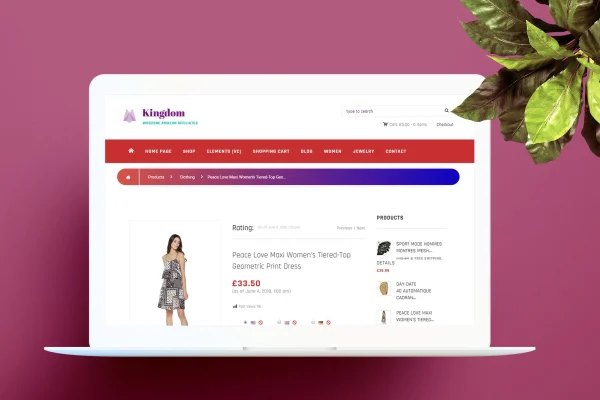
This WordPress plugin adds breadcrumb trails to your blog and WooCommerce store so visitors can see where they are in your site's structure. It places breadcrumbs automatically on posts, archives, search results and product pages, and you pick from a set of templates to match your design.
- Version
- 2.0
- Released
- May 2, 2023
- Type
- WordPress plugin
- Requires
- WooCommerce
- Licence
- GPL
- Included in
- Every plan, or $3.99 on its own
What’s new in Wordpress / WooCommerce Custom Breadcrumbs Plugin 2.0
Version 2.0 · May 2, 2023
Latest
What it does
Visitors who land deep inside a site, on a single post or a product page, often have no quick way to see how that page fits into the rest of your content. Breadcrumbs solve that with a short trail of links back up through categories and parent pages. This plugin handles the trail for you, so there is no need to edit theme files or write code to get breadcrumbs showing across your site.
Once set up, the plugin inserts breadcrumbs on blog posts, search results, archives, categories and tags, plus WooCommerce product lists and product pages. WooCommerce is required. You can choose from more than 9 templates, then adjust colors, fonts and separators so the trail fits your theme. The breadcrumbs are responsive across desktop, tablet and mobile screens, and they are built to display consistently in major browsers.
Best for
- WooCommerce stores with many product categories
- Blogs with deep category and tag archives
- Site owners who want breadcrumbs without writing code
Features
Setup without coding
Add breadcrumb navigation to your site in a few minutes through the plugin settings, with no need to touch theme files or write any code.
More than 9 templates
Pick from over 9 breadcrumb templates and choose the one that suits your site's layout and branding, then adjust it further if you want.
WooCommerce product breadcrumbs
Breadcrumbs appear automatically on WooCommerce product lists and single product pages, helping shoppers move back to categories while they browse your store.
Automatic placement on blog pages
Trails are added to blog posts, search results, archive pages, categories and tags without inserting shortcodes or code on each page by hand.
Custom colors, fonts and separators
Change the breadcrumb colors, fonts and separator characters so the trail matches your theme's look instead of standing out awkwardly.
Responsive display
Breadcrumbs adapt to desktop, tablet and mobile screen sizes, so the navigation trail stays readable for visitors on any device.
Cross-browser support
The breadcrumbs are built to display and work consistently across major web browsers, giving visitors the same navigation wherever they view your site.
Questions about Wordpress / WooCommerce Custom Breadcrumbs Plugin
Do I have to add breadcrumbs to each page manually?
No. The plugin places breadcrumbs automatically on blog posts, search results, archives, categories and tags, as well as WooCommerce product lists and product pages. You configure it once and the trails appear across those page types.
Can I make the breadcrumbs match my theme?
Yes. You can start from one of more than 9 included templates and then change the colors, fonts and separators. That lets you fit the breadcrumb trail to your site's existing design and branding.
Does it need WooCommerce?
Yes, WooCommerce is listed as a requirement. With it active, the plugin shows breadcrumbs on product lists and product pages alongside the regular blog, archive and search pages of your WordPress site.
Will the breadcrumbs work on mobile?
The breadcrumbs are responsive, so they adjust to desktop, tablet and mobile screens. They are also designed to display consistently across major browsers, giving visitors the same navigation trail on any device.
Is Wordpress / WooCommerce Custom Breadcrumbs Plugin free?
The code of Wordpress / WooCommerce Custom Breadcrumbs Plugin is licensed under the GPL, so anyone may use, change and share it. GPL Feast is a paid service: a plan or a single purchase gives you the download and automatic updates. The developer's own support, licence key and online services are not included.
Which version of Wordpress / WooCommerce Custom Breadcrumbs Plugin is this?
Version 2.0, released May 2, 2023. New versions appear here when the developer publishes them, and members get them as automatic updates.
How do I update Wordpress / WooCommerce Custom Breadcrumbs Plugin?
Install the free GPL Feast Updater on your site and connect it with your API key. It installs new versions of Wordpress / WooCommerce Custom Breadcrumbs Plugin automatically and keeps a backup, so you can roll back.
What does Wordpress / WooCommerce Custom Breadcrumbs Plugin need?
Wordpress / WooCommerce Custom Breadcrumbs Plugin needs WooCommerce installed and active.
You might also like






