
Plugin
Updated
Wordpress / WooCommerce Custom Pagination Plugin
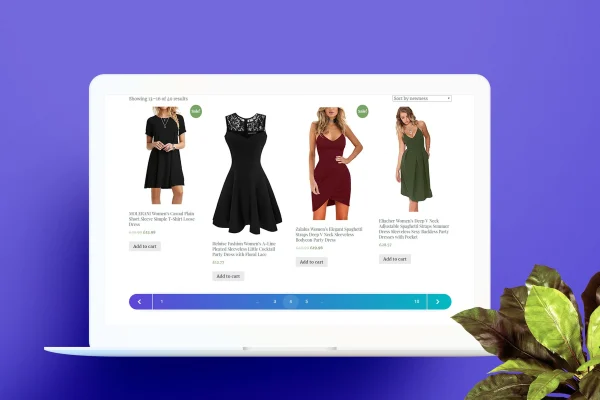
Custom Pagination for Wordpress / WooCommerce is a plugin that replaces the default page number links on your site with styled, customizable pagination. It covers blog posts, archives, categories, tags, search results and WooCommerce product listings, so visitors can move through long lists of content more easily.
- Version
- 2.0
- Released
- May 2, 2023
- Type
- WordPress plugin
- Requires
- WooCommerce
- Licence
- GPL
- Included in
- Every plan, or $3.99 on its own
What’s new in Wordpress / WooCommerce Custom Pagination Plugin 2.0
Version 2.0 · May 2, 2023
Latest
What it does
Default WordPress pagination is often plain and can look out of place next to a carefully designed theme. This plugin swaps those basic links for pagination controls that you can style to match your site. It works across the places where pagination usually appears: post listings, archive pages, category and tag pages, search results and WooCommerce product listings. Because it requires WooCommerce, it suits store owners who want their shop pages and their blog to share a consistent navigation style.
Setup is simple and needs no coding. You pick from more than 10 pagination templates, then adjust colors, fonts and layout styles until the controls fit your design. The plugin adds the custom pagination to relevant pages automatically, so you do not have to edit theme files by hand. The pagination is responsive, adapting to phones, tablets and desktops, and it is built to work across modern web browsers.
Best for
- WooCommerce stores with large product catalogs
- Blogs and content sites with many archive pages
- Freelancers styling pagination on client WordPress sites
Features
More than 10 templates
Choose from over 10 distinct pagination templates and pick the one that best matches your site's style and branding.
Custom colors, fonts and layout
Change colors, fonts and layout styles to build a pagination display that fits the rest of your website's design.
Covers posts and archives
Applies to blog listings, archive pages, categories, tags and search results, giving your content pages a consistent way to move between pages.
WooCommerce product listings
Adds the same styled pagination to WooCommerce product listings, so shoppers can page through your catalog with controls that match your theme.
Automatic placement
The plugin adds custom pagination to the relevant pages on its own, without manual template editing or a complicated setup process.
Responsive on all screens
Pagination controls adjust to different screen sizes, so the navigation stays usable for visitors on mobile devices as well as desktops.
Cross-browser support
Built to work consistently across modern web browsers, so visitors see the same pagination regardless of the browser they use.
No coding required
Configure templates and styling through the plugin's options, which makes it approachable for site owners without development experience.
Questions about Wordpress / WooCommerce Custom Pagination Plugin
Does this work on WooCommerce shop pages as well as blog pages?
Yes. The plugin handles WooCommerce product listings along with blog posts, archives, categories, tags and search results. WooCommerce is required, so it is aimed at sites running a store that also want matching pagination on their content pages.
Can I make the pagination match my theme's design?
You can start from one of more than 10 templates and then adjust colors, fonts and layout styles. This lets you fit the pagination to your branding without writing any CSS or code yourself.
Will I need to edit my theme files to add the pagination?
No. The plugin adds the custom pagination to relevant pages automatically, so you do not need to edit template files or insert code by hand to get it working.
How does the pagination look on mobile devices?
The pagination is responsive, so it adjusts to different screen sizes and stays usable on phones and tablets as well as desktop screens. It is also built to work across modern web browsers.
Is Wordpress / WooCommerce Custom Pagination Plugin free?
The code of Wordpress / WooCommerce Custom Pagination Plugin is licensed under the GPL, so anyone may use, change and share it. GPL Feast is a paid service: a plan or a single purchase gives you the download and automatic updates. The developer's own support, licence key and online services are not included.
Which version of Wordpress / WooCommerce Custom Pagination Plugin is this?
Version 2.0, released May 2, 2023. New versions appear here when the developer publishes them, and members get them as automatic updates.
How do I update Wordpress / WooCommerce Custom Pagination Plugin?
Install the free GPL Feast Updater on your site and connect it with your API key. It installs new versions of Wordpress / WooCommerce Custom Pagination Plugin automatically and keeps a backup, so you can roll back.
What does Wordpress / WooCommerce Custom Pagination Plugin need?
Wordpress / WooCommerce Custom Pagination Plugin needs WooCommerce installed and active.
You might also like






